BIM Crusader Turned AECO Tech Explorer | Speaker | Autodesk Expert Elite | 25+ years in AECO | Technical Success Manager at Newforma. Opinions expressed are my own unless I borrowed them. Cover photo by: Devin Henry
So like many of you out there in Internet land I’ve been looking for, and waiting for some of the 2016 versions of the Revit Subscription Add-ins I’ve come accustom to getting every year when the new version comes out.
In residential architecture, as well as other types, it is often a required part of the working drawing set to be able to show the roof overhang as a hidden line on the floor plan views. Out of the box, Revit doesn’t do this because Revit shows it as it’s built. Some may call this WYSIWYG or, what you see is what you get. Meaning that in the real world we don’t see a dashed lines on the ground so we know there is a roof above. To get Revit to do this there is a simple work around that I have outlined below.
The AU 2015 acceptance emails came out this week, and I was lucky enough to get one again this year! This will cap off a busy year of Speaking for me with 2 classes at RTCNA 2015 in July, 2 Classes and RTCEUR 2015 in October, and then one more at AU 2015 in December.
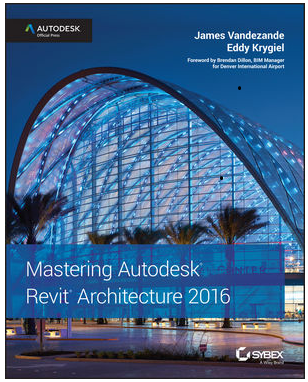
This past week I received my copy of the 2016 version of the “Master Autodesk Revit Architecture” series paperback book in the mail. While this was not something new to me, as I’ve been “collecting” them since the 2009 version, this one is special. Why you ask, well because this copy came direct to me from one of the authors, Eddy Krygiel …….and it was signed!
I had a client point out this issue to me, what they had tried to do was to export a Revit file to BIM 360 Glue, using the NWC option in the “Glue” feature in the BIM 360 Revit Add-in. It was a Revit 2014 model from a 3D view with Revit 2 links loaded. They had set their Navisworks Exporter 2014 to convert linked files. However after exporting to Glue, none of the links have been exported.
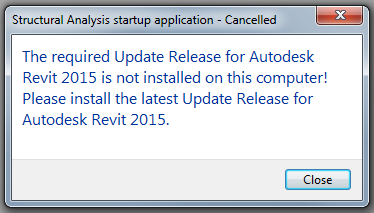
If like me you have been receiving an error to do with the Structural Analysis Tool Kit 2015 over the last week or so since installing Revit 2015 Update Release 6, a fix is here.
The image above is of the offending error, and basically it happens because the Structural Analysis Toolkit 2015 was install before the Revit 2015 Update release 6 was installed.
Autodesk has just released an updated version of the Structural Analysis Toolkit 2015 that can be downloaded free from the exchange site.
You need to uninstall your current version in order to install the recent one.
A collection of observations and opinions from myself and my friends around the world in relation to the Architecture, BIM, Sustainability, Technology & Learning in the AEC industry. There's no space here for 'old skool' thinking.
A meeting place of worldwide BIM managers and BIM professionals to gather information regarding BIM, BIM software, BIM classes, BIM conference, BIM standards, BIM definition, BIM consulting.






 The BIMsider