
BIM, Fun, Weekly Roundup

Weekly Roundup – 2014.21

download

The week that was in the world of BIM and other Techie fun stuff, for the week of Dec. 14th – 20th.

I will start this weeks roundup with a post that some may agree with and some may not, its all about the way you upgrade your Revit Models. This post from IMAGINiT Support Blog favours the slower and more systematic approach of incremental upgrading (year by year no skipping). While the incremental way might be slower I believe that it truly is a way that will end up with less errors in the long run.

Revit: Proper Process for Upgrading Your Models

Here is a need workaround from Steve over at Revit OpEd about getting dimensions to work as you want them when dealing with circles.

Detailing and Circles

Another handy post from IMAGINiT Support Blog is this handy list of all the Revit Updates from 2012 – 2015, very helpful!

All Updates for Revit (2012 – 2015)

Here are a couple of posts from the FormIt Blog that I missed last week, but still worth a post this week. The first one is a recap of all things FormIt from AU2014.

FormIt at Autodesk University 2014 – a recap

The second is much more fun as it involves the Christmas classic “National Lampoons Christmas Vacation” and how to design a pool house in FormIt.

#FormItFriday for the Griswolds

I must admit I had no idea this technology was so close to being real (but when you think about it it makes sense) an iPhone that can do laser scanning……with some help from Trimble Tango? Find out more at the ThinkBIM post below.

It takes two (or three) to Tango. Apple Patent Reveals a Scanning iPhone

If you have ever made a Revit family or 75 while working with Revit then you might have struggled with the proper orientation for the family (I know I have). This post from Revit OpEd tries to lend a helping hand for dealing with just that issue.

Family Orientation

So to switch gears this is a cool post from The Construction App Guru about a 3D/360 Photo tool for Job sites (or really wherever). below is the link to the Blog post, but you also need to click on the sample project link below that to really see what this technology from matterport can do.

ATV App #1 (We Get Around)

 Sample Project (you really should click this link!)

This next post from What Revit Wants is about editing shared parameters for Revit…….in the cloud of all places!

Edit Revit Shared Parameters in the Cloud using Google Sheets Add-On

This next post is one of my favourite posts from Revit OpEd all year! (which is saying something because there are a lot of posts per year over at Revit OpEd). While the content is helpful, and somethign I had not yet discovered in Revit 2015 R2, the story within which Steve weaves the tale about the new features is price less……..you really must read it…….60’s the era of “Free Modeling”

Revit 2015 R2 – Perspective View Changes

Now its time for free stuff. Jeff from The Revit Kid has posted a free ebook for all to download on the design process in BIM. What are you waiting for go download it.

Free eBook! – Design:BIM – A Guide to Utilizing Design in the BIM Process

Its been far to long since I’ve post a link to a Dynamo post, lets fix that right now with a post from Revit beyond BIM.

Dynamo for Revit – Review design with Room Access Requirements

Autodesk put out any update for A360 over the weekend, here is a post from the A360 Blog about what was in the update. I have also included a link to another post form A360 blog about managing your data with the new A360.

Check out what’s New in the latest A360 Update

How to manage your Data in A360

I post a lot of great blogs from What Revit Wants, this next one is a little different as it’s a reader sending a tip to Luke at What Revit Wants about Radial Arrays in Revit.

How to make a Radial Array with a value of 2 in Revit

I have not posted about this since 2015 Revit R2 came out but I have used it many times. Revit OpEd posts about the improved ability to see things that are constrained.

Revit 2015 R2 – Reveal Constrains 

Here is another great wrap up of AU2014 by AECBytes

AU2014 Wrap up

Have you been having issues with crashes since updating to Revit 2015 R2 or Updated 5? If so check out this post from What Revit Wants about a work around that might work for you.

Revit 2015 R2 and Update 5 Crashes

One more post from Steve over at Revit OpEd about creating elevation views and finish floors.

Creating Elevation Views and Finish Floors

I have 2 posts I would like to use to wrap up this weeks blog. The first is about a retirement in the BIM world, sending an old friend out to pasture if you will. The second is about the resurgence of the LP, and how that just might kill it as the talent to create LP’s is vanishing.

A Moment of silence – The Revit Cow is going into Retirement (Simply Complex)
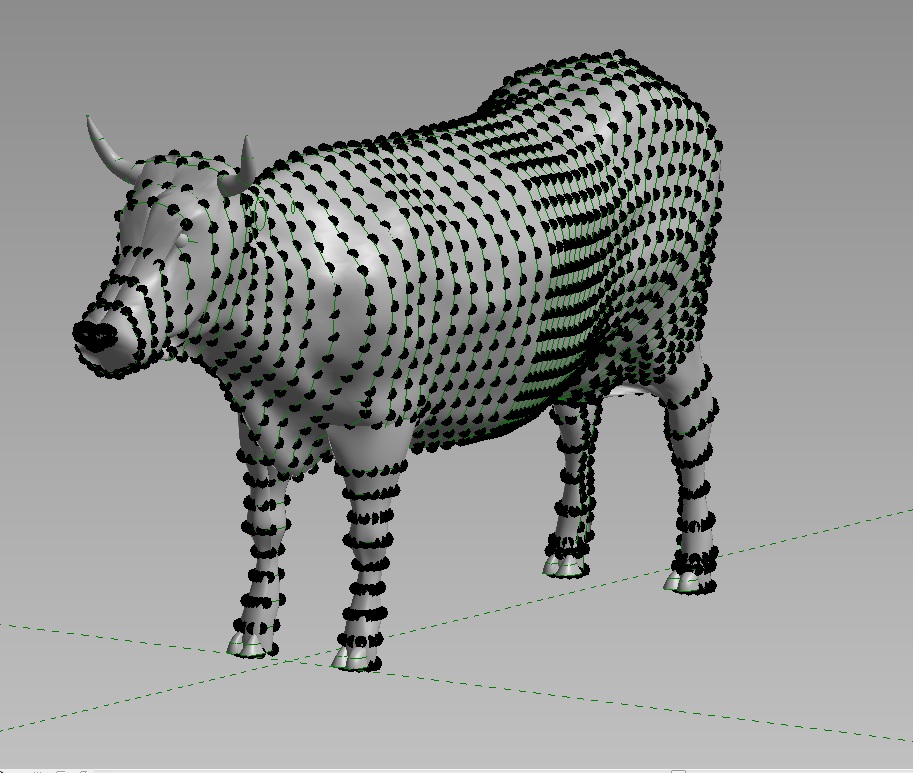
REVIT_COW_POINTS

Vinyl Storage stages a comeback (ZDNet)

big_vinyl_rules_1

The BIMsider

Twitter @theBIMsider
Facebook: theBIMsider

BIM, Fun, Weekly Roundup

Weekly Roundup – 2014.20

download

The week(s) that was in the world of BIM and other Techie fun stuff, for the week of Nov. 30th – Dec. 13th.

I missed the roundup last week as I was in Las Vegas for AU 2014, and well there was a lot of shinny things so I just didn’t get around to it. This week I’m getting back into the routine and we have a jam packed Roundup with 2 weeks worth of great BIM content for you all.

I will start off this week(s) with a post by the Construction App Guru about the SafeSite app, if you are the safety person for your company you should check this out.

SafeSite App Review

Are you having an issue upgrading your project, then central file can’t be reached? Check out this post from What Revit Wants, it just might be able to help you out.

Upgrade Revit Files using eTransmit

It was the day before my AU session and I saw this blog post, which was very timley as I was talking about some of the 123D apps in my session. Basically they have ended support for all 123D web apps, but don’t worry you can still use mobile and desktop versions. Find out more in this post from Autodesk 123D blog

123D Web Apps Closing

This next post is from Revit OpEd, and it covers yes/no parameters in formulas in Revit.

Setting Yes No Parameters with Formulas

Here is another post by Steve form Revit OpEd, this time he is shedding some light on Sketch Staris in Revit.

By Stetch Stairs and using Stair Path and Tread Number Annotation Tools

This post is right in my wheel house, The Construction App Guru talks about what options are out there for BIM on Mobile Devices.

BIM Options for Mobile Devices

This next post could be big news for Revit users, in fact in the article they call it a game changer……..time will tell what people think about everything in the cloud all the time, especially when that everything is your projects Revit Central Files. Find out more about Autodesk A360 Collaboration for Revit in this post by In The Fold.

Autodesk Amps Up BIM with Expanded Cloud-based Collaboration Services

Autodesk A360 Collaboration for Revit overview

Like most weeks What Revit Wants have been busy pumping out great posts about all thing BIM, but this last 2 weeks have been crazy, below is a list of the highlights – click links for all the details.

The Difference between A360 Drive and A360 (Project or team)

Turn off or batch delete light sources when exporting from Revit 2015 to NWC and appending to Navisworks 2015

Revit to FBX to Inventor Publisher to 3D PDF

The State of BIM in South Australia in 2014

Revit to Fabrication CADmep

Struggling with Lights in Navisworks?

Now for something completely different…..well sorta. This next post is from AECbytes Blog and its about Bentley’s 2014 in Infrastructure

Bentley’s Year in Infrastructure 2014 Conference

There was a lot of buzz at AU this year about the “New” A360 and what it brings to the table (don’t call it Autodesk 360 any more please). The folks at the A360 Blog take a crack at telling everyone what A360 is now.

Understanding A360

There was also an update to Revit 2015 released last week, R5 you can find out more in posts from What Revit Wants and Revit OpEd

Revit 2015 Update Release 5 (What Revit Wants)

Revit 2015 Release Update 5 ad Terminology (Revit OpEd)

Here is another post on release 5 from the IMAGINiT Support Blog

Revit 2015: Update 5

Another big thing that was talked about at AU 2014 was the new subscription option or process that is coming down the pipes. Here are 2 posts about it from It’s Alive in the Lab and Revit OpEd

What does “moving away from perpetual licenses” mean? (Its Alive in the Labs)

Autodesk Subscription Concepts Changing (Revit OpEd)

and just for good measure another post about this from Studiodaily

Autodesk Plans to Go Subscription-Only Over Next One to Two Years

As you can already see it was a neck and next race these last 2 weeks to see who could put out th emost post about BIM between What Revit Wants and Revit OpEd. Well below are the rest of Revit OpEd’s posts.

Our Revit Username and Signing into A360

Changing Column Types and Copy Monitor

Guide Grid and Pin

Revit 2015 R2 and Shaft Openings

New Canadian CISC Standard 9.2 Structural Shapes Available

This is a nice little post from IMAGINiT BSD about FormIT and Levels.

Autodesk FormIT and Levels

If you are using Clarity and find there is a issue with PDF fonts from your workstation are not matching what comes form the clarity task server than this post form IMAGINiT Support Blog should get you fixed up.

Clarity PDF Task – Fonts Not Printing Properly

Sometimes begin to quick to upgrade or update your software isn’t a good thing. Learn more about this as it regards to Revit 2015 R2 in this post over at the BIM Blog.

Beware upgrading to Revit 2015 R2…….

There are a lot of good Revit blogs out there, and while I try to visits as many as I can to fill this weekly update with all the Revit and BIM goodness I can I don’t always make it. I was just about to publish this weeks post when I took one last look and saw 3 great posts by RevitCat.

Best Tall Building in the World Documented on Revit

View Filter Sort Order in Revit

Revit Stair Treads – Minimum Widths

I will end this weeks Post with this cool time lapse video of a LEGO Christmas Tree Build

The BIMsider

Twitter @theBIMsider
Facebook: theBIMsider

BIM, Fun, Weekly Roundup

Weekly Roundup – 2014.19

download

The week that was in the world of BIM and other Techie fun stuff, for the week of Nov. 23rd – Nov. 29th.

This is kind of interesting, and until I read about it on What Revit Wants I didn’t know it was a thing (of course t is still in Beta so maybe I’m not the only one) but seems there is a Design Academy from Autodesk.

In case you missed it – Design Academy Beta is now Live

Another post from What Revit Wants with a different way to look at LOD, maybe simplify it a little.

A different take on LODs

On last weeks Roundup (Actually 2 weeks ago) I had a post from The Construction App Guru on new Safety Apps, while this week he has posted part 2.

New Safety Apps (Part 2)   (Part 1 if you missed it)

Ever wonder how to do an Angled Arched Beam in Revit, well wonder no more thanks to The Revit Kid

Revit Tutorial – Angled Arched Beams

You can now edit your RPC’s with Entourage Workshop right in Revit, so more in this What Revit Wants post.

 Entourage Workshop

Here is a nice Dynamo Tutorial and data-set for download from BIM Troublemaker. I missed this when it was originally posted, but lucky What Revit Wants had a re-post of it this week to remind me I missed it.

Dynamo Tutorial Presentation

Another good post that I missed a few weeks from HOK BIM Solutions about Underlay Visibility Issues, this time I was reminded by Do U Revit.

Underlay Visibility Issue in Linked Models

I don’t normally get into a lot of ID (Interior Design) Stuff on this blog, but this artificial by The Midnight Lunch is for sure worth a read.

Do Revit and Interior Design go together?

In case you missed my blog post yesterday (Tuesday Nov. 25th) about Revit Survival tips, here are the two blogs a got the tips from.

Between the LinesAutodesk University 2014 Survive and Thrive Tips

The Revit Jedi – AU Survival Tips

Some of you that use Navisworks may already know abut this “Known Issue” with no suitable geometry when export form Revit to Navisworks in 2015. What Revit Wants has a post this week that talks about a work around that might help you out with this “Know Issue”.

Workarounds

New release of Dynamo, version 0.7.4 is now out. You can find out all about it on the Dynamo Blog.

Dynamo 0.7.4 Release

Problem with the 2015 Navisworks quantification, and the fixes courtesy of the IMAGINiT BSD Blog.

Navisworks Quantification 2015 Unit Problems and Fixes

Another good post from the IMAGINiT BSD Blog about Multi-Category Schedules in Revit

Multi-Category Schedules in Revit

I will end this weeks Roundup with an article from arch daily about the 10 tallest buildings of 2015.

5463a569e58eceecb50000ac_the-world-s-10-tallest-new-buildings-of-2015_feature1-530x409

Have a Great Weekend, and see you at AU!

The BIMsider

Twitter @theBIMsider
Facebook: theBIMsider

BIM, Fun, Weekly Roundup

Weekly Roundup – 2014.18

download

The week that was in the world of BIM and other Techie fun stuff, for the week of Nov. 16th – Nov. 22nd.

If you use or are thinking about using the app PlanGrid then you should check out this post by Construction App Guru first to find out about the new features.

PlanGrid App Update #3

There are lots of good reasons to share this next post by talkBIM, but I’m doing it simply because of the awesome pun in the title, check it out for yourself

Steel not convinced? talkBIM featured in AISD news!

If you have ever worked in a support role in an Architectural office, weather it was CAD, BIM, or some mix of both Support then you should spend a few minutes and read this post from BIM Freak. I have personally been in this role a few times, and in fact back in the day I worked with Laura from BIM Freak in the same office doing the same role. Enjoy the post, and your SWAG and have a little smile.

Enjoying the Support Role

Here is a post by What Revit Wants on a new NWC Batch export tool from BIM One. Spoiler alert this might find its way into my AU Presentation as a Bonus Add-in.

NWC Batch Export

Here is another Add-in review from What Revit Wants, this time about an Batch printing and exporting.

Automatic Batch printing and Exporting

Here is another post by What Revit wants about a post he found about BIM, Revit, FM and Health.

BIM, Revit, Fm and Health (What Revit Wants post)

BIM’s Role expands as health Facility managers Take Ownership (AHDC Post)

If you are looking at the post above and you aren’t sure what FM (Facilities Management) really is then his next post form IMAGINiT BSD Blog is for you.

FM 101 for Executives 

intellectual Property (IP) can be (read is) a sticky think when it comes to BIM, everyone wants you to share yours, but you are crazy if you ask for mine…….or something like that. Practical BIM tries to make sense out of the IP question

IP – it is not all ours, get used to it

Who likes free? That’s right everyone, so you better check out this new FREE project management platform Geniebelt. To learn more, and to see if its for you head over to Construction App Guru and see what Rob has to say about it.

New Free Project Management Platform: Geniebelt

This week we have a couple good posts from Revit OpEd, which is pretty normal Steve is always putting out good stuff.

Importing CAD Files and By Shared Coordinates

Username and Local Files

Have you ever really thought about BIM, and said to yourself that BIM really is like a game of hockey (or any other team sport) well if yo have you are not alone. Check out the post over at BIM blog about just that idea, BIM as a team sport.

BIM is a team sport

How do you stop the dreaded “Plague of the Meetings”? You can start by checking out the A360 blog, they have 3 ways to do just that.

Improve Productivity: 3 ways to Stop the Meeting plague

So what’s the deal with Point Clouds? Good question, you can learn more at the AECbytes blog.

Putting Point Clouds to Work: Then, Now, & Later

If you are a Clarity user (or thinking about becoming one) then this post from the IMAGINiT Support Blog may help with some PDF issues

Clarity PDF Task Sheets Out of Order

And I end this weeks post with a picture to remind us how quick things change………..

comic_thumb_email


Have a Great Weekend

The BIMsider

Twitter @theBIMsider
Facebook: theBIMsider

BIM, Fun, Weekly Roundup

Weekly Roundup – 2014.17

download

The week that was in the world of BIM and other Techie fun stuff, for the week of Nov. 9th – Nov. 15th

This week we start off with a post on Drones from the Guru over at Construction Apps Guru.

Drones interview (Part 2)   If you missed part one you can find it here

If you are going to be at AU in a few weeks you should swing by the A360 booth and find out about all the new things coming down the pipe for rendering with A360. You can learn more from the post listed below form the A360 Blog.

A360 Rendering Fun @ Autodesk University 2014

Have you ever wondered what might happen at the cross roads of BIM (or what the cross roads of BIM might be?) well them take a left at curiosity lane and head on over to the Revit Jedi and find out his thought of just that.

Initiating Change

Trimble is growing into the AEC space some more with a couple of announcements this week. The first I comes from Think BIM and lets us know that Trimble has acquired amtech, a leader in the UK MEP industry construction software solutions.

Put that in your pipe

The next bit of Trimble news come from Linkedin group Field BIM that tells us of a strange partnership between Trimble and Bentley to make BIM better for all through construction modeling. See original post below from Bentley’s website.

Bentley and Trimble advance BIM through construction modeling

If you work on a construction site, and deal with the safety of that site then you need to read this post from the Construction App Guru about what’s out there (and new) in the Safety App world.

New Safety Apps

You ever have a deadline at the office……Okay so I know that’s I trick questions everyone has office deadlines, and some more than others. Maybe this post form the team at the A360 Blog might help with the next one.

3 Tips for meeting deadlines    (Where were these tips last night as I typed away like a mad man to get my AU 2014 handout in on time. No matter how much time I have never seems like enough, must be that I need to leave it to the last minute to really get the creative juices flowing……..yeah I’m going with that one.)

This next post contains the magical secrets of relocating projects in Revit, the secrets are reveals by Steve at Revit OpEd

Relocate Project is Slight of Hand

This next post from Revit OpEd about 2D settings for Grid lines might not be magic, but its a trick worth knowing.

Enable 2D setting for Multiple grid lines

Have you ever wondered how to do QTO with Navisworks? Well What Revit Wants has posted about some free tutorials on line from Autodesk that just might help get you up and running.

Free model based estimating and takeoff tutorial

The team at BIM Blog has posted some links to help you do Green Building from the Start with Revit and other Autodesk software, add-ins, and cloud tools.

Green Building from the Start

Who’s Afraid of the Big Bad BIM does a Fro-back Friday on his blog this week to remind everyone about BIM Execution plans…..again

BIM Execution…..Again

Do you code? If and you use Revit you should check out The Building Coder, most if its over my head, but I know you are all smarter than me so go forth and code!

Futureproofing and Determining Intersecting Elements

There is never any “Shades of Grey” when it comes to toilets in Revit……..or is there?

Yet more Toilets

If you are working with colour plan in Revit, you should check out this post from Revittize about it.

Room/Area Colour Schemes

The RevitCat talks about weirs stair stuff in this weeks post.

Weird Revit Stair Stuff – Stairs in Groups

I’m going to add a little ACAD content to this weeks post, so if you are going to AU this year you should check out Jarod Schultz Class “Super Duper Click Saver” so you save some picks and clicks in your everyday ACAD work.

Hit 276 People for my Autodesk University Class

This is a really fun post from BIM Troublemaker, some cool modeling in Revit and a nice tie in to a cool building and a super cool car.

Ferrari World Abu Dhabi in Revit

Here are a couple of good posts from BIM 42

AutoCAD Civil 3D to Revit

Getting started programming Revit

For those of you that have not tried Revit 2015 R2 (or maybe don’t have access) BIM & BEAM fill us in on a cool new inclusion for it.

Dynamo Now Pre-Installed with Revit

I’m a little behind with this post, but FormIt is really cool, so you should check out this blog post about it from the Autodesk FormIt Blog

Design is a Team Sport

Now a little content for the Revit Strcutre folks in the crowd from the Autodesk Revit Structure Blog

Revit 2015 Tutorial – Creating Filters for Structural Modelling and Documentation

As mentioned earlier in this weeks post, I get the benefit of all the API and visual programming that became all the rage these days but have yet sat down and really learned (played) with any of it. So I will leave that up to the people that know, like the people at arCHI+Lab

analysis visualization with ladybug & mantis shrimp

If you use BIM 360 and are not sure about the Sovereignty of the data (yes big word on a Saturday morning before my first coffee). What Revit wants posted on this topic and gave a link to a video from AU2014 AUx

Data Sovereignty and Autodesk Cloud Products like BIM360 (at AU2014 AUx)

And on that “not enough coffee” note, I will end this weeks post with this little gem.

Coffee_in_the_morning

Have a Great Weekend

The BIMsider

Twitter @theBIMsider
Facebook: theBIMsider
BIM, Fun, Weekly Roundup

Weekly Roundup – 2014.16

download

The week that was in the world of BIM and other Techie fun stuff, for the week of Nov. 2nd – Nov. 8th

This week we start with another be announcement from Trimble as they move more and more into the Heart of the AEC space and put more pressure on Autodesk. Trimble announces an MEP platform extension for SketchUp, check out the TenLinks blog for more info.

Trimble MEPdesigner for SketchUp Announced

This next post is technically from last week, but I missed it so you get to enjoy it this week. BIM 42 give a review of using BIM 360 Glue as a project review tool.

Project Review with BIM 360 Glue

Here is another good post that I missed from last week, but you should still check it out from The Revit Geek

Revit Basics – Group Origin Points

If you follow my blog (yeas all 16 of you) then you know that pretty much every week I have a post or 2 from the Construction App Guru, this week is no different. He has started a new feature on his blog called “App-View” where in interviews people involved with some of the best and most popular construction apps out there. This week he post 2 of these interviews for 2 great apps.

App-View #3 PlanGrid

App-View #4 FotoIn Mobile

Those same 16 followers will also know that What Revit Wants also appears weekly in my Roundup posts, this week I’ve got 3 nuggets of Wisdom form Luke over there at WRW.

Gteam is now called Trimble Connect for BIM

Using Able2Extract to convert PDFs to Vector information for use in CAD and BIM

What does BIM for MEP look like in 2014?

Steve over at Revit OpEd had a post this week talking about ways to learn and understanding Dynamo (more on Dynamo later on) by checking out the Dynamo website www.DynamoBIM.org

Dynamo Tip and Fourm

In related Dynamo news the latest stable release we let out into the world this week Version 0.7.3, learn more about it in the latest Dynamo Blog

Dynamo 0.7.3 Release

Direct link to 0.7.3 download

Another little bit of Dynamo love from arCHI+lab

View Organization management with Dynamo

What happens when Rhino and Dynamo get together? You get Rhynamo, learn more from this blog post at The Proving Ground

Rhynamo – An Open Source Project

This next post is one I can’t speak too as I’m a PC guy to the core, no MAC for me (I did sip the Apple kool-aid and have an iPad for work). However I do know that many people do want to run Revit on a Mac so hopefully this post from BIM Outsourcing can help.

How to Install Revit for Mac Device

What is the cloud and how can I use it in my engineering company? Well if you are asking yourself this questions then you should check out this post from the A360 Blog about just that.

5 Things Enterprises Must Know about Cloud Applications for Engineering

if you use Navsiworks 2015 check out this post from IMAGINiT Technologies Support Blog about the new 2015 PDF reader Add-in.

Navisworks 2015 – Add PDFs to your project

If you haven’t visited the Revit Kid lately over on his page, swing by and take a look at his new Homepage.

New Homepage! Plus, Updates and News!

Below is a link to a post from the Revit Jedi, which is a fun little post about all the stuff he track round with him, but the best part of the post is the last 2 sentences under the picture!

Keep your staff engaged, run regular training and information sessions that includes all offices. You have the opportunity to be the “glue” that helps bind the offices together.

That’s important!

Check out the rest of the post here: Travelling Road “Train” Style

Are you interested in learning a little more about the newest BIM 360 app “BIM 360 Layout” then check out this post from Beyond Design

Extending the BIM 360 ecosystem with component content

Here is a good post for some easy Revit filters for Elevations form the BIMChicks

Easy Revit Filters for Elevations

Are you wondering do I need Revit 2015 or can I make do with Revit 2015 LT? Well check out this post over at CADZulu

Revit vs Revit LT

Keeping on the Revit LT train, here is another point of view (much more in-depth) on Revit Lt from the RevitCAT

Revit LT – Is it any good?

If like me you didn’t make it to RTCEUR in Dublin last week, yu can get a small fix here from Jay Zallan’s blog Fear and Loathing in a CAD vs BIM world as he shares his class info (and files)

RTCEUR 2014 Jay Zallan’s Class

More RTCEUR love from the Dark Arts of Revit Blog

RTCEUR

I don’t give enough love to ACAD in the blog (some might say I still give it to much) here is a post form Lynn Allen’s Blog about offsets in ACAD.

Are you getting the most out of your Offsets in AutoCAD?

Trimble released SketchUp 2015 this week, learn more from the SketchUpdate Blog

Sharpening SketchUp for 2015

Have you worked with Revit Curtain wall doors? (or what graphically settles for curtain wall doors) whether you have or haven’t you should check out this post form Revittize

Revit Curtainwall Doors

This is a good post if you are thinking about (or are already) looking at using rental software from Autodesk, go to the Up and Ready blog for more info.

Quick Start: Setting up your Autodesk Desktop Rental Software

I will end this weeks post (long long post) with a funny, hope you enjoy.

funnypigeon
Have a Great Weekend

The BIMsider

Twitter @theBIMsider

Facebook: theBIMsider
BIM, Fun, Weekly Roundup

Weekly Roundup – 2014.15

download

The week that was in the world of BIM and other Techie fun stuff, for the week of Oct. 26th – Nov. 1st

If you are looking for some good construction apps, you can’t go wrong checking out The Construction App Guru. This week he had a couple of posts form a resent presentation about some useful apps for in the field.

CMAA Presentation: Apps for Construction

CMAA Conference Debrief 

More love for Dynamo and all the things it can do (seems almost limitless) This time via What Revit Wants

How to get Energy Analysis for Dynamo – Open Beta (CORE studio)

From Rhino to Revit with Dynamo, Grasshopper, Python and mantis shrimp

Here is an excellent tip for Parameters and families in Revit form Revit OpEd.

Visible Parameter and Associates Family Parameter

If you are brave and don’t mind a little coding check out this post about editing your Navisworks Shortcuts, provided by What Revit Wants

Editing Keyboard Shortcuts in Navisworks

Super Nanny to the rescue…….check out Revit beyond BIM to learn how to raise your Revit model.

Raise your Revit model: Structural Modeling meets Quantification

Another post from Revit beyond BIM this time about some new (or updated) join geometry features in Revit 2015

Switching geometric join order for multiple elements

Steve from Revit OpEd shares what he found out when he tested a new addin to allow a java script to play with Revit.

Occupancy Calculation and JavaScripts

Scott from the Revit Jedi has been doing some cool stuff with VR in his office (AEC Firm), learn more in this post.

Virtual Reality and it impact on Design

Looking for a fast easy way to renumber views on sheets? If so check out this post from the IMAGINiT BSD Blog about the 2015 versions of the IMAGINiT Utilities For Revit.

Renumber Revit Views on Sheets

The AECBytes blog take a look at the “Internet of Things” this week in their blog post, check it out below.

The Internet of Things

This week there was an update set free for A360, see all it contained in this blog post from the A360 Blog (hint multi-file download and better folders)

Check out whats new in the latest update

the team at Revit Beyond BIM has been on fire this week, here is another cool post about showing walls as hidden lines in a ceiling plan

Showing Cut Patterns of hidden walls in ceiling plans

If you are like me and not one of the lucky ones that is at RTCEUR this weekend in Dublin, then you might want to check out Boost your BIM as Harry is once again blogging (and tweeting @BoostYourBIM) is RTCEUR wish list. Below is just one of the wishes, #3 to be exact, check his blog for all of them.

#RTCEUR Wish 3″ Scheduling adaptive point location values

Having issues with annotation line weight from a linked file? Well maybe this post from What Revit Wants can help……or maybe not?

Line weight issues

More info on what BIM ROI should look like, and how to quantify it from the BIM Blog

BIM ROI in more Detail

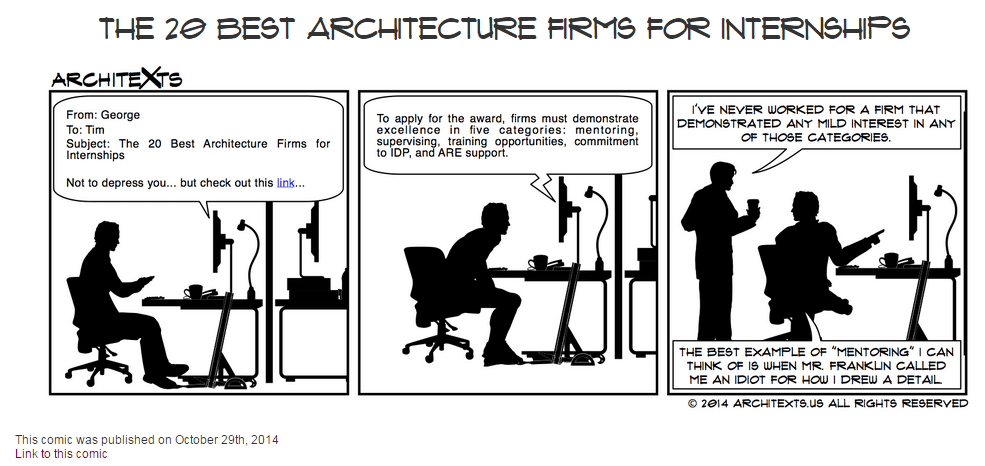
I will end this weeks Roundup with another classic from the great people over at Architexts……..be sure to check them out often.

11-1-2014 10-10-11 AM

Have a Great Weekend

The BIMsider

BIM, Fun, Weekly Roundup

Weekly Roundup – 2014.14

download

The week that was in the world of BIM and other Techie fun stuff, for the week of Oct. 19th – Oct. 25th

We will start this week off with one of many post from Revit OpEd (good to see Steve back to posting up a storm on his blog), this post is about an issue that can arise when using worksets to mange links in Revit 2015.

Revit 2015 – Closing a Workset and Linked File Ownership Conflict

Another post from Revit OpEd, this time for the MEP crowd.

Revit MEP Pipe Appearance in Sections

Some more MEP infor for Revit, this time coming form What Revit Wants, the age old questions – Overlay or Attachment?

MEP Space Bounding and Revit Links – Overlay or Attachment

Now we switch hats, and grab that old beat up hardhat off the shelf and head over to the Construction App Guru to learn more about some Punch List apps that are out there.

Punch List App Options

If you like to use BIM for all that it can do for Building Performance, it has been a good week. Over at the BIM blog they touch on 3 big things from that area that came out this week.

A Great Week for Building Performance

the Autodesk Blog In The Fold also shared it’s take on the new products out this week for Building performance

Autodesk Expands Software Portfolio for Designing High Performance Buildings and Infrastructure 

One more post about Building Performance – this time on the Building Lifecycle side (sweet Infographic alert!) in the IMAGINiT BSD Blog

Building Lifecycle Management Explained

This has also been a big week Navisworks learning to play nice together with Rhino and Dynamo! Here is a couple of posts from Luke over at What Revit Wants about it.

Free Rhino to Navisworks addin

Using Dynamo with Navisworks to Automate Common Tasks (using DynaWorks) (this post also introduced me to the blog Stuff and BIMs you shoudl check it out too)

A few weeks ago I posted a blog from the Revit Kid in which he told us all about another BIM blog called Curtainwall BIM, well he is at it again this time Jeff is pointing us to a great little post by Curtain wall BIM about creating your own curtainwall mullion profiles, so if you having been looking to do this look no further. Just remember nothing can kill your model faster than an overly complicated mullion profile (especially if you model is curtain wall heavy) so keep that in mind when you are creating your custom profile…….less is more for sure in this case.

Revit Tutorial – Creating a custom Mullion profile (Curtainwall BIM)

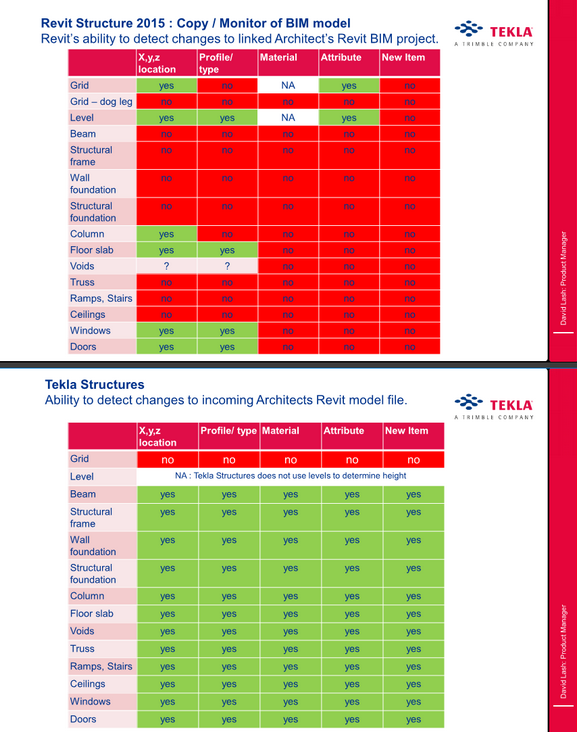
Now that Revit (2015) allows us the link in IFC files directly from the ribbon here is a handy chart that Luke post on What Revit Wants about what can be copy monitored in an IFC (Tekla) file.

Copy / Monitor – Tekla Structures vs Revit Structure (chart was created by Tekla for what that’s worth)

10-25-2014 9-16-58 AM

Do you and your company require that the location of your file (drawing) be listed somewhere on the sheet? If this is so Revit OpEd has an interesting post about it and how you might want to go about doing it in Revit.

Including a sheet file name and path

Something a little different, how to handle your emails in an effective AND collaborative way. This is a post form the A360 Blog.

Getting out of Email: The Biggest Roadblock to Effective Collaboration

To end this Weeks Roundup here is a story about a student that turned an old school bus in to his home, post brought to us by guff

An Architecture Student Couldn’t Afford Housing

10-25-2014 9-32-11 AM

Have a Great Weekend

The BIMsider

BIM, Fun, Weekly Roundup

Weekly Roundup – 2014.13

download

The week that was in the world of BIM and other Techie fun stuff, for the week of Oct. 12th – Oct. 18th

If you use site photos and are looking for a good way to get them into Revit check out this post from What Revit Wants

Send Site Photos and more to Revit with Mobile app

Over at Revit Beyond BIM they posted a good blog on hidden line with for Concrete beams in Revit

Clean join and hidden lines for concrete beams

Has your company been thinking about making the move to the cloud for plan distribution, if you you need to read this post form the Construction App Guru first.

New Plan App Options

Another interesting post from What Revit Wants with help from Revit Beginners about the possibility of Revit Family Arrays with a count of only 1.

Array in a Revit family

Revit Beginners also has another good post (technically it was from last week, but I missed it) with some schedule tips.

Schedule Basics & Tips

The BIM 360 brand is expanding with the launch of BIM 360 Layout app for iOS, see 2 stories about this listed below from In the Fold and Beyond Design

New BIM 360 Layout iPad App

Construction Layout with BIM 360 has Arrived

This may already be out there, but it’s a good reminder post from Revit OpEd about the new default setting for importing files into Revit 2015 R2.

Revit 2015 R2 – Default Setting for Import Positioning

If you run a BIM 360 Glue project you and you Admin team can now have access to Navisworks Manage for free (with your paid subscription for BIM 360, and only for project or host admins on the project). Find out more about it in this What Revit Wants post (be sure to ready the fine print or in this case the bold underlined print)

Free Navisworks Manage with your Glue Subscription

For those of you still on the fence about going to AU (you should go!), then you should take a read of the reasons why over at the A360 Blog.

Autodesk University 2014 – Why you should be there

If you have been wanting to change your background colour in Revit, now with Revit 2015 R2 you can, check out more form Revit OpEd on this below.

Revit 2015 R2 – Background Color

Check out the Revit Jedi’s blog post about the upcoming CanBIM Certification from CanBIM

CanBIM Certification

I missed this post below from the Revit Geek a few weeks back, but Jeff over a the Revit Kid blogged about it this week, and I’m glad he did as it’s a great tip.

Spot Slope Revit (Revit Geek)

Revit Tip – Showing a Triangle on a spot slope (Revit Kid)

Are you looking for how to find the ROI of BIM? Well here is a good start with a blog post from bimblog

 Are you seeing a Return from your BIM Investment (Part 1)

Here is another good “list” post form What Revit Wants, which he found on the Revit Modeling India site.

Some Mobile app for Construction

I will end this weeks post with a little Star Wars humour. Get it, he will not…

10615329_689970907754917_9190872900597888901_n

Have a Great Weekend

The BIMsider

BIM, Fun, Weekly Roundup

Weekly Roundup – 2014.12

download

The week that was in the world of BIM and other Techie fun stuff, for the week of Oct. 5th – Oct. 11th

This week we start off with a post about another acquisition on the BIM (or BIMish) world. Nemetschek (makers of ArchiCAD and Vectorworks) has bought bluebeam for $100 million!

Bluebeam joins Nemetschek

Jeff from the Revit Kid introduced me to a new blog this week Curtain Wall BIM in one of his posts, check it out (or better yet check them both out).

“New” Blog – Curtainwall BIM

Over at the A360 Blog they teach us about how yo can now search and view within your design on A360’s Larger Model viewer.

View and Search

This week Revit Beyond BIM give us a Turorial on Robot Structural Analysis, RC Plate Design anyone?

Robot Structural Analysis Tutorials: RC Plate Design

Seems never a week goes by that we don’t get at least one great post from What Revit Wants, (usually many great posts). This we we learn about a suite of free addin for Revit from CTC (CAD Technology Center)

Free Explorer Extension that lists Revit version and workshare information for RVT and RFA files

Luke (What Revit Wants) also helps us out with Hidden Lines this week

Don’t forget about the Discipline of the View in Revit, especially when it comes to Hidden Lines

In the Fold lets us know all about the brand new SkecthBook mobile app that just came out this week

Introducing the all-new SketchBook for Mobile

For those in the construction industry this next blog is a must follow, The Construction App Guru. This week he shows us where to find all that saftey information you can never find when you are looking for it on the web.

Safety Resource Blog

Has your company started using Digital Signing yet? We have in my office for the sales transactions and for some customers it’s great………while for others not so much, fear of the unknown mostly. AECbytes Blog takes a deeper look into digital signing and the AEC industry.

The Ins and Outs of Digital Signing in AEC

Over at Autodesk Revit Structure they put up a quick post with a link to a PDF that shows all the 2D details items in out of the box Revit, very handy!

 Revit 2015 2D Detail Components

Have you played with Formit yet? If not the people over at BIM 42 took it for a test drive and can fill you in with their latest post.

Autodesk Formit and Revit

If you dare try you hand in the 6th Annual Parametric Pumpkin Carving contest, learn more over at buildz 

6th Annual Parametric Pumpkin Carving

This week Fear and Loathing In a CAD vs BIM World put up a great post about Modeling for Construction and why Architects don’t want to do it.

Architects Modeling for Construction

Here is a quickly but a goodie from the Revit Geek

Scope Box Quirk

I will end this weeks post with what some might call some “Stair Porn”, check it out over at boredpanda

creative-staircase-designs-4creative-stair-design-11

22 Beautiful Stairs

Have a Great Weekend

The BIMsider