AU2014, BIM Events, Fun, Revit

AU only a week away – So here are some Survival Tips

I will start by saying that these are not my Survival Tips (this is my 1st AU, so I will be using them) but they come from a friend, Scott over at the Revit Jedi. So I don’t feel to bad just re-posting his tips.

You can head over to Scott’s blog to see this post AU Survival Tips, or just read it below.

Shaan Hurley recently posted Autodesk University 2014 Survive and Thrive Tips

Here are a few of my own after going to AU… many times….

  • Good luck requesting a Humidifier for your room… they’re typically all gone by the time you remember. Just keep a glass of water by your bed at night.
  • Go outside at least once during the day, just to remind you what fresh air smells like.
  • Take a hand sanitise…. germs are everywhere !!!!
  • Sleep, trust me you’ll need it.. and I don’t mean during your (my) sessions.
  • Shaan mentions “static electricity”, this is a great opportunity to ZAP unwary bystanders.
  • Resist the urge to baa like a sheep during the line up at meal time… and if you do hear a sheep it’s not me!
  • Wear comfortable shoes, your going to be on your feet all day and walking for miles!
  • Meet as many people as you possibly can. This makes the AU experience more enjoyable and you can make some great contacts which you can meet net time you go. If you see me stop me and say hi. I’ll give you a Revit Jedi decal.
  • It’s Vegas, go down the Strip and also go see Fremont Street.
  • It’s Vegas, enjoy yourself… but remember your there for a conference which you paid good money to attend, don’t waste a day being hung over!
  • Make the event memorable… however don’t be “that guy” that everyone remember for the wrong reasons.
  • Travel light. Your packing that c#@!p around with you all day… you really don’t need your laptop! 
  • Sit at a different table during meals and introduce yourself to everyone at the table. Shaan suggests to take lots of business cards…. trust me you’ll need LOTS!
Finally, enjoy yourself !. 
It’s a great opportunity to meet people. I learn the most after the sessions when I talk to people.
 
See you there!
 
Also don’t forget to sign up for JJ’s and my session.
BM7557 – Real Revit set up and its partnership with a BIM Execution Plan
Sc
Now back to actual BIMsider content.
I too have a class being offered at AU this year, and there are 41 seats left (130 filled).

AC6640 – 60 Minutes, 30 Apps, 4 Categories, 2 Much Fun

This class is designed to provide a little fun as we explore some of the apps and add-ins that are out there for Autodesk, Inc., software. While the general flow of this class will be fun, you’ll discover some helpful apps that can increase your productivity as well. The class will cover 30 different apps, which fit into 4 different categories during this 60-minute class. The 4 categories will be: mobile, production, add-ins, and fun.

My class is Tuesday December 2nd 3:00 pm – 4:00 pm, South Seas G, Level 3

You can register here

Hope to see you there.

The BIMsider

PC_Solo_AU2014

P.S. there will be free giveaways in my session . I will be giving away 5 copies of the IMAGINiT Utilities for Revit 2015 (or version of your choice 2012 – 2015) on a 12 month stand-alone license.

Just remember to you have to be there to win!

The BIMsider

BIM, Fun, Weekly Roundup

Weekly Roundup – 2014.18

download

The week that was in the world of BIM and other Techie fun stuff, for the week of Nov. 16th – Nov. 22nd.

If you use or are thinking about using the app PlanGrid then you should check out this post by Construction App Guru first to find out about the new features.

PlanGrid App Update #3

There are lots of good reasons to share this next post by talkBIM, but I’m doing it simply because of the awesome pun in the title, check it out for yourself

Steel not convinced? talkBIM featured in AISD news!

If you have ever worked in a support role in an Architectural office, weather it was CAD, BIM, or some mix of both Support then you should spend a few minutes and read this post from BIM Freak. I have personally been in this role a few times, and in fact back in the day I worked with Laura from BIM Freak in the same office doing the same role. Enjoy the post, and your SWAG and have a little smile.

Enjoying the Support Role

Here is a post by What Revit Wants on a new NWC Batch export tool from BIM One. Spoiler alert this might find its way into my AU Presentation as a Bonus Add-in.

NWC Batch Export

Here is another Add-in review from What Revit Wants, this time about an Batch printing and exporting.

Automatic Batch printing and Exporting

Here is another post by What Revit wants about a post he found about BIM, Revit, FM and Health.

BIM, Revit, Fm and Health (What Revit Wants post)

BIM’s Role expands as health Facility managers Take Ownership (AHDC Post)

If you are looking at the post above and you aren’t sure what FM (Facilities Management) really is then his next post form IMAGINiT BSD Blog is for you.

FM 101 for Executives 

intellectual Property (IP) can be (read is) a sticky think when it comes to BIM, everyone wants you to share yours, but you are crazy if you ask for mine…….or something like that. Practical BIM tries to make sense out of the IP question

IP – it is not all ours, get used to it

Who likes free? That’s right everyone, so you better check out this new FREE project management platform Geniebelt. To learn more, and to see if its for you head over to Construction App Guru and see what Rob has to say about it.

New Free Project Management Platform: Geniebelt

This week we have a couple good posts from Revit OpEd, which is pretty normal Steve is always putting out good stuff.

Importing CAD Files and By Shared Coordinates

Username and Local Files

Have you ever really thought about BIM, and said to yourself that BIM really is like a game of hockey (or any other team sport) well if yo have you are not alone. Check out the post over at BIM blog about just that idea, BIM as a team sport.

BIM is a team sport

How do you stop the dreaded “Plague of the Meetings”? You can start by checking out the A360 blog, they have 3 ways to do just that.

Improve Productivity: 3 ways to Stop the Meeting plague

So what’s the deal with Point Clouds? Good question, you can learn more at the AECbytes blog.

Putting Point Clouds to Work: Then, Now, & Later

If you are a Clarity user (or thinking about becoming one) then this post from the IMAGINiT Support Blog may help with some PDF issues

Clarity PDF Task Sheets Out of Order

And I end this weeks post with a picture to remind us how quick things change………..

comic_thumb_email


Have a Great Weekend

The BIMsider

Twitter @theBIMsider
Facebook: theBIMsider

BIM, Fun, Weekly Roundup

Weekly Roundup – 2014.17

download

The week that was in the world of BIM and other Techie fun stuff, for the week of Nov. 9th – Nov. 15th

This week we start off with a post on Drones from the Guru over at Construction Apps Guru.

Drones interview (Part 2)   If you missed part one you can find it here

If you are going to be at AU in a few weeks you should swing by the A360 booth and find out about all the new things coming down the pipe for rendering with A360. You can learn more from the post listed below form the A360 Blog.

A360 Rendering Fun @ Autodesk University 2014

Have you ever wondered what might happen at the cross roads of BIM (or what the cross roads of BIM might be?) well them take a left at curiosity lane and head on over to the Revit Jedi and find out his thought of just that.

Initiating Change

Trimble is growing into the AEC space some more with a couple of announcements this week. The first I comes from Think BIM and lets us know that Trimble has acquired amtech, a leader in the UK MEP industry construction software solutions.

Put that in your pipe

The next bit of Trimble news come from Linkedin group Field BIM that tells us of a strange partnership between Trimble and Bentley to make BIM better for all through construction modeling. See original post below from Bentley’s website.

Bentley and Trimble advance BIM through construction modeling

If you work on a construction site, and deal with the safety of that site then you need to read this post from the Construction App Guru about what’s out there (and new) in the Safety App world.

New Safety Apps

You ever have a deadline at the office……Okay so I know that’s I trick questions everyone has office deadlines, and some more than others. Maybe this post form the team at the A360 Blog might help with the next one.

3 Tips for meeting deadlines    (Where were these tips last night as I typed away like a mad man to get my AU 2014 handout in on time. No matter how much time I have never seems like enough, must be that I need to leave it to the last minute to really get the creative juices flowing……..yeah I’m going with that one.)

This next post contains the magical secrets of relocating projects in Revit, the secrets are reveals by Steve at Revit OpEd

Relocate Project is Slight of Hand

This next post from Revit OpEd about 2D settings for Grid lines might not be magic, but its a trick worth knowing.

Enable 2D setting for Multiple grid lines

Have you ever wondered how to do QTO with Navisworks? Well What Revit Wants has posted about some free tutorials on line from Autodesk that just might help get you up and running.

Free model based estimating and takeoff tutorial

The team at BIM Blog has posted some links to help you do Green Building from the Start with Revit and other Autodesk software, add-ins, and cloud tools.

Green Building from the Start

Who’s Afraid of the Big Bad BIM does a Fro-back Friday on his blog this week to remind everyone about BIM Execution plans…..again

BIM Execution…..Again

Do you code? If and you use Revit you should check out The Building Coder, most if its over my head, but I know you are all smarter than me so go forth and code!

Futureproofing and Determining Intersecting Elements

There is never any “Shades of Grey” when it comes to toilets in Revit……..or is there?

Yet more Toilets

If you are working with colour plan in Revit, you should check out this post from Revittize about it.

Room/Area Colour Schemes

The RevitCat talks about weirs stair stuff in this weeks post.

Weird Revit Stair Stuff – Stairs in Groups

I’m going to add a little ACAD content to this weeks post, so if you are going to AU this year you should check out Jarod Schultz Class “Super Duper Click Saver” so you save some picks and clicks in your everyday ACAD work.

Hit 276 People for my Autodesk University Class

This is a really fun post from BIM Troublemaker, some cool modeling in Revit and a nice tie in to a cool building and a super cool car.

Ferrari World Abu Dhabi in Revit

Here are a couple of good posts from BIM 42

AutoCAD Civil 3D to Revit

Getting started programming Revit

For those of you that have not tried Revit 2015 R2 (or maybe don’t have access) BIM & BEAM fill us in on a cool new inclusion for it.

Dynamo Now Pre-Installed with Revit

I’m a little behind with this post, but FormIt is really cool, so you should check out this blog post about it from the Autodesk FormIt Blog

Design is a Team Sport

Now a little content for the Revit Strcutre folks in the crowd from the Autodesk Revit Structure Blog

Revit 2015 Tutorial – Creating Filters for Structural Modelling and Documentation

As mentioned earlier in this weeks post, I get the benefit of all the API and visual programming that became all the rage these days but have yet sat down and really learned (played) with any of it. So I will leave that up to the people that know, like the people at arCHI+Lab

analysis visualization with ladybug & mantis shrimp

If you use BIM 360 and are not sure about the Sovereignty of the data (yes big word on a Saturday morning before my first coffee). What Revit wants posted on this topic and gave a link to a video from AU2014 AUx

Data Sovereignty and Autodesk Cloud Products like BIM360 (at AU2014 AUx)

And on that “not enough coffee” note, I will end this weeks post with this little gem.

Coffee_in_the_morning

Have a Great Weekend

The BIMsider

Twitter @theBIMsider
Facebook: theBIMsider

AU2014, Autodesk, BIM, Fun

Only 3 weeks until AU 2014!

AU14-Speaker-225x205

Hello All,

Hard to believe but AU is only 3 weeks away, so if you haven’t signed up yet there is still time.

If you are looking for a Tuesday afternoon class for Autodesk University 2014 (AU 2014) December 2nd – 4th at Mandalay Bay in Las Vegas, NV, well I just might have one for you…..Mine!

You can sign up for my class by going to the AU site and search for class AC6640 – There are currently 53 spots left (118 seats filled) so about 70% full.

AC6640 – 60 Minutes, 30 Apps, 4 Categories, 2 Much Fun

This class is designed to provide a little fun as we explore some of the apps and add-ins that are out there for Autodesk, Inc., software. While the general flow of this class will be fun, you’ll discover some helpful apps that can increase your productivity as well. The class will cover 30 different apps, which fit into 4 different categories during this 60-minute class. The 4 categories will be: mobile, production, add-ins, and fun.

My class is Tuesday December 2nd 3:00 pm – 4:00 pm

You can register here

Hope to see you there.

The BIMsider

PC_Solo_AU2014

P.S. there will be free giveaways in my session . I will be giving away 5 copies of the IMAGINiT Utilities for Revit 2015 (or version of your choice 2012 – 2015) on a 12 month stand-alone license.

Just remember to you have to be there to win!


BIM, Fun, Weekly Roundup

Weekly Roundup – 2014.16

download

The week that was in the world of BIM and other Techie fun stuff, for the week of Nov. 2nd – Nov. 8th

This week we start with another be announcement from Trimble as they move more and more into the Heart of the AEC space and put more pressure on Autodesk. Trimble announces an MEP platform extension for SketchUp, check out the TenLinks blog for more info.

Trimble MEPdesigner for SketchUp Announced

This next post is technically from last week, but I missed it so you get to enjoy it this week. BIM 42 give a review of using BIM 360 Glue as a project review tool.

Project Review with BIM 360 Glue

Here is another good post that I missed from last week, but you should still check it out from The Revit Geek

Revit Basics – Group Origin Points

If you follow my blog (yeas all 16 of you) then you know that pretty much every week I have a post or 2 from the Construction App Guru, this week is no different. He has started a new feature on his blog called “App-View” where in interviews people involved with some of the best and most popular construction apps out there. This week he post 2 of these interviews for 2 great apps.

App-View #3 PlanGrid

App-View #4 FotoIn Mobile

Those same 16 followers will also know that What Revit Wants also appears weekly in my Roundup posts, this week I’ve got 3 nuggets of Wisdom form Luke over there at WRW.

Gteam is now called Trimble Connect for BIM

Using Able2Extract to convert PDFs to Vector information for use in CAD and BIM

What does BIM for MEP look like in 2014?

Steve over at Revit OpEd had a post this week talking about ways to learn and understanding Dynamo (more on Dynamo later on) by checking out the Dynamo website www.DynamoBIM.org

Dynamo Tip and Fourm

In related Dynamo news the latest stable release we let out into the world this week Version 0.7.3, learn more about it in the latest Dynamo Blog

Dynamo 0.7.3 Release

Direct link to 0.7.3 download

Another little bit of Dynamo love from arCHI+lab

View Organization management with Dynamo

What happens when Rhino and Dynamo get together? You get Rhynamo, learn more from this blog post at The Proving Ground

Rhynamo – An Open Source Project

This next post is one I can’t speak too as I’m a PC guy to the core, no MAC for me (I did sip the Apple kool-aid and have an iPad for work). However I do know that many people do want to run Revit on a Mac so hopefully this post from BIM Outsourcing can help.

How to Install Revit for Mac Device

What is the cloud and how can I use it in my engineering company? Well if you are asking yourself this questions then you should check out this post from the A360 Blog about just that.

5 Things Enterprises Must Know about Cloud Applications for Engineering

if you use Navsiworks 2015 check out this post from IMAGINiT Technologies Support Blog about the new 2015 PDF reader Add-in.

Navisworks 2015 – Add PDFs to your project

If you haven’t visited the Revit Kid lately over on his page, swing by and take a look at his new Homepage.

New Homepage! Plus, Updates and News!

Below is a link to a post from the Revit Jedi, which is a fun little post about all the stuff he track round with him, but the best part of the post is the last 2 sentences under the picture!

Keep your staff engaged, run regular training and information sessions that includes all offices. You have the opportunity to be the “glue” that helps bind the offices together.

That’s important!

Check out the rest of the post here: Travelling Road “Train” Style

Are you interested in learning a little more about the newest BIM 360 app “BIM 360 Layout” then check out this post from Beyond Design

Extending the BIM 360 ecosystem with component content

Here is a good post for some easy Revit filters for Elevations form the BIMChicks

Easy Revit Filters for Elevations

Are you wondering do I need Revit 2015 or can I make do with Revit 2015 LT? Well check out this post over at CADZulu

Revit vs Revit LT

Keeping on the Revit LT train, here is another point of view (much more in-depth) on Revit Lt from the RevitCAT

Revit LT – Is it any good?

If like me you didn’t make it to RTCEUR in Dublin last week, yu can get a small fix here from Jay Zallan’s blog Fear and Loathing in a CAD vs BIM world as he shares his class info (and files)

RTCEUR 2014 Jay Zallan’s Class

More RTCEUR love from the Dark Arts of Revit Blog

RTCEUR

I don’t give enough love to ACAD in the blog (some might say I still give it to much) here is a post form Lynn Allen’s Blog about offsets in ACAD.

Are you getting the most out of your Offsets in AutoCAD?

Trimble released SketchUp 2015 this week, learn more from the SketchUpdate Blog

Sharpening SketchUp for 2015

Have you worked with Revit Curtain wall doors? (or what graphically settles for curtain wall doors) whether you have or haven’t you should check out this post form Revittize

Revit Curtainwall Doors

This is a good post if you are thinking about (or are already) looking at using rental software from Autodesk, go to the Up and Ready blog for more info.

Quick Start: Setting up your Autodesk Desktop Rental Software

I will end this weeks post (long long post) with a funny, hope you enjoy.

funnypigeon
Have a Great Weekend

The BIMsider

Twitter @theBIMsider

Facebook: theBIMsider

BIM, Fun, Weekly Roundup

Weekly Roundup – 2014.15

download

The week that was in the world of BIM and other Techie fun stuff, for the week of Oct. 26th – Nov. 1st

If you are looking for some good construction apps, you can’t go wrong checking out The Construction App Guru. This week he had a couple of posts form a resent presentation about some useful apps for in the field.

CMAA Presentation: Apps for Construction

CMAA Conference Debrief 

More love for Dynamo and all the things it can do (seems almost limitless) This time via What Revit Wants

How to get Energy Analysis for Dynamo – Open Beta (CORE studio)

From Rhino to Revit with Dynamo, Grasshopper, Python and mantis shrimp

Here is an excellent tip for Parameters and families in Revit form Revit OpEd.

Visible Parameter and Associates Family Parameter

If you are brave and don’t mind a little coding check out this post about editing your Navisworks Shortcuts, provided by What Revit Wants

Editing Keyboard Shortcuts in Navisworks

Super Nanny to the rescue…….check out Revit beyond BIM to learn how to raise your Revit model.

Raise your Revit model: Structural Modeling meets Quantification

Another post from Revit beyond BIM this time about some new (or updated) join geometry features in Revit 2015

Switching geometric join order for multiple elements

Steve from Revit OpEd shares what he found out when he tested a new addin to allow a java script to play with Revit.

Occupancy Calculation and JavaScripts

Scott from the Revit Jedi has been doing some cool stuff with VR in his office (AEC Firm), learn more in this post.

Virtual Reality and it impact on Design

Looking for a fast easy way to renumber views on sheets? If so check out this post from the IMAGINiT BSD Blog about the 2015 versions of the IMAGINiT Utilities For Revit.

Renumber Revit Views on Sheets

The AECBytes blog take a look at the “Internet of Things” this week in their blog post, check it out below.

The Internet of Things

This week there was an update set free for A360, see all it contained in this blog post from the A360 Blog (hint multi-file download and better folders)

Check out whats new in the latest update

the team at Revit Beyond BIM has been on fire this week, here is another cool post about showing walls as hidden lines in a ceiling plan

Showing Cut Patterns of hidden walls in ceiling plans

If you are like me and not one of the lucky ones that is at RTCEUR this weekend in Dublin, then you might want to check out Boost your BIM as Harry is once again blogging (and tweeting @BoostYourBIM) is RTCEUR wish list. Below is just one of the wishes, #3 to be exact, check his blog for all of them.

#RTCEUR Wish 3″ Scheduling adaptive point location values

Having issues with annotation line weight from a linked file? Well maybe this post from What Revit Wants can help……or maybe not?

Line weight issues

More info on what BIM ROI should look like, and how to quantify it from the BIM Blog

BIM ROI in more Detail

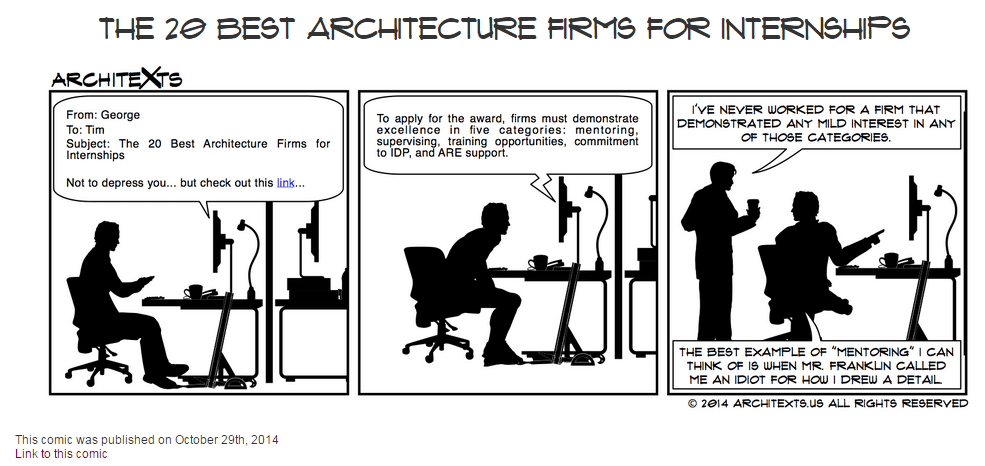
I will end this weeks Roundup with another classic from the great people over at Architexts……..be sure to check them out often.

11-1-2014 10-10-11 AM

Have a Great Weekend

The BIMsider