BIM, Fun, Weekly Roundup

Weekly Roundup – 2014.16

download

The week that was in the world of BIM and other Techie fun stuff, for the week of Nov. 2nd – Nov. 8th

This week we start with another be announcement from Trimble as they move more and more into the Heart of the AEC space and put more pressure on Autodesk. Trimble announces an MEP platform extension for SketchUp, check out the TenLinks blog for more info.

Trimble MEPdesigner for SketchUp Announced

This next post is technically from last week, but I missed it so you get to enjoy it this week. BIM 42 give a review of using BIM 360 Glue as a project review tool.

Project Review with BIM 360 Glue

Here is another good post that I missed from last week, but you should still check it out from The Revit Geek

Revit Basics – Group Origin Points

If you follow my blog (yeas all 16 of you) then you know that pretty much every week I have a post or 2 from the Construction App Guru, this week is no different. He has started a new feature on his blog called “App-View” where in interviews people involved with some of the best and most popular construction apps out there. This week he post 2 of these interviews for 2 great apps.

App-View #3 PlanGrid

App-View #4 FotoIn Mobile

Those same 16 followers will also know that What Revit Wants also appears weekly in my Roundup posts, this week I’ve got 3 nuggets of Wisdom form Luke over there at WRW.

Gteam is now called Trimble Connect for BIM

Using Able2Extract to convert PDFs to Vector information for use in CAD and BIM

What does BIM for MEP look like in 2014?

Steve over at Revit OpEd had a post this week talking about ways to learn and understanding Dynamo (more on Dynamo later on) by checking out the Dynamo website www.DynamoBIM.org

Dynamo Tip and Fourm

In related Dynamo news the latest stable release we let out into the world this week Version 0.7.3, learn more about it in the latest Dynamo Blog

Dynamo 0.7.3 Release

Direct link to 0.7.3 download

Another little bit of Dynamo love from arCHI+lab

View Organization management with Dynamo

What happens when Rhino and Dynamo get together? You get Rhynamo, learn more from this blog post at The Proving Ground

Rhynamo – An Open Source Project

This next post is one I can’t speak too as I’m a PC guy to the core, no MAC for me (I did sip the Apple kool-aid and have an iPad for work). However I do know that many people do want to run Revit on a Mac so hopefully this post from BIM Outsourcing can help.

How to Install Revit for Mac Device

What is the cloud and how can I use it in my engineering company? Well if you are asking yourself this questions then you should check out this post from the A360 Blog about just that.

5 Things Enterprises Must Know about Cloud Applications for Engineering

if you use Navsiworks 2015 check out this post from IMAGINiT Technologies Support Blog about the new 2015 PDF reader Add-in.

Navisworks 2015 – Add PDFs to your project

If you haven’t visited the Revit Kid lately over on his page, swing by and take a look at his new Homepage.

New Homepage! Plus, Updates and News!

Below is a link to a post from the Revit Jedi, which is a fun little post about all the stuff he track round with him, but the best part of the post is the last 2 sentences under the picture!

Keep your staff engaged, run regular training and information sessions that includes all offices. You have the opportunity to be the “glue” that helps bind the offices together.

That’s important!

Check out the rest of the post here: Travelling Road “Train” Style

Are you interested in learning a little more about the newest BIM 360 app “BIM 360 Layout” then check out this post from Beyond Design

Extending the BIM 360 ecosystem with component content

Here is a good post for some easy Revit filters for Elevations form the BIMChicks

Easy Revit Filters for Elevations

Are you wondering do I need Revit 2015 or can I make do with Revit 2015 LT? Well check out this post over at CADZulu

Revit vs Revit LT

Keeping on the Revit LT train, here is another point of view (much more in-depth) on Revit Lt from the RevitCAT

Revit LT – Is it any good?

If like me you didn’t make it to RTCEUR in Dublin last week, yu can get a small fix here from Jay Zallan’s blog Fear and Loathing in a CAD vs BIM world as he shares his class info (and files)

RTCEUR 2014 Jay Zallan’s Class

More RTCEUR love from the Dark Arts of Revit Blog

RTCEUR

I don’t give enough love to ACAD in the blog (some might say I still give it to much) here is a post form Lynn Allen’s Blog about offsets in ACAD.

Are you getting the most out of your Offsets in AutoCAD?

Trimble released SketchUp 2015 this week, learn more from the SketchUpdate Blog

Sharpening SketchUp for 2015

Have you worked with Revit Curtain wall doors? (or what graphically settles for curtain wall doors) whether you have or haven’t you should check out this post form Revittize

Revit Curtainwall Doors

This is a good post if you are thinking about (or are already) looking at using rental software from Autodesk, go to the Up and Ready blog for more info.

Quick Start: Setting up your Autodesk Desktop Rental Software

I will end this weeks post (long long post) with a funny, hope you enjoy.

funnypigeon
Have a Great Weekend

The BIMsider

Twitter @theBIMsider

Facebook: theBIMsider
BIM, Fun, Weekly Roundup

Weekly Roundup – 2014.15

download

The week that was in the world of BIM and other Techie fun stuff, for the week of Oct. 26th – Nov. 1st

If you are looking for some good construction apps, you can’t go wrong checking out The Construction App Guru. This week he had a couple of posts form a resent presentation about some useful apps for in the field.

CMAA Presentation: Apps for Construction

CMAA Conference Debrief 

More love for Dynamo and all the things it can do (seems almost limitless) This time via What Revit Wants

How to get Energy Analysis for Dynamo – Open Beta (CORE studio)

From Rhino to Revit with Dynamo, Grasshopper, Python and mantis shrimp

Here is an excellent tip for Parameters and families in Revit form Revit OpEd.

Visible Parameter and Associates Family Parameter

If you are brave and don’t mind a little coding check out this post about editing your Navisworks Shortcuts, provided by What Revit Wants

Editing Keyboard Shortcuts in Navisworks

Super Nanny to the rescue…….check out Revit beyond BIM to learn how to raise your Revit model.

Raise your Revit model: Structural Modeling meets Quantification

Another post from Revit beyond BIM this time about some new (or updated) join geometry features in Revit 2015

Switching geometric join order for multiple elements

Steve from Revit OpEd shares what he found out when he tested a new addin to allow a java script to play with Revit.

Occupancy Calculation and JavaScripts

Scott from the Revit Jedi has been doing some cool stuff with VR in his office (AEC Firm), learn more in this post.

Virtual Reality and it impact on Design

Looking for a fast easy way to renumber views on sheets? If so check out this post from the IMAGINiT BSD Blog about the 2015 versions of the IMAGINiT Utilities For Revit.

Renumber Revit Views on Sheets

The AECBytes blog take a look at the “Internet of Things” this week in their blog post, check it out below.

The Internet of Things

This week there was an update set free for A360, see all it contained in this blog post from the A360 Blog (hint multi-file download and better folders)

Check out whats new in the latest update

the team at Revit Beyond BIM has been on fire this week, here is another cool post about showing walls as hidden lines in a ceiling plan

Showing Cut Patterns of hidden walls in ceiling plans

If you are like me and not one of the lucky ones that is at RTCEUR this weekend in Dublin, then you might want to check out Boost your BIM as Harry is once again blogging (and tweeting @BoostYourBIM) is RTCEUR wish list. Below is just one of the wishes, #3 to be exact, check his blog for all of them.

#RTCEUR Wish 3″ Scheduling adaptive point location values

Having issues with annotation line weight from a linked file? Well maybe this post from What Revit Wants can help……or maybe not?

Line weight issues

More info on what BIM ROI should look like, and how to quantify it from the BIM Blog

BIM ROI in more Detail

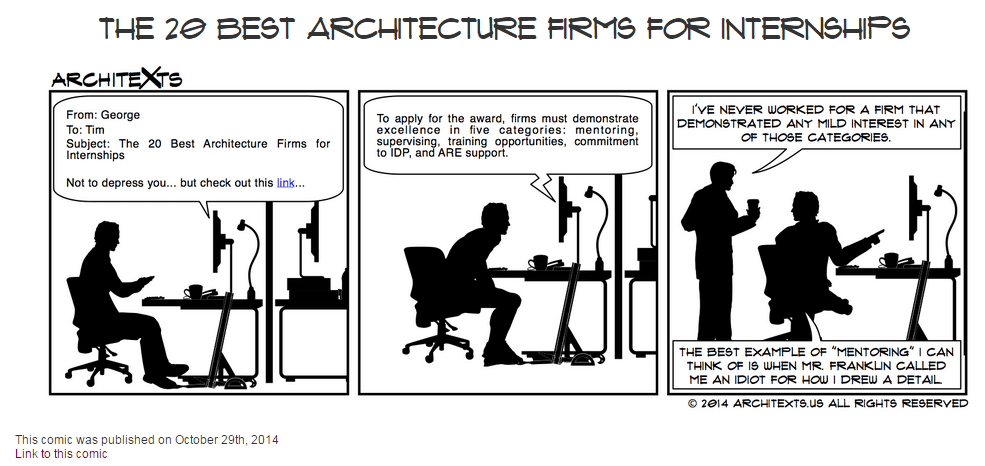
I will end this weeks Roundup with another classic from the great people over at Architexts……..be sure to check them out often.

11-1-2014 10-10-11 AM

Have a Great Weekend

The BIMsider

BIM, Fun, Weekly Roundup

Weekly Roundup – 2014.14

download

The week that was in the world of BIM and other Techie fun stuff, for the week of Oct. 19th – Oct. 25th

We will start this week off with one of many post from Revit OpEd (good to see Steve back to posting up a storm on his blog), this post is about an issue that can arise when using worksets to mange links in Revit 2015.

Revit 2015 – Closing a Workset and Linked File Ownership Conflict

Another post from Revit OpEd, this time for the MEP crowd.

Revit MEP Pipe Appearance in Sections

Some more MEP infor for Revit, this time coming form What Revit Wants, the age old questions – Overlay or Attachment?

MEP Space Bounding and Revit Links – Overlay or Attachment

Now we switch hats, and grab that old beat up hardhat off the shelf and head over to the Construction App Guru to learn more about some Punch List apps that are out there.

Punch List App Options

If you like to use BIM for all that it can do for Building Performance, it has been a good week. Over at the BIM blog they touch on 3 big things from that area that came out this week.

A Great Week for Building Performance

the Autodesk Blog In The Fold also shared it’s take on the new products out this week for Building performance

Autodesk Expands Software Portfolio for Designing High Performance Buildings and Infrastructure 

One more post about Building Performance – this time on the Building Lifecycle side (sweet Infographic alert!) in the IMAGINiT BSD Blog

Building Lifecycle Management Explained

This has also been a big week Navisworks learning to play nice together with Rhino and Dynamo! Here is a couple of posts from Luke over at What Revit Wants about it.

Free Rhino to Navisworks addin

Using Dynamo with Navisworks to Automate Common Tasks (using DynaWorks) (this post also introduced me to the blog Stuff and BIMs you shoudl check it out too)

A few weeks ago I posted a blog from the Revit Kid in which he told us all about another BIM blog called Curtainwall BIM, well he is at it again this time Jeff is pointing us to a great little post by Curtain wall BIM about creating your own curtainwall mullion profiles, so if you having been looking to do this look no further. Just remember nothing can kill your model faster than an overly complicated mullion profile (especially if you model is curtain wall heavy) so keep that in mind when you are creating your custom profile…….less is more for sure in this case.

Revit Tutorial – Creating a custom Mullion profile (Curtainwall BIM)

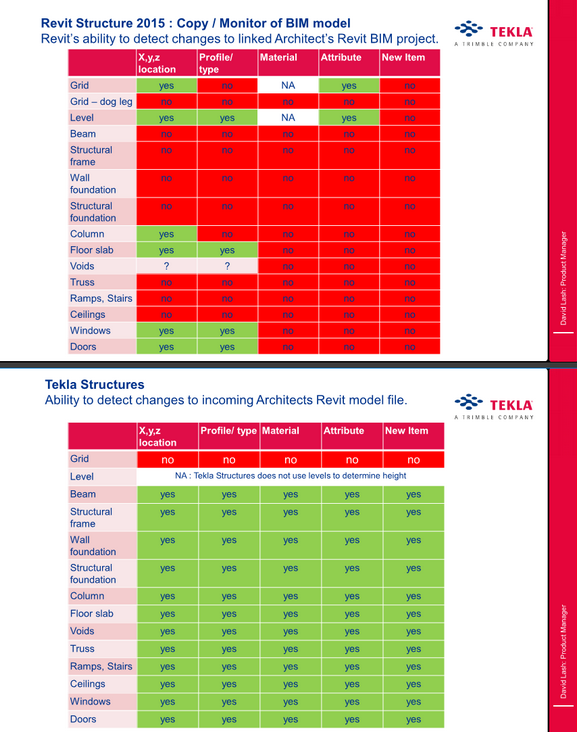
Now that Revit (2015) allows us the link in IFC files directly from the ribbon here is a handy chart that Luke post on What Revit Wants about what can be copy monitored in an IFC (Tekla) file.

Copy / Monitor – Tekla Structures vs Revit Structure (chart was created by Tekla for what that’s worth)

10-25-2014 9-16-58 AM

Do you and your company require that the location of your file (drawing) be listed somewhere on the sheet? If this is so Revit OpEd has an interesting post about it and how you might want to go about doing it in Revit.

Including a sheet file name and path

Something a little different, how to handle your emails in an effective AND collaborative way. This is a post form the A360 Blog.

Getting out of Email: The Biggest Roadblock to Effective Collaboration

To end this Weeks Roundup here is a story about a student that turned an old school bus in to his home, post brought to us by guff

An Architecture Student Couldn’t Afford Housing

10-25-2014 9-32-11 AM

Have a Great Weekend

The BIMsider

AU2014, Autodesk, BIM, Fun

Only 10 Seats Left! – Speaking at AU 2014 – 6 Weeks From Today – Updated

AU14-Speaker-225x205

Quick update – Oct. 22/14

Autodesk University has moved my class to a bigger room to allow for more seats. My class now has 209 seats total – 105 seats open, with 104 seats filled.

Hello All,

Autodesk University 2014 (AU 2014) December 2nd – 4th at Mandalay Bay in Las Vegas, NV is quickly approaching, only 6 weeks from today I will be speaking.

You can sign up for my class by going to the AU site and search for class AC6640 – There are currently 10 spots left (104 seats filled)

AC6640 – 60 Minutes, 30 Apps, 4 Categories, 2 Much Fun

This class is designed to provide a little fun as we explore some of the apps and add-ins that are out there for Autodesk, Inc., software. While the general flow of this class will be fun, you’ll discover some helpful apps that can increase your productivity as well. The class will cover 30 different apps, which fit into 4 different categories during this 60-minute class. The 4 categories will be: mobile, production, add-ins, and fun.

My class is Tuesday December 2nd 3:00 pm – 4:00 pm

You can register here

Hope to see you there.

The BIMsider

PC_Solo_AU2014

P.S. there will be free giveaways in my session – stay tuned for more info!


BIM, Fun, Weekly Roundup

Weekly Roundup – 2014.13

download

The week that was in the world of BIM and other Techie fun stuff, for the week of Oct. 12th – Oct. 18th

If you use site photos and are looking for a good way to get them into Revit check out this post from What Revit Wants

Send Site Photos and more to Revit with Mobile app

Over at Revit Beyond BIM they posted a good blog on hidden line with for Concrete beams in Revit

Clean join and hidden lines for concrete beams

Has your company been thinking about making the move to the cloud for plan distribution, if you you need to read this post form the Construction App Guru first.

New Plan App Options

Another interesting post from What Revit Wants with help from Revit Beginners about the possibility of Revit Family Arrays with a count of only 1.

Array in a Revit family

Revit Beginners also has another good post (technically it was from last week, but I missed it) with some schedule tips.

Schedule Basics & Tips

The BIM 360 brand is expanding with the launch of BIM 360 Layout app for iOS, see 2 stories about this listed below from In the Fold and Beyond Design

New BIM 360 Layout iPad App

Construction Layout with BIM 360 has Arrived

This may already be out there, but it’s a good reminder post from Revit OpEd about the new default setting for importing files into Revit 2015 R2.

Revit 2015 R2 – Default Setting for Import Positioning

If you run a BIM 360 Glue project you and you Admin team can now have access to Navisworks Manage for free (with your paid subscription for BIM 360, and only for project or host admins on the project). Find out more about it in this What Revit Wants post (be sure to ready the fine print or in this case the bold underlined print)

Free Navisworks Manage with your Glue Subscription

For those of you still on the fence about going to AU (you should go!), then you should take a read of the reasons why over at the A360 Blog.

Autodesk University 2014 – Why you should be there

If you have been wanting to change your background colour in Revit, now with Revit 2015 R2 you can, check out more form Revit OpEd on this below.

Revit 2015 R2 – Background Color

Check out the Revit Jedi’s blog post about the upcoming CanBIM Certification from CanBIM

CanBIM Certification

I missed this post below from the Revit Geek a few weeks back, but Jeff over a the Revit Kid blogged about it this week, and I’m glad he did as it’s a great tip.

Spot Slope Revit (Revit Geek)

Revit Tip – Showing a Triangle on a spot slope (Revit Kid)

Are you looking for how to find the ROI of BIM? Well here is a good start with a blog post from bimblog

 Are you seeing a Return from your BIM Investment (Part 1)

Here is another good “list” post form What Revit Wants, which he found on the Revit Modeling India site.

Some Mobile app for Construction

I will end this weeks post with a little Star Wars humour. Get it, he will not…

10615329_689970907754917_9190872900597888901_n

Have a Great Weekend

The BIMsider

BIM, Fun, Weekly Roundup

Weekly Roundup – 2014.12

download

The week that was in the world of BIM and other Techie fun stuff, for the week of Oct. 5th – Oct. 11th

This week we start off with a post about another acquisition on the BIM (or BIMish) world. Nemetschek (makers of ArchiCAD and Vectorworks) has bought bluebeam for $100 million!

Bluebeam joins Nemetschek

Jeff from the Revit Kid introduced me to a new blog this week Curtain Wall BIM in one of his posts, check it out (or better yet check them both out).

“New” Blog – Curtainwall BIM

Over at the A360 Blog they teach us about how yo can now search and view within your design on A360’s Larger Model viewer.

View and Search

This week Revit Beyond BIM give us a Turorial on Robot Structural Analysis, RC Plate Design anyone?

Robot Structural Analysis Tutorials: RC Plate Design

Seems never a week goes by that we don’t get at least one great post from What Revit Wants, (usually many great posts). This we we learn about a suite of free addin for Revit from CTC (CAD Technology Center)

Free Explorer Extension that lists Revit version and workshare information for RVT and RFA files

Luke (What Revit Wants) also helps us out with Hidden Lines this week

Don’t forget about the Discipline of the View in Revit, especially when it comes to Hidden Lines

In the Fold lets us know all about the brand new SkecthBook mobile app that just came out this week

Introducing the all-new SketchBook for Mobile

For those in the construction industry this next blog is a must follow, The Construction App Guru. This week he shows us where to find all that saftey information you can never find when you are looking for it on the web.

Safety Resource Blog

Has your company started using Digital Signing yet? We have in my office for the sales transactions and for some customers it’s great………while for others not so much, fear of the unknown mostly. AECbytes Blog takes a deeper look into digital signing and the AEC industry.

The Ins and Outs of Digital Signing in AEC

Over at Autodesk Revit Structure they put up a quick post with a link to a PDF that shows all the 2D details items in out of the box Revit, very handy!

 Revit 2015 2D Detail Components

Have you played with Formit yet? If not the people over at BIM 42 took it for a test drive and can fill you in with their latest post.

Autodesk Formit and Revit

If you dare try you hand in the 6th Annual Parametric Pumpkin Carving contest, learn more over at buildz 

6th Annual Parametric Pumpkin Carving

This week Fear and Loathing In a CAD vs BIM World put up a great post about Modeling for Construction and why Architects don’t want to do it.

Architects Modeling for Construction

Here is a quickly but a goodie from the Revit Geek

Scope Box Quirk

I will end this weeks post with what some might call some “Stair Porn”, check it out over at boredpanda

creative-staircase-designs-4creative-stair-design-11

22 Beautiful Stairs

Have a Great Weekend

The BIMsider

AU2014, Autodesk, BIM, Fun

Speaking at AU 2014 – 8 Weeks From Today

AU14-Speaker-225x205

Hello All,

Autodesk University 2014 (AU 2014) December 2nd – 4th at Mandalay Bay in Las Vegas, NV is quickly approaching, only 8 weeks from today I will be speaking. If you haven’t signed up yet there is still time to get in on my class, and the early bird discount of $500 on AU 2014 from Autodesk.

You can sign up for my class by going to the AU site and search for class AC6640 – There are currently 28 spots left (86 seats filled)

AC6640 – 60 Minutes, 30 Apps, 4 Categories, 2 Much Fun

This class is designed to provide a little fun as we explore some of the apps and add-ins that are out there for Autodesk, Inc., software. While the general flow of this class will be fun, you’ll discover some helpful apps that can increase your productivity as well. The class will cover 30 different apps, which fit into 4 different categories during this 60-minute class. The 4 categories will be: mobile, production, add-ins, and fun.

My class is Tuesday December 2nd 3:00 pm – 4:00 pm

For the $500 discount you need to sign up for AU 2014 before the end of Oct. 19th.

You can register here

Hope to see you there.

The BIMsider

PC_Solo_AU2014

P.S. there will be free giveaways in my session – stay tuned for more info!


BIM, Fun, Weekly Roundup

Weekly Roundup – 2014.11

download

The week that was in the world of BIM and other Techie fun stuff, for the week of Sept. 28th – Oct. 4th

This week we start off with a post from a new to me Blog called Phil-osophy in BIM, that is about “Divide” when you are suing adaptive components.

Divide Path Direction

You may have heard about Revit Skyscraper, while it seems to be moving forward as Autodesk has released a beta “Open House” test for all to try. Learn more about here in this post from What Revit Wants

Revit Skyscraper is gearing up!

Are you always taking photos on the job site, and then forgetting to take them off the camera or your cell phone so that can get added to the job file? If this sounds like you then you need to check out this post from Con App Guru about FotoIN

FotoIN Mobile App Update

Here is another post from Con App Guru, but this time its about a backpack type of case for your Tablet to make walking the job site easy and hands free!

What’s in Your Bag?

Once again this week What Revit Wants is busy sharing the latest and greatest news about all that is BIM and Revit.

Free BIM Viewing

The Best just got Better IFC for Revit 2015 V 15.2.0 released

IFC Templates and Parameter Upgrade Files

This should convince your MEP guy to go to Revit

This is a blog post from In The Fold, and the blog is really about how Fusion 360 helped this company (Hydrobee) get their product up and running. That part is all well and good, but I just really thought the product they came up with was super cool (the PowerBee)

Hydrobee Generate Personal Power from Nature with Autodesk Fusion 360

PowerBee-Collage (1)


This post from the IMAGINiT Support Blog drops some knowledge about Boundary Conditions for Revit Structure users.

Revit Structure Setting for Boundary Conditions

The A360 Blog has a post this week about the new features of the newly released A360 mobile app

A360 Mobile – New Face, New Tools, New Opportunities!

Well in case you missed it, Microsoft announced it’s next O/S this week, and they are skipping Windows 9 and going straight to Windows 10! Check out this post from Laptop about best features of Windows 10 – I personally like the idea of multiple desktops!

Windows 10: Top 6 New Features

1412099323_675339.92307692308


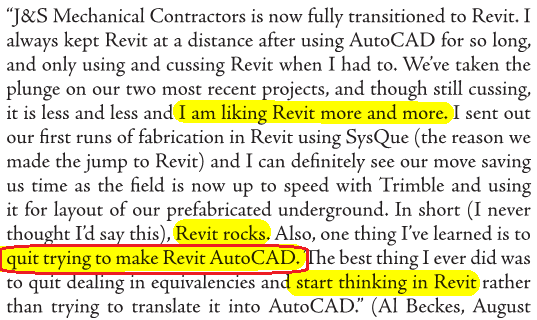
I’m going to end this weeks post with a picture from a What Revit Wants post, that is a screen shot of the current AUGI World (Oct. 2014)

mech-contractor

Truer words have never been spoke “quit trying to make Revit AutoCAD.”

Have a Great Weekend

The BIMsider

BIM, Fun, Weekly Roundup

Weekly Roundup – 2014.10

download

The week that was in the world of BIM and other Techie fun stuff, for the week of Sept. 21st – Sept. 27th

I will start this weeks roundup off with a little flattery as Autodesk’s Revit 2015 R2 incorporates something that’s a lot like Boost Your BIM’s API add-in from 2013.

Imitation is the sincerest form of flattery

Here is another post about this same feature from Revit OpEd as well as the Load into Project and Close feature.

Revit 2015 R2 – Upgrade File Warning (and an update to this post – Revit 2015 R2 – Double Click Open an Older File)

Revit 2015 R2 – Load into Project and Close

And still one more Blog post about this option that was triggered by Steve’s Post on Revit OpEd this time the post is from Do U Revit?

Upgrade Warning

Have issues with Revision clouds and revision in general in Revit? Then check out this post form BIM 42

Revisions and Revision Clouds

Some more info on Revisions, this time on tags from The Revit Geek

Revision Tags Rotate with Components 

Next is a link from What Revit Wants for a Dynamo Presentation by Zach Kron

Dynamo

If you do more on the construction side you might be interested in this post from ThinkBIM about Tekla and BuildingPoint ANZ

Tekla is BuildingOn with BuildingPoint ANZ

Steve over at Revit OpEd fills us in on some of the updates to Revit MEP with the Revit 2015 R2 release form last week.

Revit 2015 R2 – MEP

Now who doesn’t like drones right? Well if you are thinking about getting a Drone for your company you should check this post out first from Con App Guru

To Drone or not to Drone?

Level of Detail or is it Level of Development? Well Laura over at BIM Freak tackles that questions and gives us her thoughts in this Blog post

Level of Development vs Level of Detail

Are you a student, are you using Autodesk’s 360 rendering? if the answer is yes than you want to check out this post from The Revit Kid right now!

Autodesk 360 Rendering for Students

Scott over at The Revit Jedi has a great post about Running a BIM Lead Meeting. I the post I was introduced to a new Blog “BIMBicycle Blog”  with another good post about How to run a BIM Startup Meeting.

Running a BIM Lead Meeting

How to run a BIM Startup Meeting

We have not had enough Navisworks posts, and this one comes from What Revit Wants about your CIP folder from Navisworks taking you way to much space.

Navisworks CIP Folder

Jeff over at The Revit Kid has compiled a great list of posts and info about the Revit 2015 R2 release that came out last week. Check out the link for all you ever wanted to know about Revit 2015 R2

Revit 2015 R2 – 12 Must see links

If you use ReCap Pro you might wan tot check out this post from In The Fold about the new ReCap Pro 1.4

ReCap Pro 1.4

IMAGINiT is looking for some people that use that do point cloud modelers in Revit who use Pipe and Plant data. See more in the Building Solutions Blog

Looking for Revit Point Cloud Modelers with Pipe and Plant Data

On the Dynamo Blog the let the world know yesterday that Dynamo 0.7.2 is now ready for the world. Head on over to and download it, just remember to uninstall 0.7.1 first for best results.

Dynamo 0.7.2 and Revit Sunddial

Link for download 

This is some AWESOME advise for everyone that works on 2 or more monitors, from time to time your Pop up Dialog boxes go missing (showing on phantom screens) – Below keystrokes can save your life (or at least some time). For more on this check out this blog post from HOK BIM Solutions

A. ALT+Space Key
B. M (This is for Move)
C. Push one of your Arrow Keys (Doesn’t matter which direction)
D. Move your mouse and the active dialog box will be attached to your mouse cursor and you can now place it where it can be visible.

Dialog Box, Dialog Box, Where art thou Dialog Box

Here is a good post from Sean over at Paradigm Shift about the VDC cycle.

The VDC Cycle: Leveraging the “I” in BIM

The Revit Cat and his take on “Weird Stair Stuff” See versions 1, 2, and 3 below

Part 1

Part 2

Part 3

I would like to end this week’s Roundup with a really cool post from The Dark Arts of Revit click the image to read more (and see more pictures).

dsc_7237

Have a Great Weekend

The BIMsider

BIM, BIM Events, Fun

New Date!- BIM Networking Event: Innovation in Design & Construction – New Date Nov. 13th

UPDATE: This event has been rescheduled for Thursday November 13th

If you are going to be in Kelowna, BC on Thursday September 18, November 13, 2014 you should check out The BIM User Group of Kelowna’s

BIM Networking Event:

Innovation in Design & Construction  

Thursday, September 18, 2014

Thursday, November 13, 2014

7:00 p.m. –  9:30 p.m.

Horizon Room at the Coast Capri Hotel

1171 Harvey Avenue, Kelowna, BC

Please join us for an informative and lively evening with presentations by distinguished industry speakers. This event is designed to keep you informed of the recent developments in innovation of the design and construction industry. This is also a great opportunity to network with other professionals in the architectural, engineering and construction industries.

Who should attend? Engineers, Architects, Developers, Contractors, Consultants and Construction Industry Professionals

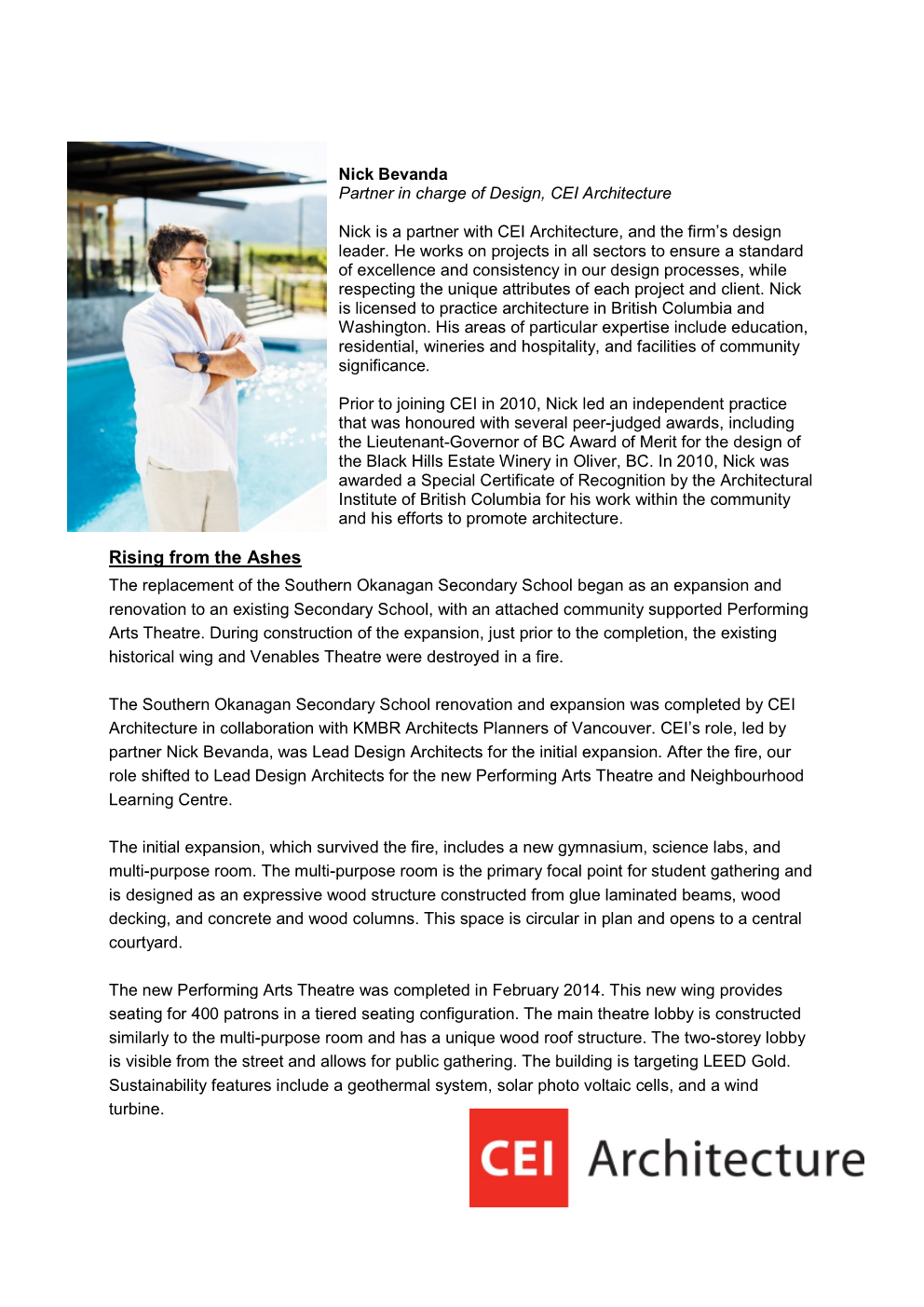
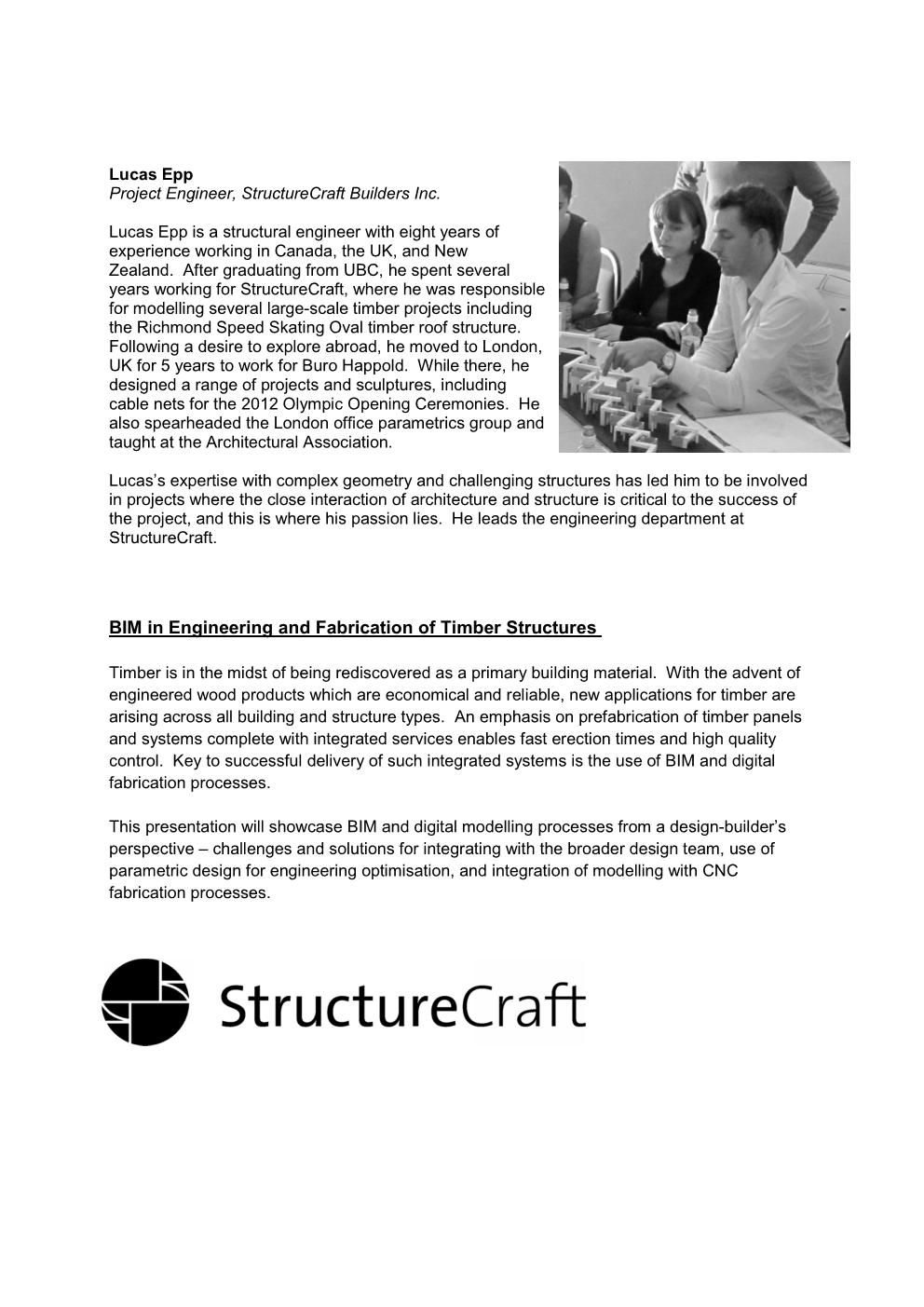
The list of Speakers is now available on The Revit Jedi’s Blog

BIM Networking EventBIM Networking Event Speakers only Page 001BIM Networking Event Speakers only Page 002BIM Networking Event Speakers only Page 003

Follow the link below it will take you to the proper location for registration

http://bim4scottc.blogspot.ca/2014/08/bim-networking-event-innovation-in.html

By the way, did I mention this is a FREE event! So be sure to thank all the great sponsors that help to put it on!

The BIMsider