Autodesk, Error Fix, Revit, Updates

Fix for Structural Analysis Tool Kit 2015 Error in Revit

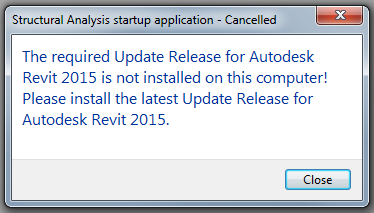
If like me you have been receiving an error to do with the Structural Analysis Tool Kit 2015 over the last week or so since installing Revit 2015 Update Release 6, a fix is here.

2-6-2015 8-04-57 AM

The image above is of the offending error, and basically it happens because the Structural Analysis Toolkit 2015 was install before the Revit 2015 Update release 6 was installed.

Autodesk has just released an updated version of the Structural Analysis Toolkit 2015 that can be downloaded free from the exchange site.

You need to uninstall your current version in order to install the recent one.

Final-Logo_BIMsider_Text

Twitter @theBIMsider
Facebook: theBIMsider

Autodesk, BIM, Fun, Revit, User Group, Virtual Reality

Okanagan BIM User Group Presents! – Feb. 25th 6 pm – 9 pm

If you are going to be in the Okanagan on Wednesday Feb. 25th then you really should check out the up coming Okanagan BIM User Groups meeting. You can find out more and learn how to register by contacting Scott Chatterton (The BIM Jedi) on his blog The BIM Jedi.

Okanagan BIM User Group Presents!

Continue reading “Okanagan BIM User Group Presents! – Feb. 25th 6 pm – 9 pm”

AU2014, Autodesk, BIM, BIM 360 Field, BIM 360 Glue, Fun, Navisworks, Revit

60 Minutes, 30 Apps, 4 Categories, 2 Much Fun – Class Handout, Presentation and Video

I’ve been a little slow getting this up here, but I guess better late then never.

If you didn’t get a chance to see my presentation at AU 2014 in December than here is the next best thing.

AC6640: 60 Minutes, 30 Apps, 4 Categories, 2 Much Fun – Video

AC6640: 60 Minutes, 30 Apps, 4 Categories, 2 Much Fun – Presentation PDF

AC6640: 60 Minutes, 30 Apps, 4 Categories, 2 Much Fun – Handout PDF

Enjoy

Final-Logo_BIMsider_Text

Twitter @theBIMsider
Facebook: theBIMsider

AU2014, BIM Events, Fun, Revit

AU only a week away – So here are some Survival Tips

I will start by saying that these are not my Survival Tips (this is my 1st AU, so I will be using them) but they come from a friend, Scott over at the Revit Jedi. So I don’t feel to bad just re-posting his tips.

You can head over to Scott’s blog to see this post AU Survival Tips, or just read it below.

Shaan Hurley recently posted Autodesk University 2014 Survive and Thrive Tips

Here are a few of my own after going to AU… many times….

  • Good luck requesting a Humidifier for your room… they’re typically all gone by the time you remember. Just keep a glass of water by your bed at night.
  • Go outside at least once during the day, just to remind you what fresh air smells like.
  • Take a hand sanitise…. germs are everywhere !!!!
  • Sleep, trust me you’ll need it.. and I don’t mean during your (my) sessions.
  • Shaan mentions “static electricity”, this is a great opportunity to ZAP unwary bystanders.
  • Resist the urge to baa like a sheep during the line up at meal time… and if you do hear a sheep it’s not me!
  • Wear comfortable shoes, your going to be on your feet all day and walking for miles!
  • Meet as many people as you possibly can. This makes the AU experience more enjoyable and you can make some great contacts which you can meet net time you go. If you see me stop me and say hi. I’ll give you a Revit Jedi decal.
  • It’s Vegas, go down the Strip and also go see Fremont Street.
  • It’s Vegas, enjoy yourself… but remember your there for a conference which you paid good money to attend, don’t waste a day being hung over!
  • Make the event memorable… however don’t be “that guy” that everyone remember for the wrong reasons.
  • Travel light. Your packing that c#@!p around with you all day… you really don’t need your laptop! 
  • Sit at a different table during meals and introduce yourself to everyone at the table. Shaan suggests to take lots of business cards…. trust me you’ll need LOTS!
Finally, enjoy yourself !. 
It’s a great opportunity to meet people. I learn the most after the sessions when I talk to people.
 
See you there!
 
Also don’t forget to sign up for JJ’s and my session.
BM7557 – Real Revit set up and its partnership with a BIM Execution Plan
Sc
Now back to actual BIMsider content.
I too have a class being offered at AU this year, and there are 41 seats left (130 filled).

AC6640 – 60 Minutes, 30 Apps, 4 Categories, 2 Much Fun

This class is designed to provide a little fun as we explore some of the apps and add-ins that are out there for Autodesk, Inc., software. While the general flow of this class will be fun, you’ll discover some helpful apps that can increase your productivity as well. The class will cover 30 different apps, which fit into 4 different categories during this 60-minute class. The 4 categories will be: mobile, production, add-ins, and fun.

My class is Tuesday December 2nd 3:00 pm – 4:00 pm, South Seas G, Level 3

You can register here

Hope to see you there.

The BIMsider

PC_Solo_AU2014

P.S. there will be free giveaways in my session . I will be giving away 5 copies of the IMAGINiT Utilities for Revit 2015 (or version of your choice 2012 – 2015) on a 12 month stand-alone license.

Just remember to you have to be there to win!

The BIMsider

Add-ins, BIM, Revit, Scan-To-BIM

Scan to BIM 2015.1 from IMAGINiT Released Today (Oct. 1st/14)

If you do much work with Point Cloud Data and Revit, then chances are that you have used or at least heard of Scan To BIM by IMAGINiT. This is a Revit add-in that allows you to easily transform Point Cloud data into actual Revit model elements. Well today Oct. 1st, 2014 IMAGINiT has released it’s latest version 2015.1

This release has many small improvements and one major feature that changes the way Scan To BIM is used for piping with the addition of an “easy button” like feature called Auto-Find Pipes. This feature when used will scan the entire point cloud or a selected area and look for pipes then create matching pipe runs using native Revit geometry.

Existing customers will get a notification starting mid-morning today with details on this update. If you are interested here is a video playlist of some of the items in 2015.1: YouTube

A few more items in this release to make note of:

  1. Help File is now web based, we can edit and update for all users at any time (ie add a more detailed example)
  2. More Tutorials, added via the app but pulling from our Youtube playlist for STB 2015.
  3. Tweak to Deviation, smaller numbers and Grid Deviation now supports placing numbers in the grid view (centre of each grid) as shown in the video above.
  4. The Adjust Pipe feature has now been moved from the Create Pull down Menu to the Modify Menu
  5. Added new settings for update check and close dialog after creation.

You can see the official press release here:

Scan To BIM 2015.1 Press Release

Happy Scanning, and then even happier modeling!

The BIMsider

Autodesk, BIM, Revit, Updates

Revit 2015 R2 is out and waiting for you to download – As long as you are on Subscription

Yesterday Autodesk released a mid-season update or R2 as it was called for Revit 2015. This new release has some cool new features and tweaks that improve on Revit 2015 R1. Of course you can only take advantage of these new features and tweaks if you are a Subscription customer of Autodesk – See note below from Autodesk

“Note: These enhancements are available only to Autodesk Maintenance and Desktop Subscription customers for Revit 2015 software releases.”

One of the biggest things that came out with the Revit R2 was a new (well new to Autodesk) extension called Site Designer Extension for Revit 2015, which is a repacked versions of EaglePoint’s Siteworks.

I was going to write something witty about this but ThinkBIM beat me to it, and his is to good to beat, so I will share his masterpiece:

A Site for Sore Eyes! Revit gets some Site Tools (Finally!)

You can also find out more about Revit 2015 R2 in the Autodesk In The Fold Blog post linked below:

Autodesk Revit 2015 Subscribers get a Slew of New Capabilities with “R2” update 

You can also take a look at the ‘What’s New with Revit 2015 R2″ help page (thanks to Revit OpEd for pointing with his post on the update)

What’s New in Revit 2015 R2

Now stop reading and start downloading!

The BIMsider

BIM, Fun, Revit, RTC, User Group

eBIMc Meeting – Tourist Fly Over of Chicago RTC 2014 – Sept. 4th

If you are going to be in the Edmonton area on Thursday September 4th between 6:00 pm and 8:00 pm you should attend the eBIMc meeting, it’s FREE!

eBIMc Tourist Fly Over of Chicago RTC 2014

On Thursday September 4th,  Mirra Maheden of SMP Engineering, Dan Doherty of Clark Builders and Brittany Mendiuk of Priority will be highlighting some of the sessions and events that were at the Revit Training Conference (RTC) in Chicago during June 19th to 21.

If you have ever wanted to attend and could not or are just interested at what is presented at this technology conference feel free come and attend.

You can register at the eBIMc website, or by following the link below

Register Now

Date: Thursday September 4th

Time: 6:00 pm – 8:00 pm

Location: Clark Builders: 4703 2nd Avenue, Edmonton


The BIMsider