BIM, Fun, Weekly Roundup

Weekly Roundup – 2014.04

download


The week that was in the world of BIM and other Techie fun stuff, for the week of Aug. 10th – Aug. 16th.

This is a good wishlist item that Revit OpEd come up with for a right click Purge unused option.

Purge Unused Wish

This is a post by What Revit Wants, about a tool in the Revit Extension pack that allows you to add shared parameters to families automatically. There is also a tip of the hat to Ideate Solutions for writing the Blog post that reminded What Revit Wants about this tool in the first place.

Adding Shared Parameters to Revit Families Automatically

Jeff over at The Revit Kid put up this post about Autodesk FormIt, which was cool because in his post he links to new to me Blog by Jarod Schultz who goes more in-depth with all that is FormIt.

Getting Started with Autodesk FormIt

Here is a good post with from IMAGINiT Building Solutions Blog with a work around for getting your view titles rotated 90 degrees to match your rotated view.

View Titles for Views Rotated on the Sheet

Another post from What Revit Wants, but this time its about Navisworks and BIM 360 Glue. We learn a not so simple work around (or two) to get a Navisworks Viewpoint into BIM 360 Glue.

Transfer Navisworks Viewpoint to BIM 360 Glue

Take a trip with the Revit Jedi to see how close we really are to using VR (Virtual Reality) on today’s construction jobs and sites.

VR and the Construction industry

I’ve been hearing about about Advanced Steel from Autodesk these days around the office, so when I found this video on the Navisworks Facebook page I thought it was worth a look.

Steelway Building Systems and Advanced Steel 

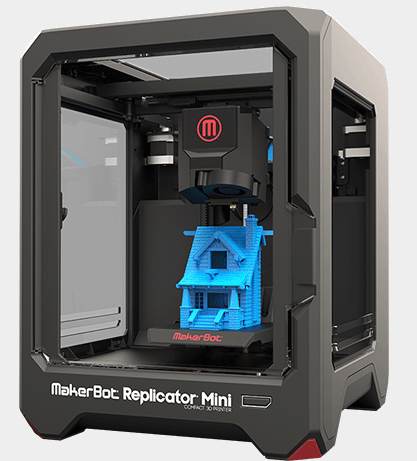
I will end this weeks round-up with a link to a cool contest from IMAGINiT where you can win a MakerBot Replicator Mini 3D Printer just by submitting your best rendering

RENDERiT Contest – Blog Post

RENDERiT Contest Page

8-15-2014 9-06-13 AM

8-15-2014 9-05-01 AM

Have a great weekend

The BIMsider

BIM, Fun, Weekly Roundup

Weekly Roundup – 2014.03

download


The week that was in the world of BIM and other Techie fun stuff, for the week of Aug. 3rd – Aug. 9th.

I’m excited the have found out this week that one of my favourite Blogs is back this week after a 2 year hiatus, join me in welcoming back Inside the Factory. You can read about what they are doing with the updated site on there first new post listed below

REVITalizing Inside the Factory

Steve over at Revit OpEd goes into a little more detail about what or why Inside the factory is back so they can showcase the new Revit Preview called Sundial

Revit Sundial and Inside the Factory

More on Sundial from What Revit Wants

Sundial and no NDA?

This is an interesting idea, but the production staff might think it is just another way for “Big Brother” to spy on them. However from a BIM management perspective i can see it being a useful tool to all to your BIM tool box. This info comes from the What Revit Wants blog, who is sharing it from a new to me blog called BIM 42

Tracking Revit Model Performance

The benefits of using the URL parameter in your Revit schedules or Families from What Revit Wants

The Power of a Simple URL parameter

Steve from Revit OpEd tells us about three way to work (or work around) with those pesky Revit tags.

Tagging Elements

If you follow Boost your BIM you might have seen this post already on an API approach to removing unwanted viewport types that purge all just won’t remove.

Deleting unused Viewport Types

There is also an update to this post above, if you are working with Revit 2014 and not Revit 2015 as in the original post

Deleting (almost) all Viewport Types in 2014

This is a good post from Cn3D Construction about how to colour your Navisworks model they way you need it for Construction collaboration, aka with simple colours not textures or materials.

Navisworks Rendering vs. Shading 

Here is a post from the Autodesk 360 Blog that talks about the possible pit falls of moving to the Cloud and how to avoid them.

Mistakes to Avoid when Moving to the Cloud

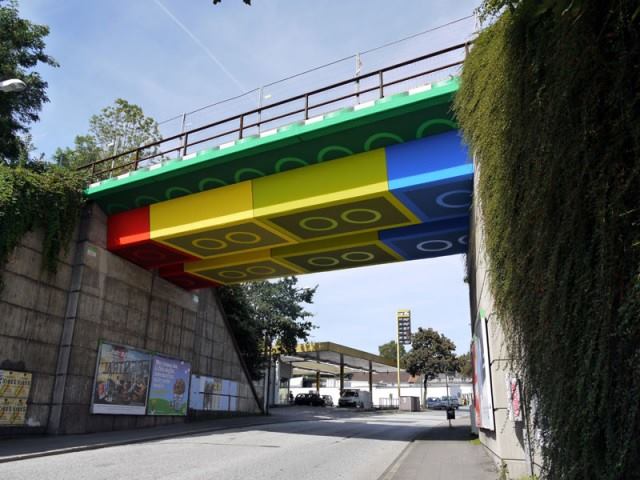
I saw this picture below on the DraftSight Facebook page and though it was good way to end this week’s Roundup

10526177_10152223418425824_6183646962943817736_n

I think all bridges should be painted to look like Lego!


Have a great weekend

The BIMsider

BIM Events

Improving the Process of Delivering Projects – Session 2 – Tuesday Aug. 12th

If you are going to be in the Vancouver area next Tuesday, Aug. 12th you should think about checking this event out.

It will be held in Kasian’s office located at 1500 West Georgia Street, Suite 1685, and starts at 6:30 pm

There will be 2 speakers:

BIM and IPD: What is Integrated Project Delivery

Michael Horta

Architectural BIM Consultants

and

Virtual Reality and the Construction Industry

Shane Scranton

CEO, IrisVR

I worked with Micheal Horta for a few years back when I worked at Kasian and he really knows his stuff!

Here is a description of what the series is all about direct from the Scott’s blog:

“The “Improving the Process of Delivering Projects” series is designed to stimulate discussion on improving the project delivery process. Sessions are designed for members of the AEC industry who would like to see a more integrated approach to project delivery. These sessions will provide you with tools and skills to enhance your project delivery and collaborate with consultants, your client and the contractor.”

You can find all in the info you need at the post below from Scott’s blog Revit Jedi, as he the one putting this event on.

Improving the Process of Delivering Projects – Session 2

The BIMsider

Autodesk, BIM, Navisworks, Service Packs, Updates

Navisworks 2015 Service Pack 3

product_AutodeskNavisworks2015

Autodesk has released Service Pack 3 for all three flavors of Navisworks 2015. This service pack fixes an irritating problem that was created by Service Pack 2 of only being able to appended models/files one at a time.

The Autodesk Application Manager has these updates on it now, or you can download it from here

I have also attached the read-me file if anyone is so inclined.

Autodesk_Navisworks_2015_Service_Pack_3_Feature_readme


The BIMsider

Add-ins, Autodesk, BIM

Have You Met Screencast Yet?

This is a need little video that will show you what Screencast can do in less than 2 minutes (1:58 to be exact). Now if you are like me and spend a lot of time teaching and supporting Revit then you will find this a very helpful little tool.

You can download the free software at screencast.autodesk.com and “show them all how you did that!”

The BIMsider


BIM, Fun, Weekly Roundup

Weekly Roundup – 2014.02

download

The week that was in the world of BIM and other Techie fun stuff, for the weeks of July 20th – 26th, 2014 & July 27th – Aug. 2nd.

So this is actually 2 weekly Roundups in one as i was on Holidays last week and didn’t get a post up last week. I know only 2nd week of posting and already I’m taking a vacation.

This looks like it could be the start of a good series of Blog post from the team over at Summit Technologies & Summit BIM. Here is what its about: “Dynamo for the 99% will be a series of posts highlighting the use of Dynamo for practical data manipulation or time-saving tasks that could apply to most Revit users.”

Dynamo for the 99%

This is a cool post about making a “Paper” model in Revit, it comes form out friend over at Revit Jedi, who turned on to the idea by Daniel Stine.

Creating a Paper Model

A great post from (bim)x about how to tell if a project should be a BIM project or not.

Should this Project be BIM

Another post about the updates to BIM 360 Glue, this time from the team over at Beyond Design

Collaborative clash resolution with BIM 360 Glue

Productivity isn’t about long hours and number of task completed, but making sure you get those few right task completed.

Why Productivity isn’t about long hours

Darth Vader Car……only from Hot Wheels!

Darth Vader Car

Have a greatweekend!

The BIMsider

BIM, BIM Events

BIM Super Session – Save the Date

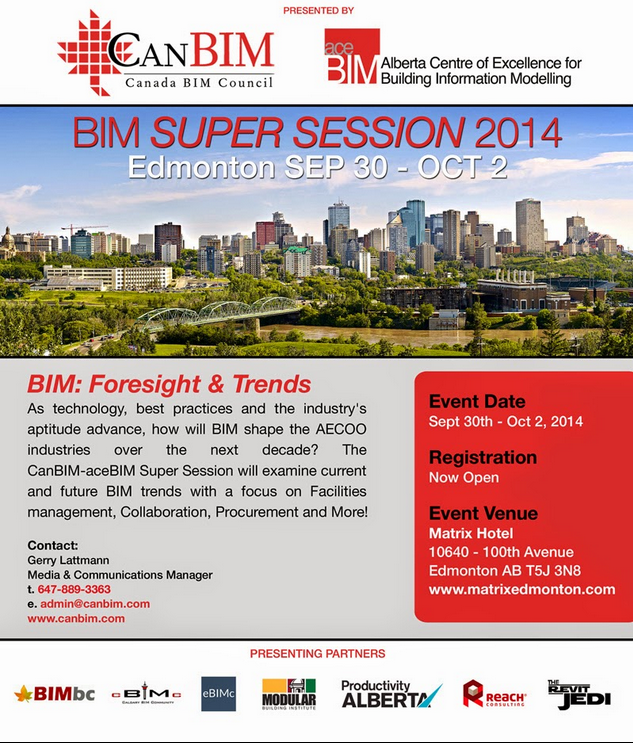
If you are in or around the Edmonton, Alberta, Canada area, or planed to be around Sept. 30th – Oct. 2nd, 2014 you should check out the BIM Super Session 2014. This is a join event put on by CanBIM and aceBIM that will focus on the current and future trends of BIM, with topics areas like Facilities Management, Collaboration, Procurement and more.

7-31-2014 7-45-25 AM


You can get more info about the event, and all the registration details at the CanBIM website.

The Revit Jedi also has a good blog post about it on his site (he is a sponsor and a speaker), see blog post here

Hope to see you there!

The BIMsider

BIM, BIM 360 Glue

BIM 360 Glue Update – July 11th 2014 Edition

This is one of the things I love about BIM 360 Glue, it is constantly getting updates, improvements, and big fixes during the course of the year. It’s not like other Autodesk software were you need to wait until the next version (will be 2016 now) comes out, and hope that the fix or new functionality you are looking for is there.

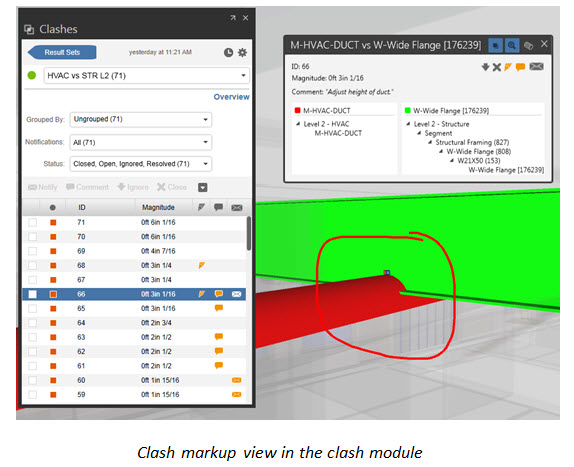
With this latest update for BIM 360 Glue the focus is on some improvements (some would say much need improvements) to the clash detection side of Glue.

The 3 main additions or improvements are:

  1. Introduction of the Clash Status. This now means you can give clashes one of four new status levels (Open, Ignored, Closed, and Resolved).

7-29-2014 12-08-44 PM

2. Improved clash filtering for easier focus on specific clash issue you care about.

7-29-2014 12-11-19 PM

3. Clash markups!

7-29-2014 12-12-59 PM

7-29-2014 12-14-05 PM

The best part is that these feature are available for new AND existing projects in BIM 360 Glue!

7-29-2014 12-07-19 PM

See the complete rundown on whats new this update (and past updates) here from the “What’s new in BIM 360 Glue” page.


The BIMsider

BIM, Fun, Weekly Roundup

Weekly Roundup – 2014.01

download

The week that was in the world of BIM and other Techie fun stuff, for the week of July 13th – 19th, 2014

Here is a good post on BIM overload by Scott over at Revit Jedi (technically this is from last week, but I wasn’t doing this last week)

BIM Fatigue

Post #2 in this weeks roundup from Revit Jedi about having a purpose for your modeling……and something about a dolphin?

Model With a Purpose

IMAGINiT’s Clarity and what its doing for the people of DIALOG

Collaboration Made Easy

The Revit Kid tells us all how to create our own Revit Material Libraries

Create Your Own Material Libraries

I really enjoy what Epic BIM put out for posts, so even though this is a few weeks old I wanted to add it to this roundup. This post is about the “Babble Fish”, whats the Babble fish well read below to find out.

Babble Fish

A little Dynamo love from Nathan Miller as he brings his lunch box into Revit with the latest update for Dynamo version 0.7 (update from 0.6)

Lunch Box

Life Hacks, because we all need them. Some of these are so simple it’s brilliant and some of them just blew my mind……like 2, 3, and 45

46 Life Hacks


The BIMsider


BIM, Fun

The Sticky Note Says it All!

first-post1


I have been thinking about doing a blog for a while now and figured its just time to get it done. I actually started setting this blog up back in January, guess it was a New Years resolution.

My idea for this blog is that it will be MY take on all things BIM (I know super original) as well as other cool technology stuff that I come across. I spend a lot of my time at the Office working on the software side, Revit, Navisworks, BIM 360 Glue & Field to name a few.

I would like to try and update this blog weekly, but seeing as it took half a year to do the first post not sure how realistic that is. I also like the idea of doing a weekly roundup of all the best BIM related blogs and news from out on the World Wide Web.

I guess we will see how that all works out, but I’m going to hit the post button now to make this all real.


The BIMsider

P.S. you can follow on Twitter @theBIMsider or like on Facebook at www.facebook.com/theBIMsider