BIM, Fun, Weekly Roundup

Weekly Roundup – 2014.13

download

The week that was in the world of BIM and other Techie fun stuff, for the week of Oct. 12th – Oct. 18th

If you use site photos and are looking for a good way to get them into Revit check out this post from What Revit Wants

Send Site Photos and more to Revit with Mobile app

Over at Revit Beyond BIM they posted a good blog on hidden line with for Concrete beams in Revit

Clean join and hidden lines for concrete beams

Has your company been thinking about making the move to the cloud for plan distribution, if you you need to read this post form the Construction App Guru first.

New Plan App Options

Another interesting post from What Revit Wants with help from Revit Beginners about the possibility of Revit Family Arrays with a count of only 1.

Array in a Revit family

Revit Beginners also has another good post (technically it was from last week, but I missed it) with some schedule tips.

Schedule Basics & Tips

The BIM 360 brand is expanding with the launch of BIM 360 Layout app for iOS, see 2 stories about this listed below from In the Fold and Beyond Design

New BIM 360 Layout iPad App

Construction Layout with BIM 360 has Arrived

This may already be out there, but it’s a good reminder post from Revit OpEd about the new default setting for importing files into Revit 2015 R2.

Revit 2015 R2 – Default Setting for Import Positioning

If you run a BIM 360 Glue project you and you Admin team can now have access to Navisworks Manage for free (with your paid subscription for BIM 360, and only for project or host admins on the project). Find out more about it in this What Revit Wants post (be sure to ready the fine print or in this case the bold underlined print)

Free Navisworks Manage with your Glue Subscription

For those of you still on the fence about going to AU (you should go!), then you should take a read of the reasons why over at the A360 Blog.

Autodesk University 2014 – Why you should be there

If you have been wanting to change your background colour in Revit, now with Revit 2015 R2 you can, check out more form Revit OpEd on this below.

Revit 2015 R2 – Background Color

Check out the Revit Jedi’s blog post about the upcoming CanBIM Certification from CanBIM

CanBIM Certification

I missed this post below from the Revit Geek a few weeks back, but Jeff over a the Revit Kid blogged about it this week, and I’m glad he did as it’s a great tip.

Spot Slope Revit (Revit Geek)

Revit Tip – Showing a Triangle on a spot slope (Revit Kid)

Are you looking for how to find the ROI of BIM? Well here is a good start with a blog post from bimblog

 Are you seeing a Return from your BIM Investment (Part 1)

Here is another good “list” post form What Revit Wants, which he found on the Revit Modeling India site.

Some Mobile app for Construction

I will end this weeks post with a little Star Wars humour. Get it, he will not…

10615329_689970907754917_9190872900597888901_n

Have a Great Weekend

The BIMsider
BIM, Fun, Weekly Roundup

Weekly Roundup – 2014.12

download

The week that was in the world of BIM and other Techie fun stuff, for the week of Oct. 5th – Oct. 11th

This week we start off with a post about another acquisition on the BIM (or BIMish) world. Nemetschek (makers of ArchiCAD and Vectorworks) has bought bluebeam for $100 million!

Bluebeam joins Nemetschek

Jeff from the Revit Kid introduced me to a new blog this week Curtain Wall BIM in one of his posts, check it out (or better yet check them both out).

“New” Blog – Curtainwall BIM

Over at the A360 Blog they teach us about how yo can now search and view within your design on A360’s Larger Model viewer.

View and Search

This week Revit Beyond BIM give us a Turorial on Robot Structural Analysis, RC Plate Design anyone?

Robot Structural Analysis Tutorials: RC Plate Design

Seems never a week goes by that we don’t get at least one great post from What Revit Wants, (usually many great posts). This we we learn about a suite of free addin for Revit from CTC (CAD Technology Center)

Free Explorer Extension that lists Revit version and workshare information for RVT and RFA files

Luke (What Revit Wants) also helps us out with Hidden Lines this week

Don’t forget about the Discipline of the View in Revit, especially when it comes to Hidden Lines

In the Fold lets us know all about the brand new SkecthBook mobile app that just came out this week

Introducing the all-new SketchBook for Mobile

For those in the construction industry this next blog is a must follow, The Construction App Guru. This week he shows us where to find all that saftey information you can never find when you are looking for it on the web.

Safety Resource Blog

Has your company started using Digital Signing yet? We have in my office for the sales transactions and for some customers it’s great………while for others not so much, fear of the unknown mostly. AECbytes Blog takes a deeper look into digital signing and the AEC industry.

The Ins and Outs of Digital Signing in AEC

Over at Autodesk Revit Structure they put up a quick post with a link to a PDF that shows all the 2D details items in out of the box Revit, very handy!

 Revit 2015 2D Detail Components

Have you played with Formit yet? If not the people over at BIM 42 took it for a test drive and can fill you in with their latest post.

Autodesk Formit and Revit

If you dare try you hand in the 6th Annual Parametric Pumpkin Carving contest, learn more over at buildz 

6th Annual Parametric Pumpkin Carving

This week Fear and Loathing In a CAD vs BIM World put up a great post about Modeling for Construction and why Architects don’t want to do it.

Architects Modeling for Construction

Here is a quickly but a goodie from the Revit Geek

Scope Box Quirk

I will end this weeks post with what some might call some “Stair Porn”, check it out over at boredpanda

creative-staircase-designs-4creative-stair-design-11

22 Beautiful Stairs

Have a Great Weekend

The BIMsider

BIM, Fun, Weekly Roundup

Weekly Roundup – 2014.11

download

The week that was in the world of BIM and other Techie fun stuff, for the week of Sept. 28th – Oct. 4th

This week we start off with a post from a new to me Blog called Phil-osophy in BIM, that is about “Divide” when you are suing adaptive components.

Divide Path Direction

You may have heard about Revit Skyscraper, while it seems to be moving forward as Autodesk has released a beta “Open House” test for all to try. Learn more about here in this post from What Revit Wants

Revit Skyscraper is gearing up!

Are you always taking photos on the job site, and then forgetting to take them off the camera or your cell phone so that can get added to the job file? If this sounds like you then you need to check out this post from Con App Guru about FotoIN

FotoIN Mobile App Update

Here is another post from Con App Guru, but this time its about a backpack type of case for your Tablet to make walking the job site easy and hands free!

What’s in Your Bag?

Once again this week What Revit Wants is busy sharing the latest and greatest news about all that is BIM and Revit.

Free BIM Viewing

The Best just got Better IFC for Revit 2015 V 15.2.0 released

IFC Templates and Parameter Upgrade Files

This should convince your MEP guy to go to Revit

This is a blog post from In The Fold, and the blog is really about how Fusion 360 helped this company (Hydrobee) get their product up and running. That part is all well and good, but I just really thought the product they came up with was super cool (the PowerBee)

Hydrobee Generate Personal Power from Nature with Autodesk Fusion 360

PowerBee-Collage (1)


This post from the IMAGINiT Support Blog drops some knowledge about Boundary Conditions for Revit Structure users.

Revit Structure Setting for Boundary Conditions

The A360 Blog has a post this week about the new features of the newly released A360 mobile app

A360 Mobile – New Face, New Tools, New Opportunities!

Well in case you missed it, Microsoft announced it’s next O/S this week, and they are skipping Windows 9 and going straight to Windows 10! Check out this post from Laptop about best features of Windows 10 – I personally like the idea of multiple desktops!

Windows 10: Top 6 New Features

1412099323_675339.92307692308


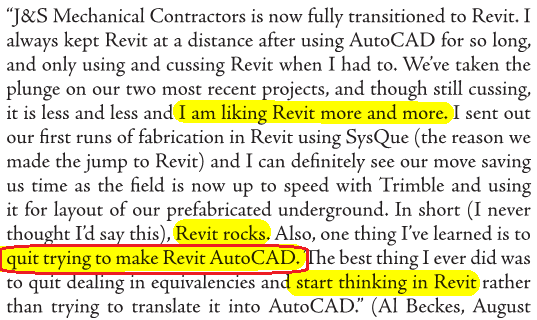
I’m going to end this weeks post with a picture from a What Revit Wants post, that is a screen shot of the current AUGI World (Oct. 2014)

mech-contractor

Truer words have never been spoke “quit trying to make Revit AutoCAD.”

Have a Great Weekend

The BIMsider

Add-ins, BIM, Revit, Scan-To-BIM

Scan to BIM 2015.1 from IMAGINiT Released Today (Oct. 1st/14)

If you do much work with Point Cloud Data and Revit, then chances are that you have used or at least heard of Scan To BIM by IMAGINiT. This is a Revit add-in that allows you to easily transform Point Cloud data into actual Revit model elements. Well today Oct. 1st, 2014 IMAGINiT has released it’s latest version 2015.1

This release has many small improvements and one major feature that changes the way Scan To BIM is used for piping with the addition of an “easy button” like feature called Auto-Find Pipes. This feature when used will scan the entire point cloud or a selected area and look for pipes then create matching pipe runs using native Revit geometry.

Existing customers will get a notification starting mid-morning today with details on this update. If you are interested here is a video playlist of some of the items in 2015.1: YouTube

A few more items in this release to make note of:

  1. Help File is now web based, we can edit and update for all users at any time (ie add a more detailed example)
  2. More Tutorials, added via the app but pulling from our Youtube playlist for STB 2015.
  3. Tweak to Deviation, smaller numbers and Grid Deviation now supports placing numbers in the grid view (centre of each grid) as shown in the video above.
  4. The Adjust Pipe feature has now been moved from the Create Pull down Menu to the Modify Menu
  5. Added new settings for update check and close dialog after creation.

You can see the official press release here:

Scan To BIM 2015.1 Press Release

Happy Scanning, and then even happier modeling!

The BIMsider

BIM, Fun, Weekly Roundup

Weekly Roundup – 2014.10

download

The week that was in the world of BIM and other Techie fun stuff, for the week of Sept. 21st – Sept. 27th

I will start this weeks roundup off with a little flattery as Autodesk’s Revit 2015 R2 incorporates something that’s a lot like Boost Your BIM’s API add-in from 2013.

Imitation is the sincerest form of flattery

Here is another post about this same feature from Revit OpEd as well as the Load into Project and Close feature.

Revit 2015 R2 – Upgrade File Warning (and an update to this post – Revit 2015 R2 – Double Click Open an Older File)

Revit 2015 R2 – Load into Project and Close

And still one more Blog post about this option that was triggered by Steve’s Post on Revit OpEd this time the post is from Do U Revit?

Upgrade Warning

Have issues with Revision clouds and revision in general in Revit? Then check out this post form BIM 42

Revisions and Revision Clouds

Some more info on Revisions, this time on tags from The Revit Geek

Revision Tags Rotate with Components 

Next is a link from What Revit Wants for a Dynamo Presentation by Zach Kron

Dynamo

If you do more on the construction side you might be interested in this post from ThinkBIM about Tekla and BuildingPoint ANZ

Tekla is BuildingOn with BuildingPoint ANZ

Steve over at Revit OpEd fills us in on some of the updates to Revit MEP with the Revit 2015 R2 release form last week.

Revit 2015 R2 – MEP

Now who doesn’t like drones right? Well if you are thinking about getting a Drone for your company you should check this post out first from Con App Guru

To Drone or not to Drone?

Level of Detail or is it Level of Development? Well Laura over at BIM Freak tackles that questions and gives us her thoughts in this Blog post

Level of Development vs Level of Detail

Are you a student, are you using Autodesk’s 360 rendering? if the answer is yes than you want to check out this post from The Revit Kid right now!

Autodesk 360 Rendering for Students

Scott over at The Revit Jedi has a great post about Running a BIM Lead Meeting. I the post I was introduced to a new Blog “BIMBicycle Blog”  with another good post about How to run a BIM Startup Meeting.

Running a BIM Lead Meeting

How to run a BIM Startup Meeting

We have not had enough Navisworks posts, and this one comes from What Revit Wants about your CIP folder from Navisworks taking you way to much space.

Navisworks CIP Folder

Jeff over at The Revit Kid has compiled a great list of posts and info about the Revit 2015 R2 release that came out last week. Check out the link for all you ever wanted to know about Revit 2015 R2

Revit 2015 R2 – 12 Must see links

If you use ReCap Pro you might wan tot check out this post from In The Fold about the new ReCap Pro 1.4

ReCap Pro 1.4

IMAGINiT is looking for some people that use that do point cloud modelers in Revit who use Pipe and Plant data. See more in the Building Solutions Blog

Looking for Revit Point Cloud Modelers with Pipe and Plant Data

On the Dynamo Blog the let the world know yesterday that Dynamo 0.7.2 is now ready for the world. Head on over to and download it, just remember to uninstall 0.7.1 first for best results.

Dynamo 0.7.2 and Revit Sunddial

Link for download 

This is some AWESOME advise for everyone that works on 2 or more monitors, from time to time your Pop up Dialog boxes go missing (showing on phantom screens) – Below keystrokes can save your life (or at least some time). For more on this check out this blog post from HOK BIM Solutions

A. ALT+Space Key
B. M (This is for Move)
C. Push one of your Arrow Keys (Doesn’t matter which direction)
D. Move your mouse and the active dialog box will be attached to your mouse cursor and you can now place it where it can be visible.

Dialog Box, Dialog Box, Where art thou Dialog Box

Here is a good post from Sean over at Paradigm Shift about the VDC cycle.

The VDC Cycle: Leveraging the “I” in BIM

The Revit Cat and his take on “Weird Stair Stuff” See versions 1, 2, and 3 below

Part 1

Part 2

Part 3

I would like to end this week’s Roundup with a really cool post from The Dark Arts of Revit click the image to read more (and see more pictures).

dsc_7237

Have a Great Weekend

The BIMsider

BIM, BIM Events, Fun

New Date!- BIM Networking Event: Innovation in Design & Construction – New Date Nov. 13th

UPDATE: This event has been rescheduled for Thursday November 13th

If you are going to be in Kelowna, BC on Thursday September 18, November 13, 2014 you should check out The BIM User Group of Kelowna’s

BIM Networking Event:

Innovation in Design & Construction  

Thursday, September 18, 2014

Thursday, November 13, 2014

7:00 p.m. –  9:30 p.m.

Horizon Room at the Coast Capri Hotel

1171 Harvey Avenue, Kelowna, BC

Please join us for an informative and lively evening with presentations by distinguished industry speakers. This event is designed to keep you informed of the recent developments in innovation of the design and construction industry. This is also a great opportunity to network with other professionals in the architectural, engineering and construction industries.

Who should attend? Engineers, Architects, Developers, Contractors, Consultants and Construction Industry Professionals

The list of Speakers is now available on The Revit Jedi’s Blog

BIM Networking EventBIM Networking Event Speakers only Page 001BIM Networking Event Speakers only Page 002BIM Networking Event Speakers only Page 003

Follow the link below it will take you to the proper location for registration

http://bim4scottc.blogspot.ca/2014/08/bim-networking-event-innovation-in.html

By the way, did I mention this is a FREE event! So be sure to thank all the great sponsors that help to put it on!

The BIMsider

BIM, Fun, Weekly Roundup

Weekly Roundup – 2014.09

download

The week that was in the world of BIM and other Techie fun stuff, for the week of Sept. 14th – Sept. 20th – and what a busy week it was, this is a jam packed Roundup!

I start this weeks roundup off with some “self praise” about the new (or re-branded) A360 app or cloud solution from the Autodesk 360 Blog (now called A360 Blog)

The New Girl

There is also a post about how to “get started” with the new A360 that would be helpful if you are new to the A360 world

Getting started with A360

For our Structural Revit users out there, this is a good post from Revit Beyond BIM about Revit and RSA with a Residential focus.

Practical BIM with Revit and RSA for Residential building with concrete beams

This week What Revit Wants has been busy turning out great post after great post, so below is you list of required “What Revit Wants” reading for this week.

3 hours of Dynamo lessons

Properties + addin for Navisworks (this is a great free addin or addon for Navisworks)

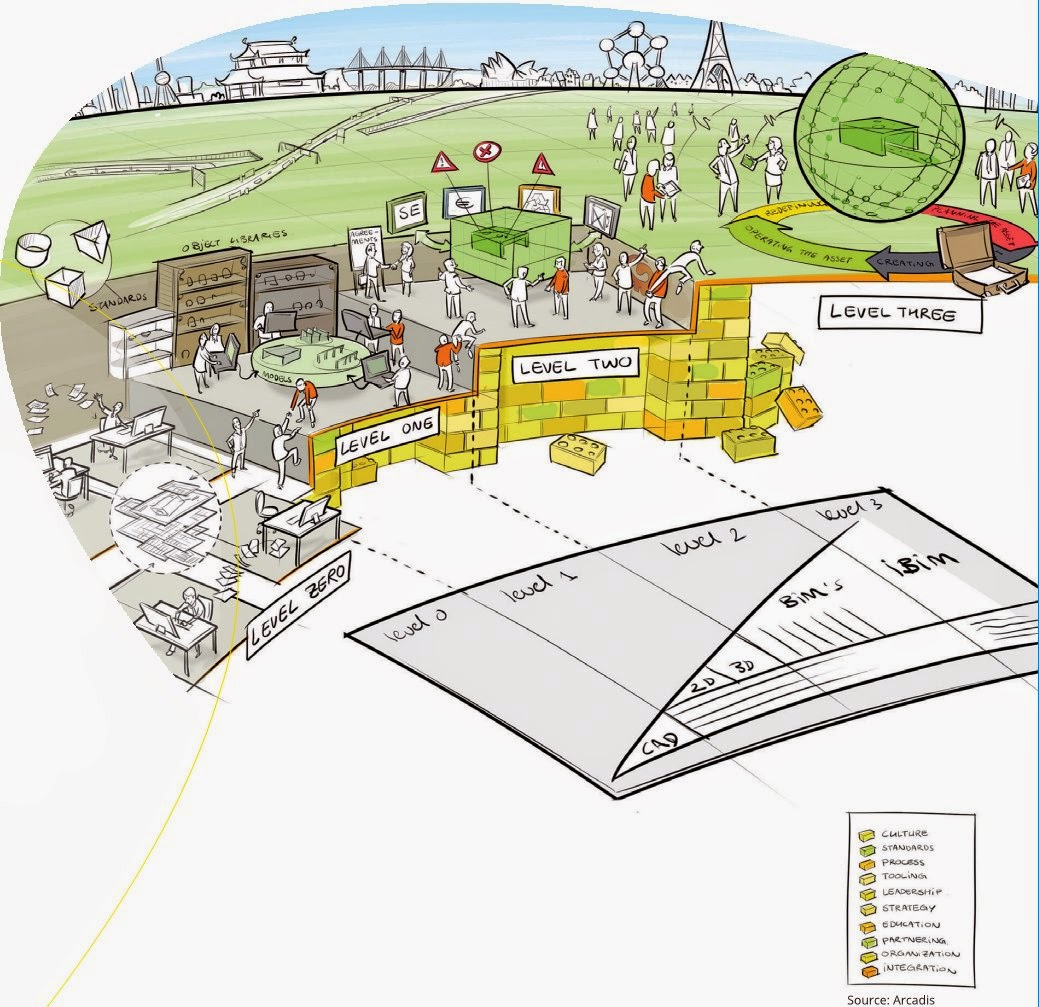
BIM level explained 

bimlevels

Use BIMsight (Tekla) to determine where IFC came from

Revit Survey Points and Coordinates Explained

Most powerful Subscription release yet – Revit 2015 R2

Over at BIM & Integrated Design they posted a good review of a new book on how to start an IPD project, if you are moving in that direction might be worth checking out.

IPD: The Missing Manual

Have you ever wondered how construction companies pick the apps they use? Well Rob over at Construction App Guru has, so much so he had an article published about it…..check it out with the link below.

An App for Construction

Scott over at The Revit Jedi shares his views on the new Android version of 123 Catch and how it’s not an apple fan boy anymore!

123D Catch this iPhone!

The Revit Kid watch us all to know about the new RTC Asia that will happen for the first time in 2015.

RTC ASIA

Leed has become a big thing in the AEC world these days (rightfully so) and now its just a little bit easier to track your Leed Credits with Revit thanks to Autodesk Labs. Find out more over at the Autodesk Labs blog

Updated Revit Credit Manager for Leed

Here is another article, this time form Constructech magazine about Trimble buying Gehry Technologies last week.

Another Acquisition for BIM

Here is another post from The Revit Jedi about Dynamo and his thoughts after learning a little more about it, and how it could be a practical tool for his office.

Do You Know Dynamo?

Have you ever wondered how to deal with a “Butt Glazing” with your curtain wall in Revit? Well wonder no more and check out the post below from The Revit Kid

Revit Tutorial – Create “Butt Glazing” in Curtain Wall / Storefront

Here is another little post on Revit 2015 R2, and the little feature that Revit OpEd help bring to be.

Revit 2015 R2 – Data Row

AECbytes has released their 2014 Fall AEC Tech update article, it worth a read to see if you missed any of the updates from over the past summer.

AEC Technology Updates, Fall 2014

Some non-BIM news, iOS 8 rolled out this week. While I’m furthest thing from an Apple “Fan Boy” I do own an iPad Air for work (because I can only demo BIM 360 Glue & BIM 360 Field on an iPad currently) so I thought this was a good summary of what’s new in iOS 8

iOS 8: 10 key features

I will end this weeks Roundup with a picture………but be warned it’s a real Spoiler!

10351672_679796868772321_6031524412411765250_n

Have a Great Weekend

The BIMsider

Autodesk, BIM, Revit, Updates

Revit 2015 R2 is out and waiting for you to download – As long as you are on Subscription

Yesterday Autodesk released a mid-season update or R2 as it was called for Revit 2015. This new release has some cool new features and tweaks that improve on Revit 2015 R1. Of course you can only take advantage of these new features and tweaks if you are a Subscription customer of Autodesk – See note below from Autodesk

“Note: These enhancements are available only to Autodesk Maintenance and Desktop Subscription customers for Revit 2015 software releases.”

One of the biggest things that came out with the Revit R2 was a new (well new to Autodesk) extension called Site Designer Extension for Revit 2015, which is a repacked versions of EaglePoint’s Siteworks.

I was going to write something witty about this but ThinkBIM beat me to it, and his is to good to beat, so I will share his masterpiece:

A Site for Sore Eyes! Revit gets some Site Tools (Finally!)

You can also find out more about Revit 2015 R2 in the Autodesk In The Fold Blog post linked below:

Autodesk Revit 2015 Subscribers get a Slew of New Capabilities with “R2” update 

You can also take a look at the ‘What’s New with Revit 2015 R2″ help page (thanks to Revit OpEd for pointing with his post on the update)

What’s New in Revit 2015 R2

Now stop reading and start downloading!

The BIMsider

BIM, BIM Events, Fun, User Group

Tonight’s (Sept. 17th) cBIMc Meeting Rescheduled – Now Oct. 22nd

The cBIMc meeting that was scheduled for tonight Wednesday Sept. 17th has been Rescheduled for Wednesday Oct. 22nd

More information and registration details can be found on the cBIMc website.

9-17-2014 8-16-27 AM


The BIMsider

BIM, Fun, Weekly Roundup

Weekly Roundup – 2014.08

download

The week that was in the world of BIM and other Techie fun stuff, for the week of Sept. 7th – Sept. 13th

I will start this week’s Roundup with the big news from Trimble this week, as they buy Gehry Technologies. Over the last couple of years Trimble has been slowly creeping into Autodesk’s world. First with the purchase of Teckla, then buying Sketchup from Google, and now Gehry Technologies. What’s that Autodesk did you hear something……is that footsteps? Below are a couple of links to stories from different blogs about this.

From BIM Colab

 Trimble buys Gehry Technologies…. Look out Autodesk.

From ThinkBIM

Frankly, this is huge BIMnews! Perhaps. Trimble signs deal with Frank Gehry.

Here is a post from BIM Troublemaker about how to use Dynamo to give you live excel links in Revit (What Revit Wants lead me to this post)

Practical Dynamo – Excel Linking

Here is a neat little post from What Revit Wants about a work around for using Annotation Symbols in a 3D (locked) View.

Using Annotation Symbols in locked 3D Views in Revit 

Are you wondering what this “new” Autodesk A360 is? How is it different from Autodesk 360? Does it cost money? These questions and more are answered (or attempted to be answered) in a blog post over at AECbytes Blog

Autodesk’s Rebranded A360 Cloud Solution

You ever want to make the “Switchback” feature in Navisworks and Revit work better, then do I have the blog post for you! Check out these nuggets of wisdom from the BIM Goddess herself (and friends) over at her blog Cn3D Construction’s Blog

Revit & Navisworks Switchback

Have a Great Weekend

The BIMsider