AU2014, Autodesk, BIM, Fun

Speaking at AU 2014 – 8 Weeks From Today

AU14-Speaker-225x205

Hello All,

Autodesk University 2014 (AU 2014) December 2nd – 4th at Mandalay Bay in Las Vegas, NV is quickly approaching, only 8 weeks from today I will be speaking. If you haven’t signed up yet there is still time to get in on my class, and the early bird discount of $500 on AU 2014 from Autodesk.

You can sign up for my class by going to the AU site and search for class AC6640 – There are currently 28 spots left (86 seats filled)

AC6640 – 60 Minutes, 30 Apps, 4 Categories, 2 Much Fun

This class is designed to provide a little fun as we explore some of the apps and add-ins that are out there for Autodesk, Inc., software. While the general flow of this class will be fun, you’ll discover some helpful apps that can increase your productivity as well. The class will cover 30 different apps, which fit into 4 different categories during this 60-minute class. The 4 categories will be: mobile, production, add-ins, and fun.

My class is Tuesday December 2nd 3:00 pm – 4:00 pm

For the $500 discount you need to sign up for AU 2014 before the end of Oct. 19th.

You can register here

Hope to see you there.

The BIMsider

PC_Solo_AU2014

P.S. there will be free giveaways in my session – stay tuned for more info!


BIM, Fun, Weekly Roundup

Weekly Roundup – 2014.10

download

The week that was in the world of BIM and other Techie fun stuff, for the week of Sept. 21st – Sept. 27th

I will start this weeks roundup off with a little flattery as Autodesk’s Revit 2015 R2 incorporates something that’s a lot like Boost Your BIM’s API add-in from 2013.

Imitation is the sincerest form of flattery

Here is another post about this same feature from Revit OpEd as well as the Load into Project and Close feature.

Revit 2015 R2 – Upgrade File Warning (and an update to this post – Revit 2015 R2 – Double Click Open an Older File)

Revit 2015 R2 – Load into Project and Close

And still one more Blog post about this option that was triggered by Steve’s Post on Revit OpEd this time the post is from Do U Revit?

Upgrade Warning

Have issues with Revision clouds and revision in general in Revit? Then check out this post form BIM 42

Revisions and Revision Clouds

Some more info on Revisions, this time on tags from The Revit Geek

Revision Tags Rotate with Components 

Next is a link from What Revit Wants for a Dynamo Presentation by Zach Kron

Dynamo

If you do more on the construction side you might be interested in this post from ThinkBIM about Tekla and BuildingPoint ANZ

Tekla is BuildingOn with BuildingPoint ANZ

Steve over at Revit OpEd fills us in on some of the updates to Revit MEP with the Revit 2015 R2 release form last week.

Revit 2015 R2 – MEP

Now who doesn’t like drones right? Well if you are thinking about getting a Drone for your company you should check this post out first from Con App Guru

To Drone or not to Drone?

Level of Detail or is it Level of Development? Well Laura over at BIM Freak tackles that questions and gives us her thoughts in this Blog post

Level of Development vs Level of Detail

Are you a student, are you using Autodesk’s 360 rendering? if the answer is yes than you want to check out this post from The Revit Kid right now!

Autodesk 360 Rendering for Students

Scott over at The Revit Jedi has a great post about Running a BIM Lead Meeting. I the post I was introduced to a new Blog “BIMBicycle Blog”  with another good post about How to run a BIM Startup Meeting.

Running a BIM Lead Meeting

How to run a BIM Startup Meeting

We have not had enough Navisworks posts, and this one comes from What Revit Wants about your CIP folder from Navisworks taking you way to much space.

Navisworks CIP Folder

Jeff over at The Revit Kid has compiled a great list of posts and info about the Revit 2015 R2 release that came out last week. Check out the link for all you ever wanted to know about Revit 2015 R2

Revit 2015 R2 – 12 Must see links

If you use ReCap Pro you might wan tot check out this post from In The Fold about the new ReCap Pro 1.4

ReCap Pro 1.4

IMAGINiT is looking for some people that use that do point cloud modelers in Revit who use Pipe and Plant data. See more in the Building Solutions Blog

Looking for Revit Point Cloud Modelers with Pipe and Plant Data

On the Dynamo Blog the let the world know yesterday that Dynamo 0.7.2 is now ready for the world. Head on over to and download it, just remember to uninstall 0.7.1 first for best results.

Dynamo 0.7.2 and Revit Sunddial

Link for download 

This is some AWESOME advise for everyone that works on 2 or more monitors, from time to time your Pop up Dialog boxes go missing (showing on phantom screens) – Below keystrokes can save your life (or at least some time). For more on this check out this blog post from HOK BIM Solutions

A. ALT+Space Key
B. M (This is for Move)
C. Push one of your Arrow Keys (Doesn’t matter which direction)
D. Move your mouse and the active dialog box will be attached to your mouse cursor and you can now place it where it can be visible.

Dialog Box, Dialog Box, Where art thou Dialog Box

Here is a good post from Sean over at Paradigm Shift about the VDC cycle.

The VDC Cycle: Leveraging the “I” in BIM

The Revit Cat and his take on “Weird Stair Stuff” See versions 1, 2, and 3 below

Part 1

Part 2

Part 3

I would like to end this week’s Roundup with a really cool post from The Dark Arts of Revit click the image to read more (and see more pictures).

dsc_7237

Have a Great Weekend

The BIMsider
BIM, Fun, Weekly Roundup

Weekly Roundup – 2014.09

download

The week that was in the world of BIM and other Techie fun stuff, for the week of Sept. 14th – Sept. 20th – and what a busy week it was, this is a jam packed Roundup!

I start this weeks roundup off with some “self praise” about the new (or re-branded) A360 app or cloud solution from the Autodesk 360 Blog (now called A360 Blog)

The New Girl

There is also a post about how to “get started” with the new A360 that would be helpful if you are new to the A360 world

Getting started with A360

For our Structural Revit users out there, this is a good post from Revit Beyond BIM about Revit and RSA with a Residential focus.

Practical BIM with Revit and RSA for Residential building with concrete beams

This week What Revit Wants has been busy turning out great post after great post, so below is you list of required “What Revit Wants” reading for this week.

3 hours of Dynamo lessons

Properties + addin for Navisworks (this is a great free addin or addon for Navisworks)

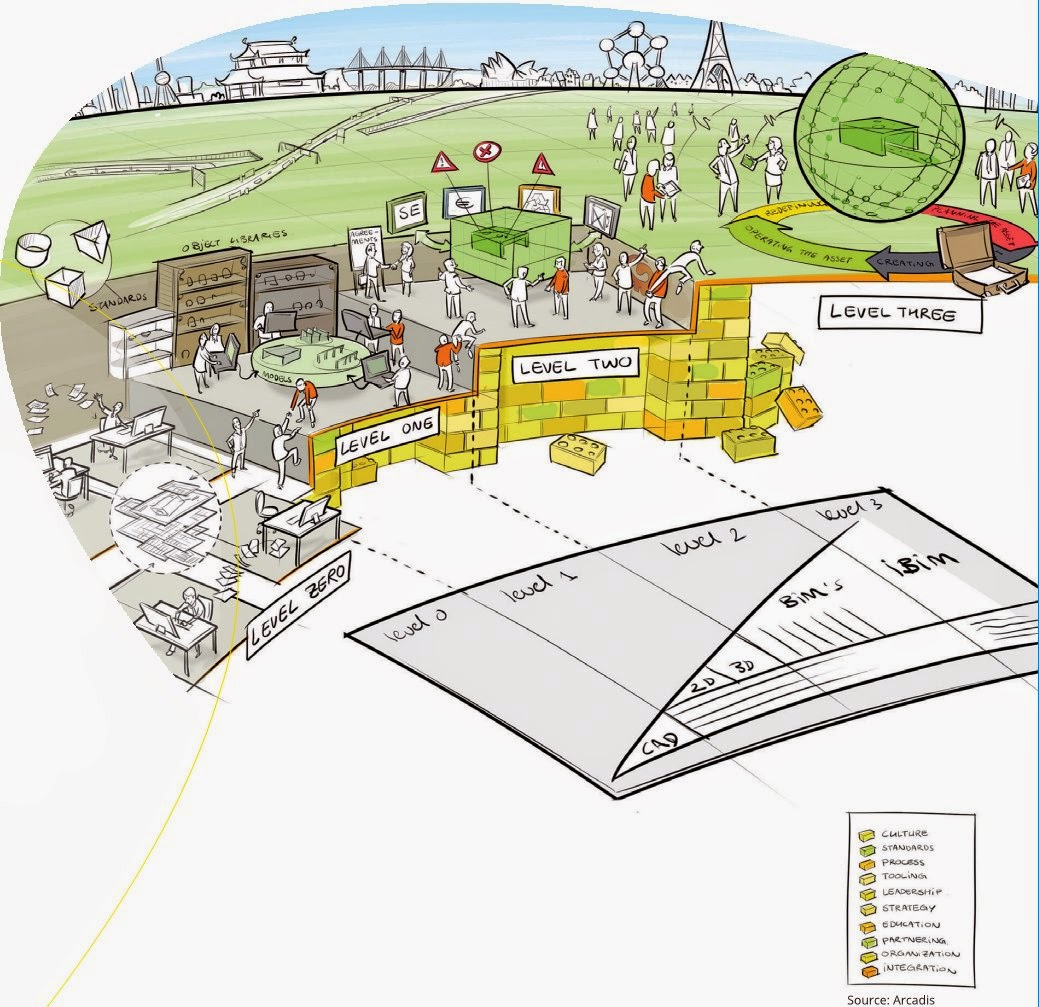
BIM level explained 

bimlevels

Use BIMsight (Tekla) to determine where IFC came from

Revit Survey Points and Coordinates Explained

Most powerful Subscription release yet – Revit 2015 R2

Over at BIM & Integrated Design they posted a good review of a new book on how to start an IPD project, if you are moving in that direction might be worth checking out.

IPD: The Missing Manual

Have you ever wondered how construction companies pick the apps they use? Well Rob over at Construction App Guru has, so much so he had an article published about it…..check it out with the link below.

An App for Construction

Scott over at The Revit Jedi shares his views on the new Android version of 123 Catch and how it’s not an apple fan boy anymore!

123D Catch this iPhone!

The Revit Kid watch us all to know about the new RTC Asia that will happen for the first time in 2015.

RTC ASIA

Leed has become a big thing in the AEC world these days (rightfully so) and now its just a little bit easier to track your Leed Credits with Revit thanks to Autodesk Labs. Find out more over at the Autodesk Labs blog

Updated Revit Credit Manager for Leed

Here is another article, this time form Constructech magazine about Trimble buying Gehry Technologies last week.

Another Acquisition for BIM

Here is another post from The Revit Jedi about Dynamo and his thoughts after learning a little more about it, and how it could be a practical tool for his office.

Do You Know Dynamo?

Have you ever wondered how to deal with a “Butt Glazing” with your curtain wall in Revit? Well wonder no more and check out the post below from The Revit Kid

Revit Tutorial – Create “Butt Glazing” in Curtain Wall / Storefront

Here is another little post on Revit 2015 R2, and the little feature that Revit OpEd help bring to be.

Revit 2015 R2 – Data Row

AECbytes has released their 2014 Fall AEC Tech update article, it worth a read to see if you missed any of the updates from over the past summer.

AEC Technology Updates, Fall 2014

Some non-BIM news, iOS 8 rolled out this week. While I’m furthest thing from an Apple “Fan Boy” I do own an iPad Air for work (because I can only demo BIM 360 Glue & BIM 360 Field on an iPad currently) so I thought this was a good summary of what’s new in iOS 8

iOS 8: 10 key features

I will end this weeks Roundup with a picture………but be warned it’s a real Spoiler!

10351672_679796868772321_6031524412411765250_n

Have a Great Weekend

The BIMsider

Autodesk, BIM, Revit, Updates

Revit 2015 R2 is out and waiting for you to download – As long as you are on Subscription

Yesterday Autodesk released a mid-season update or R2 as it was called for Revit 2015. This new release has some cool new features and tweaks that improve on Revit 2015 R1. Of course you can only take advantage of these new features and tweaks if you are a Subscription customer of Autodesk – See note below from Autodesk

“Note: These enhancements are available only to Autodesk Maintenance and Desktop Subscription customers for Revit 2015 software releases.”

One of the biggest things that came out with the Revit R2 was a new (well new to Autodesk) extension called Site Designer Extension for Revit 2015, which is a repacked versions of EaglePoint’s Siteworks.

I was going to write something witty about this but ThinkBIM beat me to it, and his is to good to beat, so I will share his masterpiece:

A Site for Sore Eyes! Revit gets some Site Tools (Finally!)

You can also find out more about Revit 2015 R2 in the Autodesk In The Fold Blog post linked below:

Autodesk Revit 2015 Subscribers get a Slew of New Capabilities with “R2” update 

You can also take a look at the ‘What’s New with Revit 2015 R2″ help page (thanks to Revit OpEd for pointing with his post on the update)

What’s New in Revit 2015 R2

Now stop reading and start downloading!

The BIMsider

BIM, Fun, Weekly Roundup

Weekly Roundup – 2014.08

download

The week that was in the world of BIM and other Techie fun stuff, for the week of Sept. 7th – Sept. 13th

I will start this week’s Roundup with the big news from Trimble this week, as they buy Gehry Technologies. Over the last couple of years Trimble has been slowly creeping into Autodesk’s world. First with the purchase of Teckla, then buying Sketchup from Google, and now Gehry Technologies. What’s that Autodesk did you hear something……is that footsteps? Below are a couple of links to stories from different blogs about this.

From BIM Colab

 Trimble buys Gehry Technologies…. Look out Autodesk.

From ThinkBIM

Frankly, this is huge BIMnews! Perhaps. Trimble signs deal with Frank Gehry.

Here is a post from BIM Troublemaker about how to use Dynamo to give you live excel links in Revit (What Revit Wants lead me to this post)

Practical Dynamo – Excel Linking

Here is a neat little post from What Revit Wants about a work around for using Annotation Symbols in a 3D (locked) View.

Using Annotation Symbols in locked 3D Views in Revit 

Are you wondering what this “new” Autodesk A360 is? How is it different from Autodesk 360? Does it cost money? These questions and more are answered (or attempted to be answered) in a blog post over at AECbytes Blog

Autodesk’s Rebranded A360 Cloud Solution

You ever want to make the “Switchback” feature in Navisworks and Revit work better, then do I have the blog post for you! Check out these nuggets of wisdom from the BIM Goddess herself (and friends) over at her blog Cn3D Construction’s Blog

Revit & Navisworks Switchback

Have a Great Weekend

The BIMsider

AU2014, BIM, Fun

AU 2014 Registration is Open – You should check out class AC6640 (my class)

8-27-2014 8-40-44 AM

Well the registration for AU 2014 in Las Vegas on Dec. 2nd – Dec. 4th is now officially open!

You can register here

If you are still on the fence about going its time to get off the fence and hop to it, as all the good classes with fill quickly. If you are having trouble getting your manager to see the value in you going, why not let Lynn Allen help you with her Convince Your Manager Tool Kit.

Now for the shameless self plug:

If you are looking for a class on the first day, (Tuesday Dec. 2nd) something that’s not to heavy and will let your brain rest a little have a hard first day of learning, then I have the class for you.

AC6640 – 60 Minutes, 30 Apps, 4 Categories, 2 Much Fun This class is designed to provide a little fun as we explore some of the apps and add-ins that are out there for Autodesk, Inc., software. While the general flow of this class will be fun, you’ll discover some helpful apps that can increase your productivity as well. The class will cover 30 different apps, which fit into 4 different categories during this 60-minute class. The 4 categories will be: mobile, production, add-ins, and fun.

The class is on Tuesday Dec. 2nd from 3:00 pm – 4:00 pm, and the word on the street is that I may even have some SWAG to give away (more on that to come later).

Its only 91 days away!

Hope to see some of you there.

The BIMsider

Autodesk, BIM, Navisworks, Service Packs, Updates

Navisworks 2015 Service Pack 3

product_AutodeskNavisworks2015

Autodesk has released Service Pack 3 for all three flavors of Navisworks 2015. This service pack fixes an irritating problem that was created by Service Pack 2 of only being able to appended models/files one at a time.

The Autodesk Application Manager has these updates on it now, or you can download it from here

I have also attached the read-me file if anyone is so inclined.

Autodesk_Navisworks_2015_Service_Pack_3_Feature_readme


The BIMsider

Add-ins, Autodesk, BIM

Have You Met Screencast Yet?

This is a need little video that will show you what Screencast can do in less than 2 minutes (1:58 to be exact). Now if you are like me and spend a lot of time teaching and supporting Revit then you will find this a very helpful little tool.

You can download the free software at screencast.autodesk.com and “show them all how you did that!”

The BIMsider


BIM, BIM 360 Glue

BIM 360 Glue Update – July 11th 2014 Edition

This is one of the things I love about BIM 360 Glue, it is constantly getting updates, improvements, and big fixes during the course of the year. It’s not like other Autodesk software were you need to wait until the next version (will be 2016 now) comes out, and hope that the fix or new functionality you are looking for is there.

With this latest update for BIM 360 Glue the focus is on some improvements (some would say much need improvements) to the clash detection side of Glue.

The 3 main additions or improvements are:

  1. Introduction of the Clash Status. This now means you can give clashes one of four new status levels (Open, Ignored, Closed, and Resolved).

7-29-2014 12-08-44 PM

2. Improved clash filtering for easier focus on specific clash issue you care about.

7-29-2014 12-11-19 PM

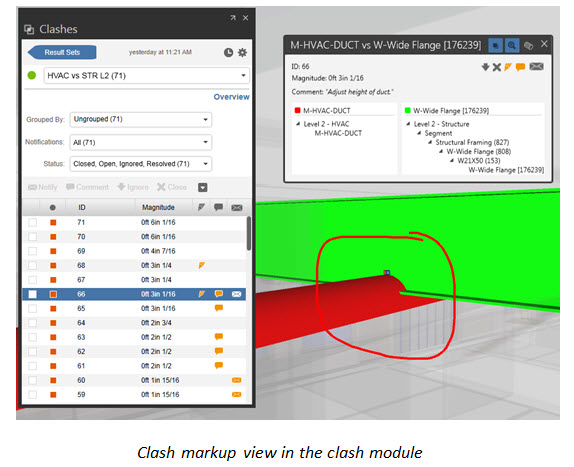
3. Clash markups!

7-29-2014 12-12-59 PM

7-29-2014 12-14-05 PM

The best part is that these feature are available for new AND existing projects in BIM 360 Glue!

7-29-2014 12-07-19 PM

See the complete rundown on whats new this update (and past updates) here from the “What’s new in BIM 360 Glue” page.


The BIMsider