
I recently completed a course from Brad Traversy at Traversy Media called Coding with AI.
I was looking to move beyond chatting with AI for my “vibe coding” sessions and into something a bit more structured. Up to this point, most of what I was building had to fit inside the limits of tools like Claude or ChatGPT in a browser. It worked, but as projects got larger and more complex, the cracks in that workflow started to show, especially if this was going to be more than just a weekend experiment.
I had dabbled with tools like Cursor, Windsurf, and early versions of Claude Code, but quickly realized I wasn’t ready for them yet. Or maybe I just didn’t need that level of horsepower. Or maybe I wasn’t ready to give up that much control. Likely a mix of all three.
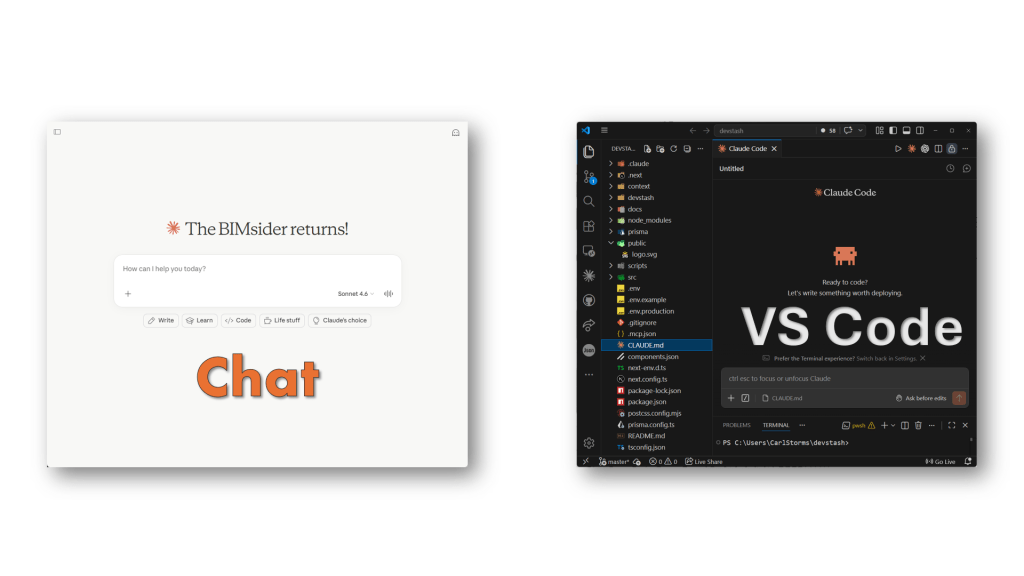
That shift, from chatting with AI to working with it inside VS Code, sounds small. And technically, it is. But it changes how you work more than you think. It comes down to the difference between what the course calls “vibe coding” and AI-assisted coding. I’ll get into that distinction in a bit.
This isn’t a course review, but I liked it enough to go through it twice. Once using Claude Code, and again using Codex. Same material, different tools, slightly different experience each time.
And that’s what got me thinking. Where’s the line between vibe coding and AI-assisted coding? More importantly, where do I actually sit on that spectrum, and what do I gain by moving out of the chat window and into VS Code?
This isn’t a course review, but I liked it enough to go through it twice.
Fair warning, this is a longer one. If you just want the quick take, here’s the:
TL;DR
- Moving from chat to VS Code isn’t a small step, it changes how you work
- Vibe coding = fast, fun, but hard to scale
- AI-assisted coding = more structure, more control, better for real projects
- The workflow matters more than the tool (Claude Code, Codex, etc.)
- Inside an IDE, AI works with your project, not just your prompts
- You lose some explanation, but gain speed, structure, and scale
- Expect friction, that’s where the learning happens
- You don’t need to be a developer, but a bit of code knowledge helps a lot
- Coding with AI is worth taking if you’re interested in this space
Bottom line:
If you want to move beyond small experiments, get out of the chat window and into an IDE. That’s where things start to click.
Where I Started: Vibe Coding
Before this, I was doing what people now call vibe coding. Back then it didn’t really have a name. Technology moves fast. AI moves even faster.
Open Claude or ChatGPT, describe what I want, get some code, copy it over, tweak it, repeat. It’s quick, it works, and honestly, it’s fun. That early rush of getting something working fast is hard to beat.
Now, I’ve been doing this for a couple of years, so this is a bit of an oversimplification. I’ve learned how to fine-tune the process. If you want more context, I did a 3-part series last year:
But even with that experience, it starts to fall apart as things grow.
You’re juggling snippets, losing context between prompts, and hoping everything still fits together by the end. It’s less building a project and more stitching together moments.
That’s where I started looking for something more structured.
The Course That Nudged the Shift
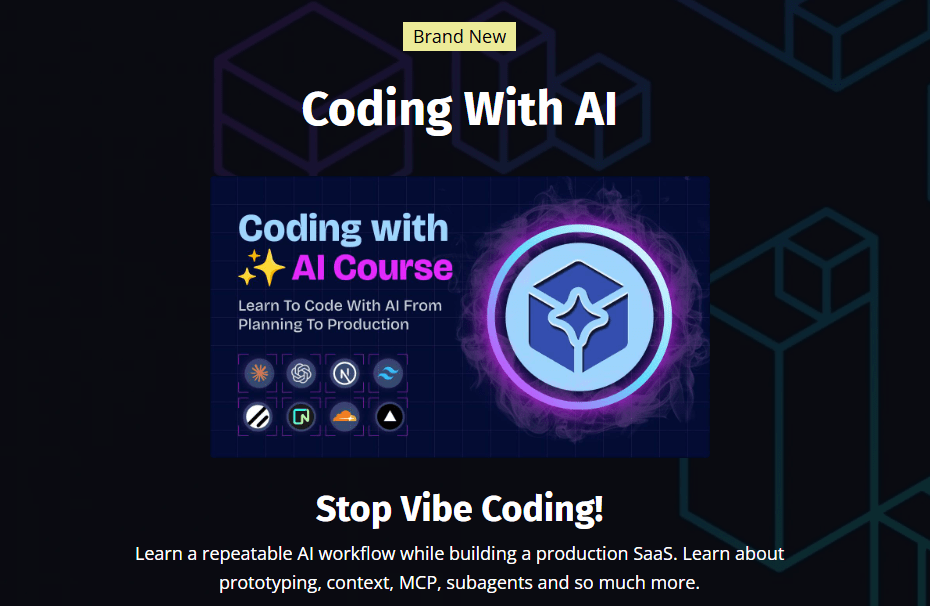
I recently went through the Coding with AI course from Brad Traversy at Traversy Media. Actually, I went through it twice.
Course Description
Times are changing. AI is everywhere, and it’s reshaping the entire landscape of software development — but a lot of bad practices have come with it. In this course, I share my own AI workflow. It’s simple, but it lets you stay the architect of your application and know exactly what’s going on feature by feature. You’ll learn everything from prototyping and planning to context management, MCPs, Claude Code skills and subagents — all while building a full-stack SaaS app that’s actually in production right now
First time, I followed along just as Brad taught it using Claude Code.
Second time, I ran through it again using Codex, to see how different the experience really was. I don’t always have access to the same tools, so I wanted to understand the workflow either way.
This isn’t a course review. I’ve watched Brad’s YouTube content and taken his courses before. His Modern JavaScript 2.0 course is a great way to learn the fundamentals, so I already trusted the quality. At $25 USD, and even better with the 20% discount, it was an easy call.
What made this one different was the timing. It was exactly what I was looking for, right when I needed it. The topic is current and relevant. All wins.
What stood out was how it pushed me out of the chat window and into a real working environment. Less copy and paste, more working directly in code. Less “give me the answer,” more “let’s build this properly together.”
The tools were different. The patterns were not.
That was the shift.
Vibe Coding vs AI-Assisted Coding
Before going any further, we should probably address the elephant in the room: vibe coding versus AI-assisted coding.
A friend and fellow blogger Jason Kunkel, said it well in his blog Answers and Solutions (paraphrasing a bit): in vibe coding, and even in AI-assisted coding to a lesser extent, you want it to work, but you don’t necessarily need to know how or why. It’s a great way to frame the mindset behind both approaches.
Up until this course, I pretty much called everything vibe coding. If I was using AI to write code, that was it. Simple. But the course pushed me to think about that a bit differently.
The way it was framed is this: vibe coding is when you ask something like ChatGPT, Lovable, or Bolt to build you something, and you don’t really care how it works. You get an output, it does the thing, and you move on. That early rush, we talked about it already, it’s fun. But you’re not really building, you’re generating.
AI-assisted coding is a step beyond that. It assumes you have some understanding of code, not necessarily deep expertise, but enough to follow what’s happening. The AI still does the heavy lifting, but you’re guiding it. You can read the output, debug it, adjust it, and shape it into something that actually fits. You’re not just prompting, you’re collaborating.
This is where it really clicked for me, especially thinking about it from an AECO perspective.
The easiest way I can describe it is Dynamo. When Dynamo first showed up, everyone was making twisty towers. It was the flashy example. But where it actually proved useful was in the everyday, repeatable work. You didn’t need to know how to code from scratch, but if you understood how Revit worked, Dynamo became a powerful tool.
That’s the same idea here. If you understand the workflow, the problem, and the end goal, even if you don’t know the syntax, you can work with AI to get there. The AI handles the code, you handle the intent.
Shameless plug. I wrote about a Dynamo custom package I built using a chat-based workflow: Here Boy! Meet DynaFetch for Dynamo3.0

And that’s where I find myself.
Somewhere in the middle. I know what I want to build. I understand the APIs, the workflows, how things should behave. I just don’t always know how to write the code to get there.
In a chat interface, that works up to a point. You can explain what you want and get something back, but it starts to break down as things get more complex. Move into an AI-assisted workflow, inside something like VS Code with tools like Claude Code or Codex, and it changes. You can go deeper. The AI handles the syntax you don’t know, and you provide the context it doesn’t have.
That said, it’s not all upside. The mistakes can be bigger. You’re handing over more control, and when the AI goes down the wrong path, you don’t always catch it right away. More code gets changed, sometimes removed, and things can drift faster than you expect. This is where having some kind of backup or version control starts to matter… but that’s a different conversation.
That’s the space I’m trying to work in now. Not pure vibe coding, not a full-on coder. Somewhere in between.
First Pass: Claude Code
So let’s talk about the first pass.
I went through the entire Coding with AI course as taught, using Claude Code. All 15 modules, about 16 hours of content. This was mostly new to me. I had experimented with Claude Code a while back, but never really used it in a structured way like this.
Brad starts things off in a pretty approachable way. There’s some early prototyping with tools like Lovable, Bolt, and v0, then a shift into working with Claude Code through the CLI, and eventually settling into using it directly inside VS Code.
That’s where things started to click.
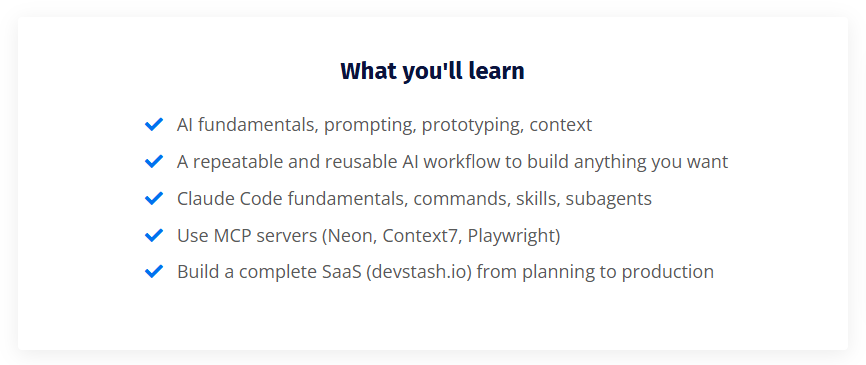
You fall into a rhythm, and it’s not really because of the project itself. Yes, you build a full SaaS app along the way, integrating things like Stripe, databases, and MCP servers. That’s all there if you want to go deep.
But that’s not really the point.
The real focus is the workflow. How you structure things, what goes into your claude.md, how you break work into small, manageable features, and how you guide the AI instead of just asking it for answers. It becomes a process of building one small piece at a time, while keeping a clear understanding of what the AI is doing at a higher level.
That was the biggest shift for me.
It wasn’t about learning how to build that specific app. It was learning how to work with an AI assistant in a way that actually scales beyond a single prompt.
Along the way, I saw the good, the bad, and the occasional “what is it doing?” moments with Claude Code. But overall, it gave me a much clearer picture of what this kind of workflow looks like when it’s done properly.
Second Pass: Codex
For the second pass, I went through the exact same course. Same material, same workflow. The only thing I changed was the tool.
Instead of Claude Code, I used Codex, which comes from the same folks behind ChatGPT. On the surface, it’s pretty similar. You can follow the same general process and still get to a working result. But getting there wasn’t quite as smooth.
I had to stumble through a few things to figure out how to make it work in the same way. And honestly, a couple of those were on me. Brad actually provides a really useful comparison document right at the start of the course. He mentions it in the first video. I completely missed it. Twice. Didn’t find it until after both runs, which would have saved me a fair bit of trial and error. It’s called AI Tool Equivalents. If you take the course, go find it early. You’ll thank yourself later.

The other wrinkle was around the CLI, basically the command-line version of these tools, versus the VS Code extension. In the comparison doc, there’s a fair bit of focus on the CLI, but in the videos most of the workflow is done using the Claude Code extension inside Visual Studio Code. So I tried to mirror that setup with Codex and stick to the extension as well. That’s where things got a little more hands-on than expected. The extensions are generally easier to work with, but they don’t always have the same capabilities as the CLI, so I had to work around a few gaps that weren’t really covered in the course. Nothing major, just enough to slow things down while I figured it out.
Once I got through that, the overall workflow started to feel familiar again. Same structure, same steps, same general rhythm. If anything, the differences showed up more in how the tools behaved than in how I worked. Claude Code felt a bit quicker and a bit sharper. Codex felt a little slower, and occasionally needed a bit more nudging to get where I wanted.
What was interesting is that both projects got to the finish line, but they didn’t look the same. You could tell they were built by different AIs. Same instructions, different interpretation. Both worked, just took slightly different paths to get there.
And for me, that was kind of the point. Sometimes I’ll have access to one AI assistant, sometimes the other, so being able to run the same workflow through both and understand where things line up, and where they don’t, was worth the extra pass. It also makes it a lot easier to switch to something else if I need to. Once you understand the workflow, the specific tool matters a bit less. Later on, I’ll break down a bit more of what I did with Codex and where I had to adjust things. If you end up using it, hopefully that saves you a few of the bumps I hit along the way.
The Real Shift: Chat → IDE
Before moving into an IDE, or Integrated Development Environment, basically the software where you write, manage, and run your code, I actually had a pretty solid workflow going in the chat window. I was using projects to hold context, storing files instead of constantly re-uploading them, and leaning on the AI to summarize each session. At the end of a run, I’d have it write a recap, set up the next prompt, and update a rough roadmap for the project. That alone made it possible to work on things that were bigger than a quick one-off script, and for a while, it worked better than I expected.
But it still had limits. Once the files got larger, or there were more moving parts, things started to break down. Context would drift, the AI would miss pieces, and I’d find myself stitching things together again, trying to keep everything aligned across multiple prompts and sessions. It was manageable, but you could feel the cracks starting to show.
That’s where moving into an IDE, in my case Visual Studio Code, really changed things. Inside the IDE, the context isn’t something you have to manage manually. It’s just there. The AI can see the files, understand the structure, and pull in what it actually needs. You’re not feeding it chunks of code and hoping it connects the dots, it’s working with the project as a whole. That alone makes a big difference. You can handle larger projects, keep things organized, and build without constantly resetting the conversation.
This is what that looks like in practice.
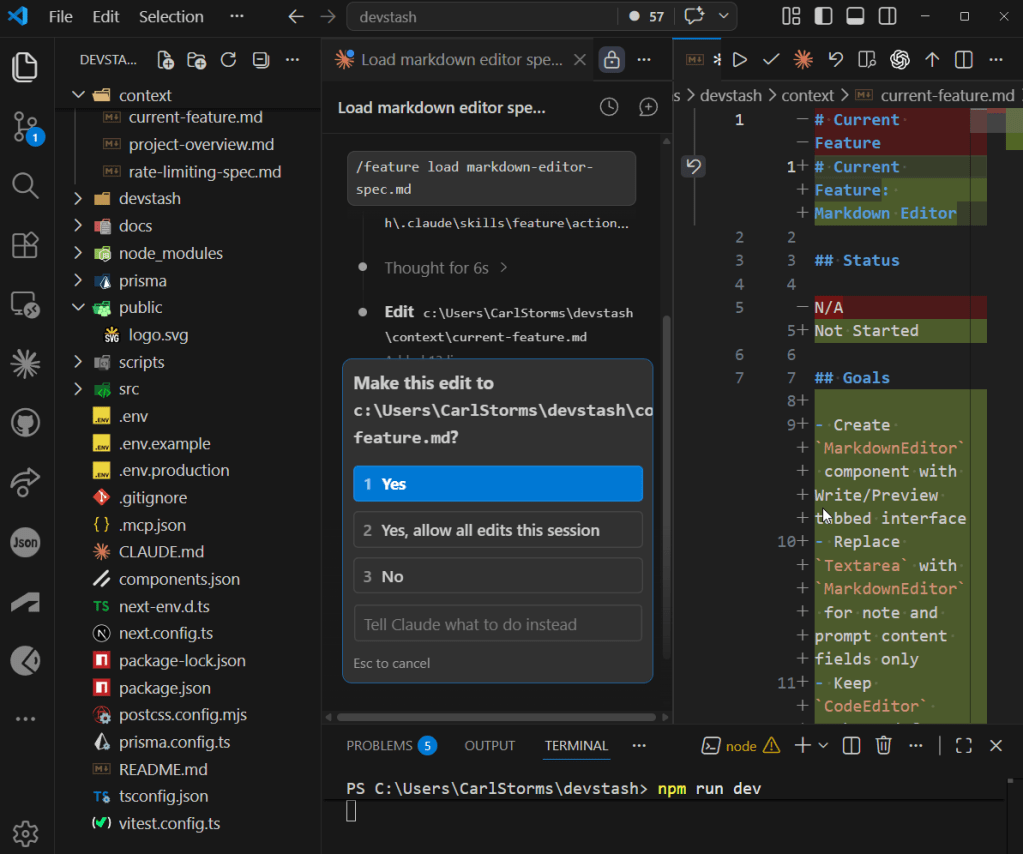
It also starts to feel more like actual development. You’re not just prompting for snippets anymore. You’re editing, testing, adjusting, and letting the AI help where it makes sense. It knows where things live, how they connect, and how to make changes across the codebase in a way that holds together. The flow becomes more continuous, less stop-and-start, and you spend less time trying to re-explain what you’re doing.
But there’s a trade-off. In the chat workflow, I was forcing the AI to explain itself. I’d ask for step-by-step breakdowns, have it walk through changes, and then copy and paste the code into my project. It was slower, and could eat up some tokens, but it gave me at least a rough sense of what was happening as I went. Inside the IDE, you lose some of that by default. The tools will show you what’s changing, you’ll see additions, deletions, even a list of tasks it’s working through, but if you don’t already understand what you’re looking at, it can feel like a blur. You’re reviewing changes without always fully understanding them, and if something goes sideways, it can burn through tokens pretty quickly while it tries to fix or redo larger chunks of code.
That’s where the gap shows up. The IDE workflow is more powerful, no question. Better context, better structure, more room to grow. It also makes working with version control, using Git and platforms like GitHub, much easier, which starts to matter as soon as a project gets even slightly serious or involves more than one person. But it also assumes a bit more from you. You don’t need to be a full-on developer, but having some baseline understanding helps. Otherwise, you’re trusting changes you can see, but not always fully interpret.
That’s really the shift. In chat, you’re constantly rebuilding context but getting more explanation along the way. In the IDE, the context is handled for you, but you’re expected to keep up. And right now, I’m somewhere in the middle of that.
Claude Code vs Codex
Alright, let’s get into what this actually looked like running the course with Claude Code versus Codex. Most of the differences showed up inside the VS Code extensions, but the patterns carry across wherever you’re using them.
The first, and probably most important, piece is the context file. In Claude Code, it’s CLAUDE.md. In Codex, it’s AGENTS.md. They serve the same purpose. This is the core of your project context, and if it’s not set up right, everything else starts to wobble. Keep it short, keep it focused, and follow Brad’s approach. Once that’s in place, the name difference doesn’t really matter.
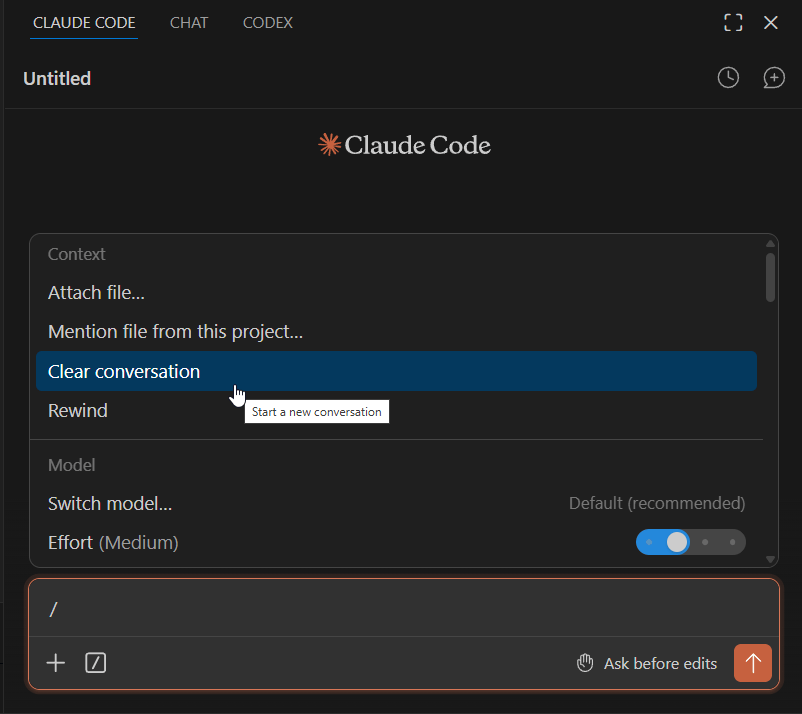
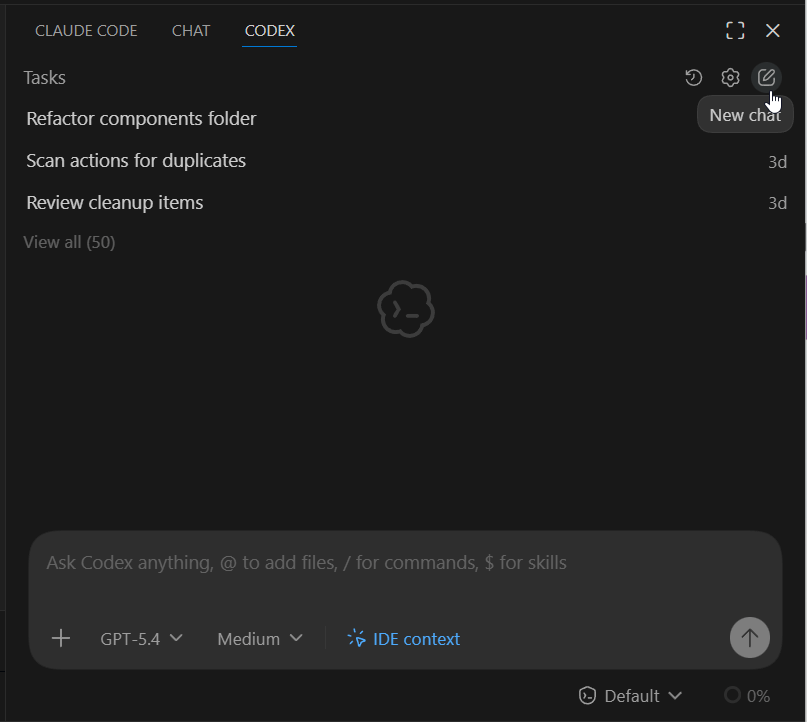
Clearing context is another small thing that ends up being important. In Claude Code, you can just run /clear and reset things. In Codex, at least in the VS Code extension, you’re starting a new chat using the UI. Same result, just a different habit you have to build.
Where things got more interesting, and honestly a bit frustrating, was around skills and subagents. The course walks through this cleanly in Claude Code, but Codex doesn’t map exactly the same way. The big unlock for me was realizing everything needs to live in a .agents folder. I didn’t catch that until later, and it caused all kinds of half-working behavior. Commands would sort of run, skills would partially trigger, nothing felt consistent. Once I fixed that, everything snapped into place and started behaving much closer to what I expected.
Quick tip: don’t try to manually translate everything between tools. I had AI do that work. I took the CLAUDE.md file and the skills from the course, dropped them in, and let the AI strip out anything Claude-specific and reshape it into AGENTS.md and the .agents structure. Once I did that, most of the friction disappeared.
The bigger point is this isn’t really about Claude Code or Codex. This workflow will carry across whatever AI assistant you’re using. You just need to get it into the right format for that tool. Let the AI do the translation. That’s literally what it’s good at.
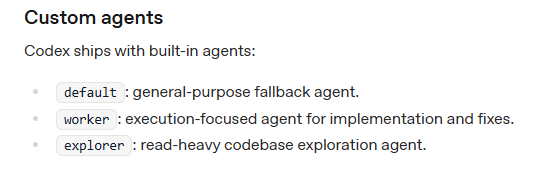
Subagents are another area where the tools feel similar but behave differently. In Claude Code, you’re explicitly creating and defining them. In Codex, you’re really working with a few built-in types like a default agent, a worker for execution, and an explorer for read-heavy tasks. Instead of building your own from scratch, you guide them using skills. So rather than defining roles ahead of time, you direct them in the moment, telling Codex to spawn a subagent with a specific skill and goal. It’s a slightly different mental model, but it works once you get used to it.
There’s also a subtle difference in how skills are structured. In Claude Code, you’re working with something like /feature and a set of actions like load, start, review, and complete. In Codex, once your .agents setup is correct, you can use the same /feature, but the structure leans on references instead of actions. It’s really just a different folder setup behind the scenes.
The bigger difference is that Codex expects an .agents folder for each skill, along with a specifically formatted YAML file, called openai.yaml. That part tripped me up at first. Once I understood it, I let AI handle most of the setup, generating the structure and formatting so everything lined up properly. Same idea, just wired a bit differently. It’s confusing at first, then it fades into the background.
Structure map below of Codex skills for the course:
.agents/└── skills/ ├── auth-auditor/ │ ├── SKILL.md │ └── agents/ │ └── openai.yaml ├── cleanup/ │ ├── SKILL.md │ └── agents/ │ └── openai.yaml ├── code-scanner/ │ ├── SKILL.md │ └── agents/ │ └── openai.yaml ├── feature/ │ ├── SKILL.md │ ├── references/ │ │ ├── load.md │ │ ├── start.md │ │ ├── review.md │ │ ├── explain.md │ │ ├── test.md │ │ └── complete.md │ └── agents/ │ └── openai.yaml ├── list-components/ │ ├── SKILL.md │ └── agents/ │ └── openai.yaml ├── refactor-scanner/ │ ├── SKILL.md │ └── agents/ ├── research/ │ ├── SKILL.md │ └── agents/ │ └── openai.yaml └── ui-reviewer/ ├── SKILL.md └── agents/ └── openai.yaml
Structure map below of Claude Code agents and skills for the course:
.claude/└── agents/ ├── auth-auditor.md ├── code-scanner.md ├── refactor-scanner.md ├── ui-reviewer.md└── skills/ ├── cleanup/ │ ├── SKILL.md ├── feature/ │ ├── SKILL.md │ ├── actions/ │ │ ├── load.md │ │ ├── start.md │ │ ├── review.md │ │ ├── explain.md │ │ ├── test.md │ │ └── complete.md ├── list-components/ │ ├── SKILL.md └── research/ └── SKILL.md
One other area that tripped me up a bit was MCPs (Model Context Protocol). The installs were slightly different between Claude Code and Codex, but this is another case where the gap is smaller than it looks. If I had found Brad’s “AI Coding Tools: Feature Equivalents & Comparisons” document earlier, it would have saved me some time.
That said, a couple of MCPs used in the course are worth calling out because they’ll likely become part of your regular workflow.
Context7 pulls in up-to-date documentation and code, so the AI isn’t working off stale knowledge. Playwright lets the AI interact with web pages through structured snapshots instead of relying on screenshots or guesswork. Once you start using them, they feel less like extras and more like part of the baseline setup.
The Playwright one is a little unsettling the first time you see it. It can open a browser and start navigating on its own, which feels like it’s doing a bit too much at first. In reality, you’re still in control. You can require approval at each step, so nothing moves forward without you accepting it.
One thing to keep in mind, MCPs can be token-heavy depending on how you use them, so it’s worth paying attention to that as you go.
The install commands are slightly different depending on the tool:
- Claude Code
- Context7 →
npx ctx7 setup - Playwright →
claude mcp add playwright npx @playwright/mcp@latest
- Context7 →
- Codex
- Context7 →
npx ctx7 setup - Playwright →
codex mcp add playwright npx "@playwright/mcp@latest"
- Context7 →
Again, same idea, just a different entry point. Once they’re installed, they behave the same way in your workflow.
If you want to go a little deeper into MCPs, Design Tech Field Guide has been doing a great series on building an MCP server using vibe coding that’s worth checking out.
The last difference is how you interact with each tool. Codex leans more toward a chat-style experience. You can be more conversational, more loose, and it will usually figure things out. The trade-off is control. The more natural language you use, the less predictable the outcome can be. Claude Code, especially when you follow the course structure, feels a bit stricter, but that structure gives you more consistent results. Because of that, I found myself using Codex more like Claude Code, sticking to skills and Brad’s workflow so the output stayed predictable.
If I had the choice, I’d probably lean toward Claude Code. But that’s not really the point. The bigger takeaway is that the workflow holds up across both. Once you understand how to structure the work, switching tools isn’t a reset. It’s just an adjustment.
The Results
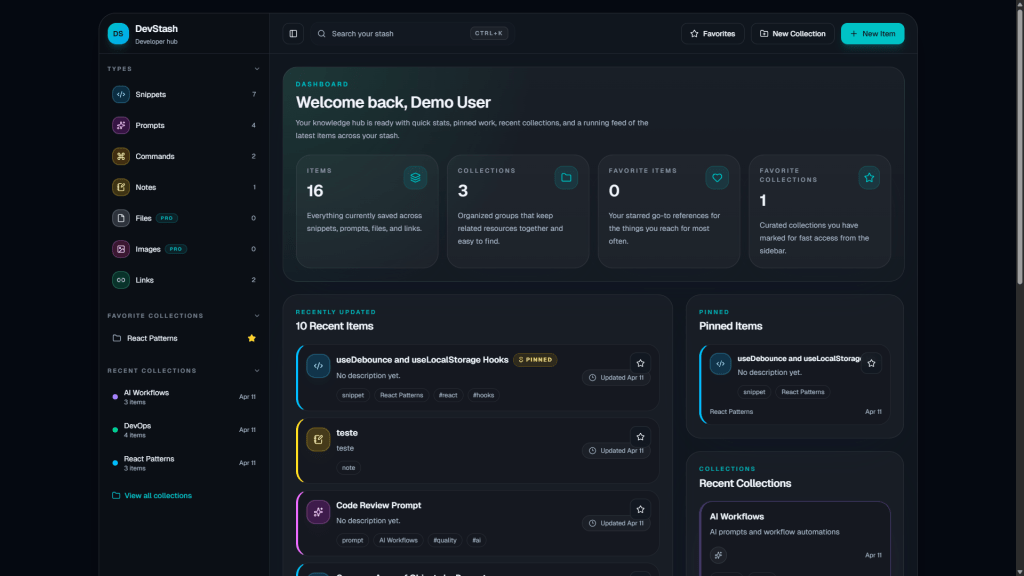
If you made it this far, here are the two “finished” products.
Devstash – Claude Code
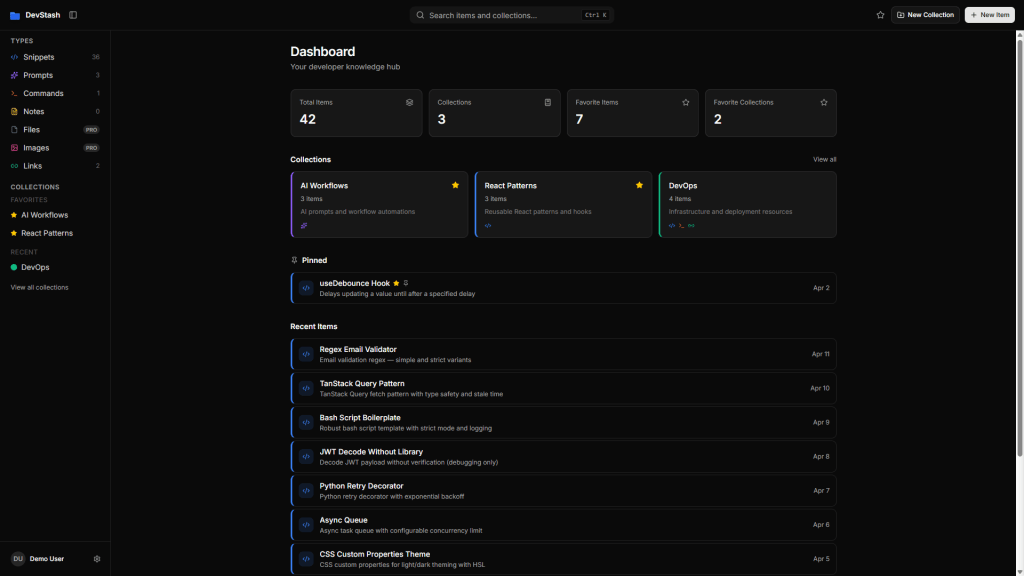
Devstash – Codex
Where This Goes Next
If you’re starting this now, the biggest thing I’d say is stop relying on chat alone, at least if you plan to do more than the occasional weekend project.
It’s a great place to learn and experiment, but it starts to break down once things get even a little complex. At some point, you have to move into an IDE. VS Code is more than enough. Add an extension, work inside your files, and let the AI be part of the workflow instead of something sitting off to the side.
From there, build something slightly bigger than you’re comfortable with.

That’s where the cracks show, but it’s also where things start to click. You’ll run into friction. Things won’t behave the way you expect. You’ll lose context, break things, and have to figure out why. That’s not a sign you’re doing it wrong. That’s the process.
If it feels a bit awkward, you’re probably in the right place.
For me, the next step is more of this. More real workflows, bigger projects, maybe learning a more modern language the old-school way, just to build that foundation. Even a basic understanding of syntax and how things actually work goes a long way. You don’t need to be a developer, but having that grounding makes it much easier to spot when the AI is off or doing something you didn’t expect.
That’s part of why I still lean on simple HTML, CSS, and JavaScript. I’ve spent enough time with them that I don’t feel completely lost when the AI generates code, or when I need to step in and fix something.
Beyond that, it’s about figuring out how APIs, automation, and AI actually come together in something that holds up beyond a demo.
I’m still figuring it out.
This isn’t mastery. It’s just the next step.

Just like my code, this post was AI-assisted. Same thoughts, better syntax, no grammar school required. Thanks, ChatGPT! 🤖

All the Links: bio.link/thebimsider

 The BIMsider
1 thought on “From Chat to VS Code: Somewhere Between Vibe Coding and AI-Assisted Coding”