
BIM, Fun, Weekly Roundup

Weekly Roundup – 2014.09

download

The week that was in the world of BIM and other Techie fun stuff, for the week of Sept. 14th – Sept. 20th – and what a busy week it was, this is a jam packed Roundup!

I start this weeks roundup off with some “self praise” about the new (or re-branded) A360 app or cloud solution from the Autodesk 360 Blog (now called A360 Blog)

The New Girl

There is also a post about how to “get started” with the new A360 that would be helpful if you are new to the A360 world

Getting started with A360

For our Structural Revit users out there, this is a good post from Revit Beyond BIM about Revit and RSA with a Residential focus.

Practical BIM with Revit and RSA for Residential building with concrete beams

This week What Revit Wants has been busy turning out great post after great post, so below is you list of required “What Revit Wants” reading for this week.

3 hours of Dynamo lessons

Properties + addin for Navisworks (this is a great free addin or addon for Navisworks)
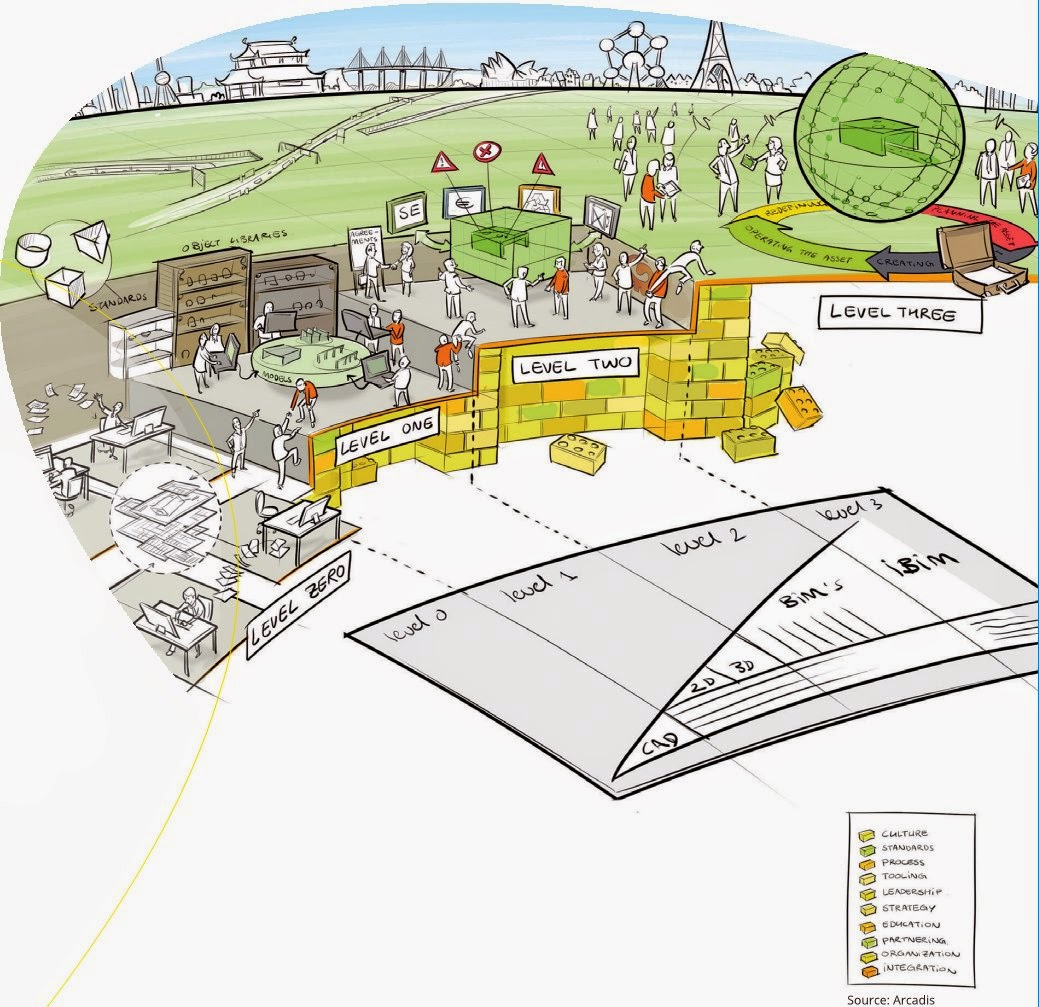
BIM level explained 

bimlevels

Use BIMsight (Tekla) to determine where IFC came from

Revit Survey Points and Coordinates Explained

Most powerful Subscription release yet – Revit 2015 R2

Over at BIM & Integrated Design they posted a good review of a new book on how to start an IPD project, if you are moving in that direction might be worth checking out.

IPD: The Missing Manual

Have you ever wondered how construction companies pick the apps they use? Well Rob over at Construction App Guru has, so much so he had an article published about it…..check it out with the link below.

An App for Construction

Scott over at The Revit Jedi shares his views on the new Android version of 123 Catch and how it’s not an apple fan boy anymore!

123D Catch this iPhone!

The Revit Kid watch us all to know about the new RTC Asia that will happen for the first time in 2015.

RTC ASIA

Leed has become a big thing in the AEC world these days (rightfully so) and now its just a little bit easier to track your Leed Credits with Revit thanks to Autodesk Labs. Find out more over at the Autodesk Labs blog

Updated Revit Credit Manager for Leed

Here is another article, this time form Constructech magazine about Trimble buying Gehry Technologies last week.

Another Acquisition for BIM

Here is another post from The Revit Jedi about Dynamo and his thoughts after learning a little more about it, and how it could be a practical tool for his office.

Do You Know Dynamo?

Have you ever wondered how to deal with a “Butt Glazing” with your curtain wall in Revit? Well wonder no more and check out the post below from The Revit Kid

Revit Tutorial – Create “Butt Glazing” in Curtain Wall / Storefront

Here is another little post on Revit 2015 R2, and the little feature that Revit OpEd help bring to be.

Revit 2015 R2 – Data Row

AECbytes has released their 2014 Fall AEC Tech update article, it worth a read to see if you missed any of the updates from over the past summer.

AEC Technology Updates, Fall 2014

Some non-BIM news, iOS 8 rolled out this week. While I’m furthest thing from an Apple “Fan Boy” I do own an iPad Air for work (because I can only demo BIM 360 Glue & BIM 360 Field on an iPad currently) so I thought this was a good summary of what’s new in iOS 8

iOS 8: 10 key features

I will end this weeks Roundup with a picture………but be warned it’s a real Spoiler!

10351672_679796868772321_6031524412411765250_n

Have a Great Weekend

The BIMsider

Autodesk, BIM, Revit, Updates

Revit 2015 R2 is out and waiting for you to download – As long as you are on Subscription

Yesterday Autodesk released a mid-season update or R2 as it was called for Revit 2015. This new release has some cool new features and tweaks that improve on Revit 2015 R1. Of course you can only take advantage of these new features and tweaks if you are a Subscription customer of Autodesk – See note below from Autodesk

“Note: These enhancements are available only to Autodesk Maintenance and Desktop Subscription customers for Revit 2015 software releases.”

One of the biggest things that came out with the Revit R2 was a new (well new to Autodesk) extension called Site Designer Extension for Revit 2015, which is a repacked versions of EaglePoint’s Siteworks.

I was going to write something witty about this but ThinkBIM beat me to it, and his is to good to beat, so I will share his masterpiece:

A Site for Sore Eyes! Revit gets some Site Tools (Finally!)

You can also find out more about Revit 2015 R2 in the Autodesk In The Fold Blog post linked below:

Autodesk Revit 2015 Subscribers get a Slew of New Capabilities with “R2” update 

You can also take a look at the ‘What’s New with Revit 2015 R2″ help page (thanks to Revit OpEd for pointing with his post on the update)

What’s New in Revit 2015 R2

Now stop reading and start downloading!

The BIMsider

BIM, Fun, Weekly Roundup

Weekly Roundup – 2014.08

download

The week that was in the world of BIM and other Techie fun stuff, for the week of Sept. 7th – Sept. 13th

I will start this week’s Roundup with the big news from Trimble this week, as they buy Gehry Technologies. Over the last couple of years Trimble has been slowly creeping into Autodesk’s world. First with the purchase of Teckla, then buying Sketchup from Google, and now Gehry Technologies. What’s that Autodesk did you hear something……is that footsteps? Below are a couple of links to stories from different blogs about this.

From BIM Colab

 Trimble buys Gehry Technologies…. Look out Autodesk.

From ThinkBIM

Frankly, this is huge BIMnews! Perhaps. Trimble signs deal with Frank Gehry.

Here is a post from BIM Troublemaker about how to use Dynamo to give you live excel links in Revit (What Revit Wants lead me to this post)

Practical Dynamo – Excel Linking

Here is a neat little post from What Revit Wants about a work around for using Annotation Symbols in a 3D (locked) View.

Using Annotation Symbols in locked 3D Views in Revit 

Are you wondering what this “new” Autodesk A360 is? How is it different from Autodesk 360? Does it cost money? These questions and more are answered (or attempted to be answered) in a blog post over at AECbytes Blog

Autodesk’s Rebranded A360 Cloud Solution

You ever want to make the “Switchback” feature in Navisworks and Revit work better, then do I have the blog post for you! Check out these nuggets of wisdom from the BIM Goddess herself (and friends) over at her blog Cn3D Construction’s Blog

Revit & Navisworks Switchback

Have a Great Weekend

The BIMsider

BIM, Fun, Weekly Roundup

Weekly Roundup – 2014.07

download

The week that was in the world of BIM and other Techie fun stuff, for the week of Aug. 31st – Sept. 6th

This is an oldie but a good from The Revit Kid that was tweeted about this week, how to make using Revit on Multiple monitors just a little better.

 Revit on Multiple Monitors

Check out this post from Revitdialog about workset filtering to control Visibility Graphics

Controlling Visibility/Graphics of a Linked Workset Using Filters

Some Revit Hotfix’s from Revit OpEd

Hotfix

2014 Hotfix (thanks Revit Clinic)

2015 Hotfix (thanks Revit Clinic)

A new BIM blog to me ThinkBIM has a interesting article on Reality Capture

Achieving BIM Certainty Through Reality Capture

What’s in a name you ask? Well head on over to Practical BIM for a Blog post on just that!

The Nature of Naming

This is a good read from Construction App Guru,  if you are thinking about moving towards have ipads or other mobile devices in your office and part of your workflow.

Setting Up a Mobile Device Program

Another post from Think BIM – This time about an addin that can give you (or promises to) automated 3D views.

Automated Room 3D Views by ARUtils

Here is a post from What Revit Wants telling us about the new A360 Team offering from Autodesk

A360 Team

Here is a comic from a great Architect Comic site called Architexts – go check them out

2014-09-03-drawings-by-engineers

Have a Great Weekend

The BIMsider

BIM, Fun, Weekly Roundup

Weekly Roundup – 2014.06

download

The week that was in the world of BIM and other Techie fun stuff, for the week of Aug. 24th – Aug. 30th.

have you ever wondered what BIM really is? If so CADZulu has a post for you. Check out the video they post by Steve Ridge.

BIM in Construction What Does BIM Really Mean

How to get precise placement of your Revit selections. This post form IMAGINiT tries to help with Revit’s inability to snap or manually align annotation objects.

Precise Placement of Revit Selections

Do you like Rhino? Do you like Dynamo? Well why not try Rhynamo then! Hop on over the Nathan Miller’s Blog The Proving Ground and check out his post, you can even sign up to try the Rhynamo by applying for the Private Beta.

RHYNAMO

If you are in Construction and you enjoy the Apps and things Techie then you should check out Rob McKinney’s post over on Construction App Guru on his wrap up of the AGC Tech Forum.

Reflections on AGC Georgia Tech Forum

Free MEP Piping Content for Revit, What Revit Wants came across 2 good locations for all your MEP piping Content needs.

Free MEP Piping Content for Revit

The Revit Jedi wants you to learn more about Autodesk’s Cloud Rendering, he lets us know that you can do more than JUST renderings with the service.

Learn more about Autodesk’s Cloud Rendering capabilities

Here is a little something for you Revit Structure people out there, how to attached structural objects together courtesy of the Autodesk Revit Structure Blog

Attaching Structural Objects Together

I came across this review of SketchUp Pro 2014 on AECbytes Blog and thought it was worth sharing

 SketchUp Pro 2014

Steve from Revit OpEd want to let everyone know about your chance to be a “Gunslinger” if you are a pro with 3DS MAX

Autodesk M&E 3DS MAX Gunslinger Summit – Montreal

A customer story about design and engineering collaboration with todays technology from the Autodesk 360 Blog

A Customer’s Perspective: Design and Engineering Collaboration in a Modern Era

Something a little different from Lifehacker on tablet Styli, in particular their pick for the top 5

Five best Tablet Styli

I will end this Weekly Roundup with a Funny

sihdNqxh[1]

Have a Great Weekend

The BIMsider