BIM, Fun, Weekly Roundup

Weekly Roundup – 2014.11

download

The week that was in the world of BIM and other Techie fun stuff, for the week of Sept. 28th – Oct. 4th

This week we start off with a post from a new to me Blog called Phil-osophy in BIM, that is about “Divide” when you are suing adaptive components.

Divide Path Direction

You may have heard about Revit Skyscraper, while it seems to be moving forward as Autodesk has released a beta “Open House” test for all to try. Learn more about here in this post from What Revit Wants

Revit Skyscraper is gearing up!

Are you always taking photos on the job site, and then forgetting to take them off the camera or your cell phone so that can get added to the job file? If this sounds like you then you need to check out this post from Con App Guru about FotoIN

FotoIN Mobile App Update

Here is another post from Con App Guru, but this time its about a backpack type of case for your Tablet to make walking the job site easy and hands free!

What’s in Your Bag?

Once again this week What Revit Wants is busy sharing the latest and greatest news about all that is BIM and Revit.

Free BIM Viewing

The Best just got Better IFC for Revit 2015 V 15.2.0 released

IFC Templates and Parameter Upgrade Files

This should convince your MEP guy to go to Revit

This is a blog post from In The Fold, and the blog is really about how Fusion 360 helped this company (Hydrobee) get their product up and running. That part is all well and good, but I just really thought the product they came up with was super cool (the PowerBee)

Hydrobee Generate Personal Power from Nature with Autodesk Fusion 360

PowerBee-Collage (1)


This post from the IMAGINiT Support Blog drops some knowledge about Boundary Conditions for Revit Structure users.

Revit Structure Setting for Boundary Conditions

The A360 Blog has a post this week about the new features of the newly released A360 mobile app

A360 Mobile – New Face, New Tools, New Opportunities!

Well in case you missed it, Microsoft announced it’s next O/S this week, and they are skipping Windows 9 and going straight to Windows 10! Check out this post from Laptop about best features of Windows 10 – I personally like the idea of multiple desktops!

Windows 10: Top 6 New Features

1412099323_675339.92307692308


I’m going to end this weeks post with a picture from a What Revit Wants post, that is a screen shot of the current AUGI World (Oct. 2014)
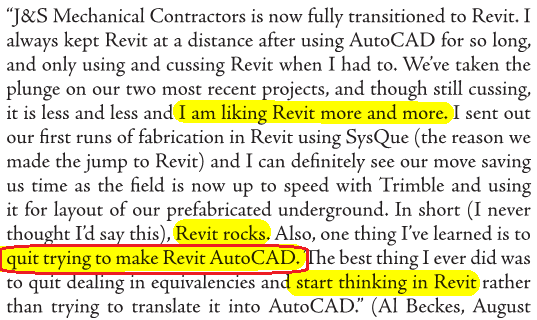
mech-contractor

Truer words have never been spoke “quit trying to make Revit AutoCAD.”

Have a Great Weekend

The BIMsider

BIM, Fun, Weekly Roundup

Weekly Roundup – 2014.10

download

The week that was in the world of BIM and other Techie fun stuff, for the week of Sept. 21st – Sept. 27th

I will start this weeks roundup off with a little flattery as Autodesk’s Revit 2015 R2 incorporates something that’s a lot like Boost Your BIM’s API add-in from 2013.

Imitation is the sincerest form of flattery

Here is another post about this same feature from Revit OpEd as well as the Load into Project and Close feature.

Revit 2015 R2 – Upgrade File Warning (and an update to this post – Revit 2015 R2 – Double Click Open an Older File)

Revit 2015 R2 – Load into Project and Close

And still one more Blog post about this option that was triggered by Steve’s Post on Revit OpEd this time the post is from Do U Revit?

Upgrade Warning

Have issues with Revision clouds and revision in general in Revit? Then check out this post form BIM 42

Revisions and Revision Clouds

Some more info on Revisions, this time on tags from The Revit Geek

Revision Tags Rotate with Components 

Next is a link from What Revit Wants for a Dynamo Presentation by Zach Kron

Dynamo

If you do more on the construction side you might be interested in this post from ThinkBIM about Tekla and BuildingPoint ANZ

Tekla is BuildingOn with BuildingPoint ANZ

Steve over at Revit OpEd fills us in on some of the updates to Revit MEP with the Revit 2015 R2 release form last week.

Revit 2015 R2 – MEP

Now who doesn’t like drones right? Well if you are thinking about getting a Drone for your company you should check this post out first from Con App Guru

To Drone or not to Drone?

Level of Detail or is it Level of Development? Well Laura over at BIM Freak tackles that questions and gives us her thoughts in this Blog post

Level of Development vs Level of Detail

Are you a student, are you using Autodesk’s 360 rendering? if the answer is yes than you want to check out this post from The Revit Kid right now!

Autodesk 360 Rendering for Students

Scott over at The Revit Jedi has a great post about Running a BIM Lead Meeting. I the post I was introduced to a new Blog “BIMBicycle Blog”  with another good post about How to run a BIM Startup Meeting.

Running a BIM Lead Meeting

How to run a BIM Startup Meeting

We have not had enough Navisworks posts, and this one comes from What Revit Wants about your CIP folder from Navisworks taking you way to much space.

Navisworks CIP Folder

Jeff over at The Revit Kid has compiled a great list of posts and info about the Revit 2015 R2 release that came out last week. Check out the link for all you ever wanted to know about Revit 2015 R2

Revit 2015 R2 – 12 Must see links

If you use ReCap Pro you might wan tot check out this post from In The Fold about the new ReCap Pro 1.4

ReCap Pro 1.4

IMAGINiT is looking for some people that use that do point cloud modelers in Revit who use Pipe and Plant data. See more in the Building Solutions Blog

Looking for Revit Point Cloud Modelers with Pipe and Plant Data

On the Dynamo Blog the let the world know yesterday that Dynamo 0.7.2 is now ready for the world. Head on over to and download it, just remember to uninstall 0.7.1 first for best results.

Dynamo 0.7.2 and Revit Sunddial

Link for download 

This is some AWESOME advise for everyone that works on 2 or more monitors, from time to time your Pop up Dialog boxes go missing (showing on phantom screens) – Below keystrokes can save your life (or at least some time). For more on this check out this blog post from HOK BIM Solutions

A. ALT+Space Key
B. M (This is for Move)
C. Push one of your Arrow Keys (Doesn’t matter which direction)
D. Move your mouse and the active dialog box will be attached to your mouse cursor and you can now place it where it can be visible.

Dialog Box, Dialog Box, Where art thou Dialog Box

Here is a good post from Sean over at Paradigm Shift about the VDC cycle.

The VDC Cycle: Leveraging the “I” in BIM

The Revit Cat and his take on “Weird Stair Stuff” See versions 1, 2, and 3 below

Part 1

Part 2

Part 3

I would like to end this week’s Roundup with a really cool post from The Dark Arts of Revit click the image to read more (and see more pictures).

dsc_7237

Have a Great Weekend

The BIMsider

BIM, Fun, Weekly Roundup

Weekly Roundup – 2014.09

download

The week that was in the world of BIM and other Techie fun stuff, for the week of Sept. 14th – Sept. 20th – and what a busy week it was, this is a jam packed Roundup!

I start this weeks roundup off with some “self praise” about the new (or re-branded) A360 app or cloud solution from the Autodesk 360 Blog (now called A360 Blog)

The New Girl

There is also a post about how to “get started” with the new A360 that would be helpful if you are new to the A360 world

Getting started with A360

For our Structural Revit users out there, this is a good post from Revit Beyond BIM about Revit and RSA with a Residential focus.

Practical BIM with Revit and RSA for Residential building with concrete beams

This week What Revit Wants has been busy turning out great post after great post, so below is you list of required “What Revit Wants” reading for this week.

3 hours of Dynamo lessons

Properties + addin for Navisworks (this is a great free addin or addon for Navisworks)

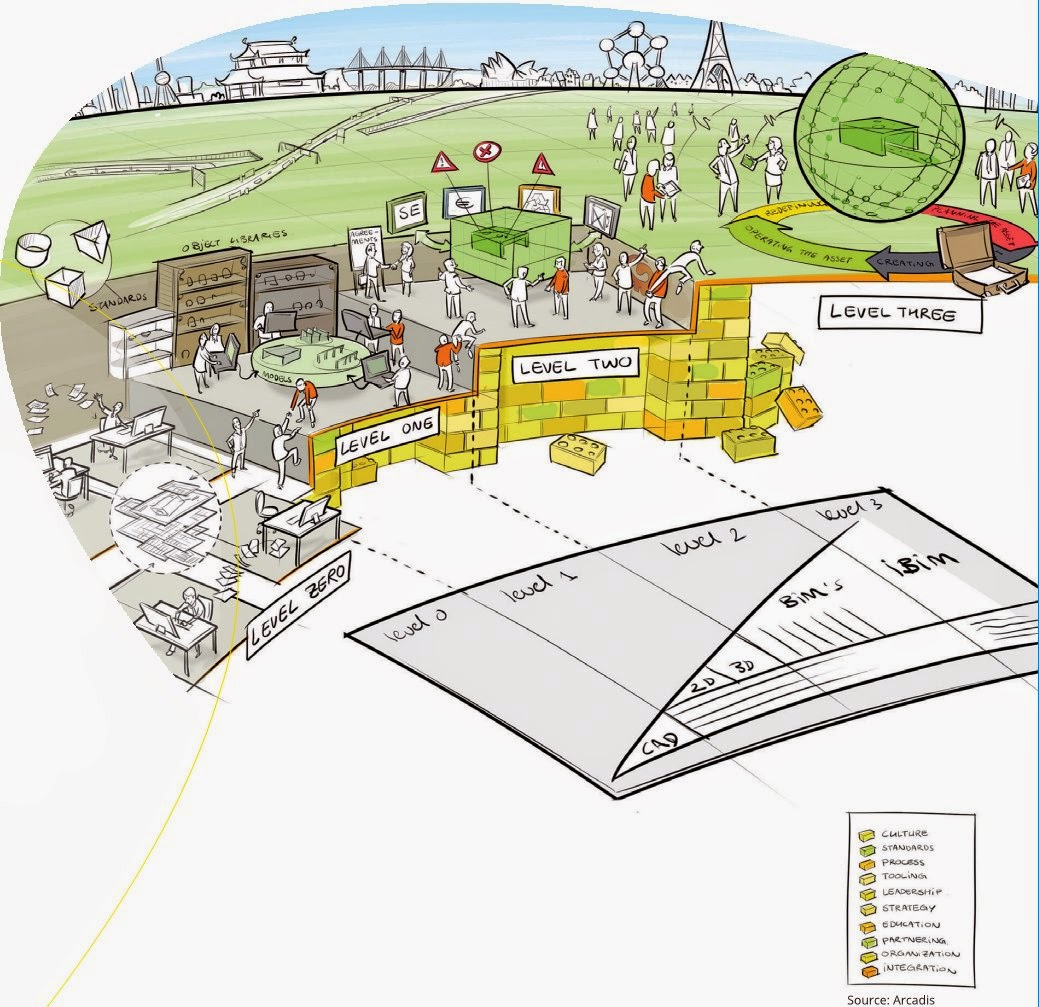
BIM level explained 

bimlevels

Use BIMsight (Tekla) to determine where IFC came from

Revit Survey Points and Coordinates Explained

Most powerful Subscription release yet – Revit 2015 R2

Over at BIM & Integrated Design they posted a good review of a new book on how to start an IPD project, if you are moving in that direction might be worth checking out.

IPD: The Missing Manual

Have you ever wondered how construction companies pick the apps they use? Well Rob over at Construction App Guru has, so much so he had an article published about it…..check it out with the link below.

An App for Construction

Scott over at The Revit Jedi shares his views on the new Android version of 123 Catch and how it’s not an apple fan boy anymore!

123D Catch this iPhone!

The Revit Kid watch us all to know about the new RTC Asia that will happen for the first time in 2015.

RTC ASIA

Leed has become a big thing in the AEC world these days (rightfully so) and now its just a little bit easier to track your Leed Credits with Revit thanks to Autodesk Labs. Find out more over at the Autodesk Labs blog

Updated Revit Credit Manager for Leed

Here is another article, this time form Constructech magazine about Trimble buying Gehry Technologies last week.

Another Acquisition for BIM

Here is another post from The Revit Jedi about Dynamo and his thoughts after learning a little more about it, and how it could be a practical tool for his office.

Do You Know Dynamo?

Have you ever wondered how to deal with a “Butt Glazing” with your curtain wall in Revit? Well wonder no more and check out the post below from The Revit Kid

Revit Tutorial – Create “Butt Glazing” in Curtain Wall / Storefront

Here is another little post on Revit 2015 R2, and the little feature that Revit OpEd help bring to be.

Revit 2015 R2 – Data Row

AECbytes has released their 2014 Fall AEC Tech update article, it worth a read to see if you missed any of the updates from over the past summer.

AEC Technology Updates, Fall 2014

Some non-BIM news, iOS 8 rolled out this week. While I’m furthest thing from an Apple “Fan Boy” I do own an iPad Air for work (because I can only demo BIM 360 Glue & BIM 360 Field on an iPad currently) so I thought this was a good summary of what’s new in iOS 8

iOS 8: 10 key features

I will end this weeks Roundup with a picture………but be warned it’s a real Spoiler!

10351672_679796868772321_6031524412411765250_n

Have a Great Weekend

The BIMsider

BIM, Fun, Weekly Roundup

Weekly Roundup – 2014.08

download

The week that was in the world of BIM and other Techie fun stuff, for the week of Sept. 7th – Sept. 13th

I will start this week’s Roundup with the big news from Trimble this week, as they buy Gehry Technologies. Over the last couple of years Trimble has been slowly creeping into Autodesk’s world. First with the purchase of Teckla, then buying Sketchup from Google, and now Gehry Technologies. What’s that Autodesk did you hear something……is that footsteps? Below are a couple of links to stories from different blogs about this.

From BIM Colab

 Trimble buys Gehry Technologies…. Look out Autodesk.

From ThinkBIM

Frankly, this is huge BIMnews! Perhaps. Trimble signs deal with Frank Gehry.

Here is a post from BIM Troublemaker about how to use Dynamo to give you live excel links in Revit (What Revit Wants lead me to this post)

Practical Dynamo – Excel Linking

Here is a neat little post from What Revit Wants about a work around for using Annotation Symbols in a 3D (locked) View.

Using Annotation Symbols in locked 3D Views in Revit 

Are you wondering what this “new” Autodesk A360 is? How is it different from Autodesk 360? Does it cost money? These questions and more are answered (or attempted to be answered) in a blog post over at AECbytes Blog

Autodesk’s Rebranded A360 Cloud Solution

You ever want to make the “Switchback” feature in Navisworks and Revit work better, then do I have the blog post for you! Check out these nuggets of wisdom from the BIM Goddess herself (and friends) over at her blog Cn3D Construction’s Blog

Revit & Navisworks Switchback

Have a Great Weekend

The BIMsider

BIM, Fun, Weekly Roundup

Weekly Roundup – 2014.07

download

The week that was in the world of BIM and other Techie fun stuff, for the week of Aug. 31st – Sept. 6th

This is an oldie but a good from The Revit Kid that was tweeted about this week, how to make using Revit on Multiple monitors just a little better.

 Revit on Multiple Monitors

Check out this post from Revitdialog about workset filtering to control Visibility Graphics

Controlling Visibility/Graphics of a Linked Workset Using Filters

Some Revit Hotfix’s from Revit OpEd

Hotfix

2014 Hotfix (thanks Revit Clinic)

2015 Hotfix (thanks Revit Clinic)

A new BIM blog to me ThinkBIM has a interesting article on Reality Capture

Achieving BIM Certainty Through Reality Capture

What’s in a name you ask? Well head on over to Practical BIM for a Blog post on just that!

The Nature of Naming

This is a good read from Construction App Guru,  if you are thinking about moving towards have ipads or other mobile devices in your office and part of your workflow.

Setting Up a Mobile Device Program

Another post from Think BIM – This time about an addin that can give you (or promises to) automated 3D views.

Automated Room 3D Views by ARUtils

Here is a post from What Revit Wants telling us about the new A360 Team offering from Autodesk

A360 Team

Here is a comic from a great Architect Comic site called Architexts – go check them out

2014-09-03-drawings-by-engineers

Have a Great Weekend

The BIMsider

BIM, Fun, Weekly Roundup

Weekly Roundup – 2014.06

download

The week that was in the world of BIM and other Techie fun stuff, for the week of Aug. 24th – Aug. 30th.

have you ever wondered what BIM really is? If so CADZulu has a post for you. Check out the video they post by Steve Ridge.

BIM in Construction What Does BIM Really Mean

How to get precise placement of your Revit selections. This post form IMAGINiT tries to help with Revit’s inability to snap or manually align annotation objects.

Precise Placement of Revit Selections

Do you like Rhino? Do you like Dynamo? Well why not try Rhynamo then! Hop on over the Nathan Miller’s Blog The Proving Ground and check out his post, you can even sign up to try the Rhynamo by applying for the Private Beta.

RHYNAMO

If you are in Construction and you enjoy the Apps and things Techie then you should check out Rob McKinney’s post over on Construction App Guru on his wrap up of the AGC Tech Forum.

Reflections on AGC Georgia Tech Forum

Free MEP Piping Content for Revit, What Revit Wants came across 2 good locations for all your MEP piping Content needs.

Free MEP Piping Content for Revit

The Revit Jedi wants you to learn more about Autodesk’s Cloud Rendering, he lets us know that you can do more than JUST renderings with the service.

Learn more about Autodesk’s Cloud Rendering capabilities

Here is a little something for you Revit Structure people out there, how to attached structural objects together courtesy of the Autodesk Revit Structure Blog

Attaching Structural Objects Together

I came across this review of SketchUp Pro 2014 on AECbytes Blog and thought it was worth sharing

 SketchUp Pro 2014

Steve from Revit OpEd want to let everyone know about your chance to be a “Gunslinger” if you are a pro with 3DS MAX

Autodesk M&E 3DS MAX Gunslinger Summit – Montreal

A customer story about design and engineering collaboration with todays technology from the Autodesk 360 Blog

A Customer’s Perspective: Design and Engineering Collaboration in a Modern Era

Something a little different from Lifehacker on tablet Styli, in particular their pick for the top 5

Five best Tablet Styli

I will end this Weekly Roundup with a Funny

sihdNqxh[1]

Have a Great Weekend

The BIMsider

BIM, Fun, Weekly Roundup

Weekly Roundup – 2014.05

download

The week that was in the world of BIM and other Techie fun stuff, for the week of Aug. 17th – Aug. 23rd.

A quick tip from Steve over at Revit OpEd – “When in doubt right click!” Find out what this has to do with missing ribbon titles below.

Ribbon Panel Titles are Missing

A new (to me) blog I found about construction apps called Construction App Guru had a good post about Google Drive for Construction (or Business in general).

Cloud Storage for construction: The Google Drive Platform

Blow is a great heads up from What Revit Wants about a Revit Hotfix to help with performance issues related to Standard materials

Hotfix for Revit 2015 – Standard materials

Have you heard about BIM scope creep? Well you can find out more over at BIM ThinkSpace in a post by guest author Rexter Retana on his viewpoint on the matter.

BIM Scope Creep

For those of you out there than enjoy a bit of coding or API work here is a good post (and video) about getting linked file data without opening the Revit File. This is brought to you by the friendly folks over at Boost Your BIM

Getting Linked file data w/out opening the RVT

Can you Survive Without BIM? This is a question Jarod Schultz thinks about on his blog called Jarod Schultz, he also provides a couple links to some good BIM Business data.

Can you Survive Without BIM?

What Revit Wants in the weekly Roundup for a second time, this time with some helpful Building Analysis links

Autodesk Building Performance Analysis Links

Learn to fix thick lines in perspective views from The Revit Kid

 Revit Tip – Fix the thick lines in perspective views: A Step-By-Step Guide

If you do much training for the AEC space especially on the GC end you will be interested in the next Blog post form Ascent about whats new in the 2015 Navisworks Essentials training guide.

What’s New in Navisworks 2015 Essentials Training Guide

This is an interesting read about coordination with Grasshopper from a new to me Blog called BIM 42

Coordination with Grasshopper

Another instalment of the “Dynamo for the 99%” series was released on Summit AEC’s bimblog this time they cover how to select objects a different way.

Dynamo for the 99% – Part 2

I know some of you out there might be doing your best to remove SketchUp from your designers toolbox, but trust me that’s easier said than done (however now that Trimble keeps raising the cost you might be getting some help). This video that I found on CADZulu might help you at least get “The Smarts” from the SketchUp model into your BIM workflow

SketchUp to Revit – Keeping “The Smarts”

Another post popped up today (Aug. 22nd) on Inside the Factory about “Sundial” the Revit beta. This time they talk about the new search box that can be found in the Type Selector.

Seek, and ye shall find

Brian from The Revit Geek tells us about a gremlin that might be in your Revit and playing with your views.

Loading Family Quirk

I know this is an older video, and I’ve shared it before on Twitter……….but somethings just need to be shared again and again. You should also check out James Vandezande’s Blog All Things BIM

Wow that was a busy week for a Roundup!

Have a great weekend

The BIMsider

BIM, Fun, Weekly Roundup

Weekly Roundup – 2014.04

download


The week that was in the world of BIM and other Techie fun stuff, for the week of Aug. 10th – Aug. 16th.

This is a good wishlist item that Revit OpEd come up with for a right click Purge unused option.

Purge Unused Wish

This is a post by What Revit Wants, about a tool in the Revit Extension pack that allows you to add shared parameters to families automatically. There is also a tip of the hat to Ideate Solutions for writing the Blog post that reminded What Revit Wants about this tool in the first place.

Adding Shared Parameters to Revit Families Automatically

Jeff over at The Revit Kid put up this post about Autodesk FormIt, which was cool because in his post he links to new to me Blog by Jarod Schultz who goes more in-depth with all that is FormIt.

Getting Started with Autodesk FormIt

Here is a good post with from IMAGINiT Building Solutions Blog with a work around for getting your view titles rotated 90 degrees to match your rotated view.

View Titles for Views Rotated on the Sheet

Another post from What Revit Wants, but this time its about Navisworks and BIM 360 Glue. We learn a not so simple work around (or two) to get a Navisworks Viewpoint into BIM 360 Glue.

Transfer Navisworks Viewpoint to BIM 360 Glue

Take a trip with the Revit Jedi to see how close we really are to using VR (Virtual Reality) on today’s construction jobs and sites.

VR and the Construction industry

I’ve been hearing about about Advanced Steel from Autodesk these days around the office, so when I found this video on the Navisworks Facebook page I thought it was worth a look.

Steelway Building Systems and Advanced Steel 

I will end this weeks round-up with a link to a cool contest from IMAGINiT where you can win a MakerBot Replicator Mini 3D Printer just by submitting your best rendering

RENDERiT Contest – Blog Post

RENDERiT Contest Page

8-15-2014 9-06-13 AM

8-15-2014 9-05-01 AM

Have a great weekend

The BIMsider

BIM, Fun, Weekly Roundup

Weekly Roundup – 2014.03

download


The week that was in the world of BIM and other Techie fun stuff, for the week of Aug. 3rd – Aug. 9th.

I’m excited the have found out this week that one of my favourite Blogs is back this week after a 2 year hiatus, join me in welcoming back Inside the Factory. You can read about what they are doing with the updated site on there first new post listed below

REVITalizing Inside the Factory

Steve over at Revit OpEd goes into a little more detail about what or why Inside the factory is back so they can showcase the new Revit Preview called Sundial

Revit Sundial and Inside the Factory

More on Sundial from What Revit Wants

Sundial and no NDA?

This is an interesting idea, but the production staff might think it is just another way for “Big Brother” to spy on them. However from a BIM management perspective i can see it being a useful tool to all to your BIM tool box. This info comes from the What Revit Wants blog, who is sharing it from a new to me blog called BIM 42

Tracking Revit Model Performance

The benefits of using the URL parameter in your Revit schedules or Families from What Revit Wants

The Power of a Simple URL parameter

Steve from Revit OpEd tells us about three way to work (or work around) with those pesky Revit tags.

Tagging Elements

If you follow Boost your BIM you might have seen this post already on an API approach to removing unwanted viewport types that purge all just won’t remove.

Deleting unused Viewport Types

There is also an update to this post above, if you are working with Revit 2014 and not Revit 2015 as in the original post

Deleting (almost) all Viewport Types in 2014

This is a good post from Cn3D Construction about how to colour your Navisworks model they way you need it for Construction collaboration, aka with simple colours not textures or materials.

Navisworks Rendering vs. Shading 

Here is a post from the Autodesk 360 Blog that talks about the possible pit falls of moving to the Cloud and how to avoid them.

Mistakes to Avoid when Moving to the Cloud

I saw this picture below on the DraftSight Facebook page and though it was good way to end this week’s Roundup

10526177_10152223418425824_6183646962943817736_n

I think all bridges should be painted to look like Lego!


Have a great weekend

The BIMsider

BIM, Fun, Weekly Roundup

Weekly Roundup – 2014.02

download

The week that was in the world of BIM and other Techie fun stuff, for the weeks of July 20th – 26th, 2014 & July 27th – Aug. 2nd.

So this is actually 2 weekly Roundups in one as i was on Holidays last week and didn’t get a post up last week. I know only 2nd week of posting and already I’m taking a vacation.

This looks like it could be the start of a good series of Blog post from the team over at Summit Technologies & Summit BIM. Here is what its about: “Dynamo for the 99% will be a series of posts highlighting the use of Dynamo for practical data manipulation or time-saving tasks that could apply to most Revit users.”

Dynamo for the 99%

This is a cool post about making a “Paper” model in Revit, it comes form out friend over at Revit Jedi, who turned on to the idea by Daniel Stine.

Creating a Paper Model

A great post from (bim)x about how to tell if a project should be a BIM project or not.

Should this Project be BIM

Another post about the updates to BIM 360 Glue, this time from the team over at Beyond Design

Collaborative clash resolution with BIM 360 Glue

Productivity isn’t about long hours and number of task completed, but making sure you get those few right task completed.

Why Productivity isn’t about long hours

Darth Vader Car……only from Hot Wheels!

Darth Vader Car

Have a greatweekend!

The BIMsider